Cinematic Shot for Z-Image Turbo: color-graded, filmic frames
Topic: Models
By Captain
Published 2026-09-30
Example renders
Prompts and settings shared by the people who made these renders on Civitai. Pick a render to see how it was made.
Settings
Sampler
res2s_FlowMatchEulerDiscreteScheduler
Steps
6
Guidance
1
Size
1280x2048
Prompt
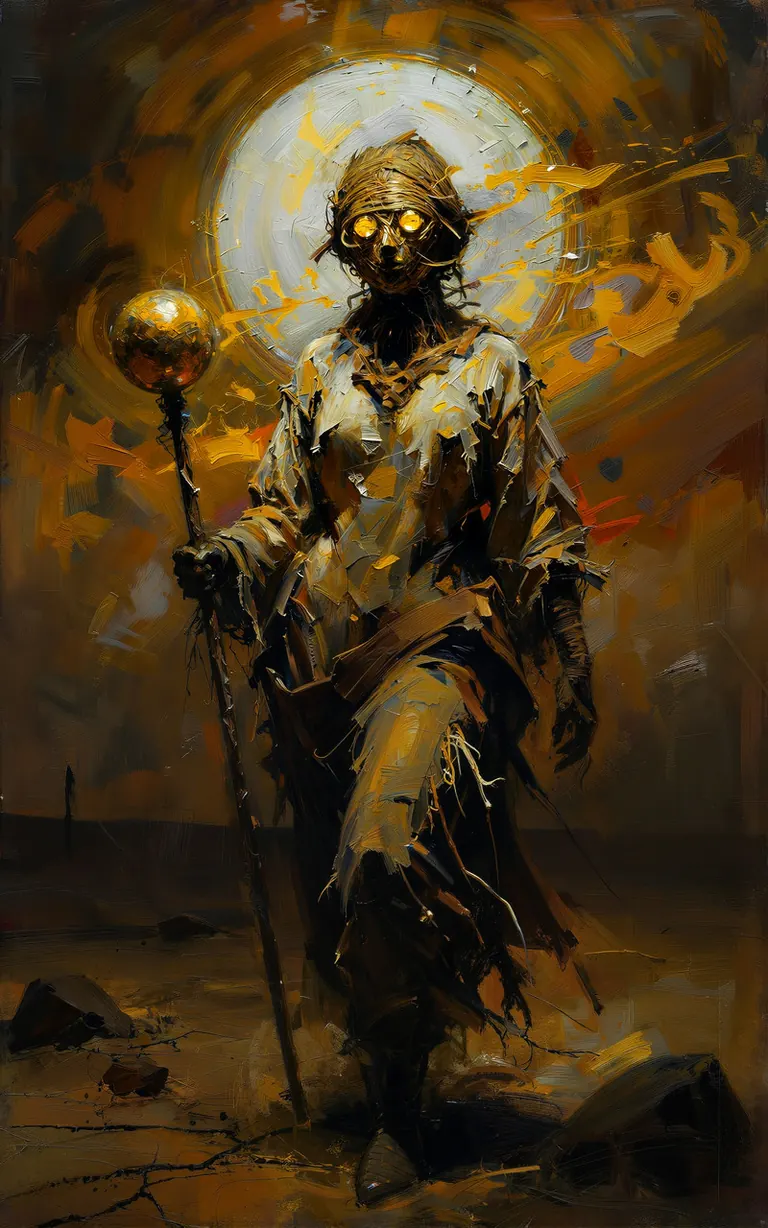
A breathtaking expressionistic oil painting of a female sentient scarecrow trekking across a vast, scorched desert under a blinding midday sun. The style features heavy impasto brushstrokes and visible palette knife textures that mimic the parched, cracked earth. The sun is a massive, radiant orb of thick zinc white and cadmium yellow, bleeding into the sky and creating a halo of light that dissolves the figure's edges. Visible heat waves are rendered through swirling, distorted strokes of amber and ochre, making the horizon appear to melt. The scarecrow’s feminine silhouette is draped in tattered canvas and sun-bleached burlap, painted with raw, aggressive strokes of sienna and cream. Her face is a haunting mask of woven fibers with two glowing, circular eyes of brilliant liquid gold leaf. She grips a gnarled staff topped with a reflective golden sphere that catches a sharp glint of light. Thick, scumbled layers of paint represent swirling dust clouds, creating a sense of movement and gritty atmosphere. The palette is a fiery explosion of brilliant golds, harsh whites, and deep burnt umber shadows. Inspired by the dramatic lighting of Caravaggio and the raw, modern textures of Anselm Kiefer. 8k resolution, heavy canvas texture, high-pigment saturation.
Settings
Size
3072x4096
Prompt
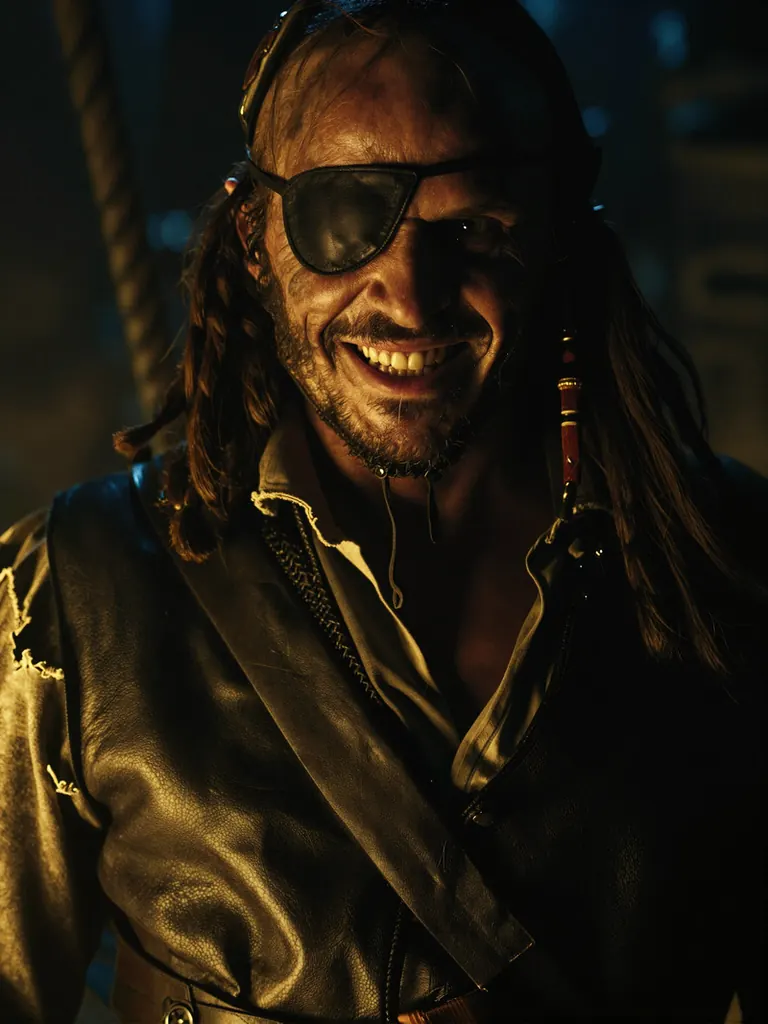
close-up movie still frame of an evil medieval fantasy middle-aged male character with weathered rugged features, wearing a dark eye patch over his left eye, sharp teeth and deep-set eyes conveying an evil smirk as he looks directly into camera lens, low-light cinematic environment with dramatic chiaroscuro lighting — single strong directional light source casting intense highlights on his cheekbones, brow ridge, and exposed eye while plunging the rest of his face into deep shadow, pirate attire including tattered leather vest over chainmail shirt, frayed sleeve cuffs, and a worn bandana tied loosely around neck, background dark with faint hints of wooden ship rigging or stone dungeon walls out-of-focus, shallow depth of field isolating subject’s face as primary focus, no text or signage visible beyond implied costume elements (e.g., “Captain” patch on vest), color grading leans toward warm amber tones against cool blue shadows — evoking a grimy tavern or cursed vessel interior, film grain texture subtly woven into frame for cinematic realism, no additional characters or action beyond subject’s direct gaze.
Settings
Size
3840x2160
Prompt
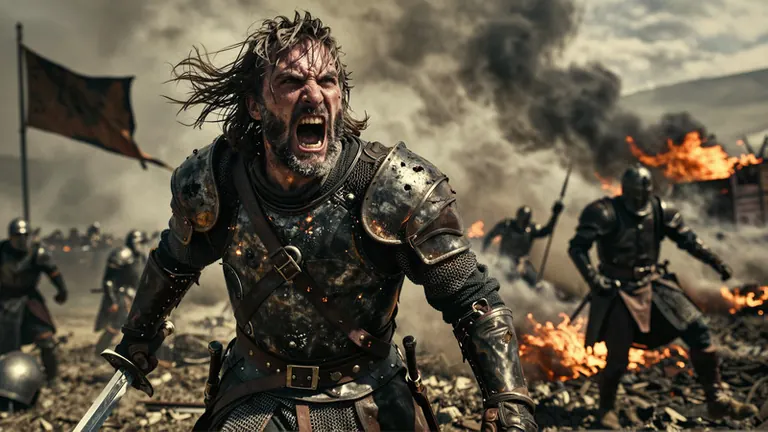
{
"subject": {
"description": "A middle-aged human warrior stands in a close-up shot, face contorted with rage as he roars — mouth wide open, teeth bared, eyes blazing with fury. Ash and smoke swirl around him from the battlefield behind, clinging to his beard and armor like battle’s breath. His expression screams vengeance or imminent doom — veins bulging slightly under weathered skin, sweat mixed with ash on his brow.",
"age": "middle-aged (40s–50s)",
"expression": "fury incarnate — eyes narrowed into slits, teeth gritted in a snarl, chest heaving from yelling",
"hair": {
"color": "dark brown streaked with gray and ash",
"style": "short, tousled, windblown by battle winds"
},
"clothing": {
"top": {
"type": "battle-worn leather cuirass",
"color": "charcoal black with scorched edges",
"details": "metal pauldrons cracked from impact, straps frayed at shoulders"
},
"bottom": {
"type": "chainmail trousers",
"color": "dark iron gray",
"details": "torn at knees, ash-streaked fabric clinging to legs"
}
},
"face": {
"preserve_original": true,
"makeup": "ash and soot covering cheeks and neck, sweat glistening under harsh light — no makeup but battle-worn realism"
}
},
"accessories": {
"weapon": {
"type": "bloodied broadsword",
"details": "blade half-coated in ash and blackened steel, hilt wrapped in leather with cracked grip"
},
"armor": {
"type": "chestplate with shoulder pauldrons",
"details": "iron plates dented from blows, glowing ember residue on edges"
}
},
"photography": {
"camera_style": "cinematic medieval fantasy battle still — high contrast, dynamic motion blur, heavy film grain",
"angle": "dynamic low-angle close-up shot (camera tilted upward to emphasize towering rage), slightly Dutch angle for tension",
"shot_type": "extreme tight frame on face and upper torso — focus locked on eyes and mouth mid-yell",
"aspect_ratio": "2:1 cinematic widescreen (horizontal) with shallow depth-of-field",
"texture": "heavy film grain overlay, motion blur trailing from ash particles in air, color grading leans into desaturated browns, fiery oranges, and smoky grays"
},
"background": {
"setting": "chaotic battlefield after a siege — scorched earth, broken shields, fallen horses",
"wall_color": "none — open field with smoke rising from burning structures",
"elements": [
"smoldering wooden barricades half-burned to ash",
"broken spears and shattered helmets scattered across ground",
"distant figures of soldiers retreating or falling in the haze",
"a charred banner hanging limp on a pole, still fluttering with wind",
"ash clouds swirling upward from burning torches"
],
"atmosphere": "ferocious, apocalyptic, primal — the last stand before collapse",
"lighting": "harsh midday sun filtered through smoke and ash — casting long shadows and glowing embers on armor, high contrast with darkened battlefield"
}
}
Settings
Size
3840x2160
Prompt
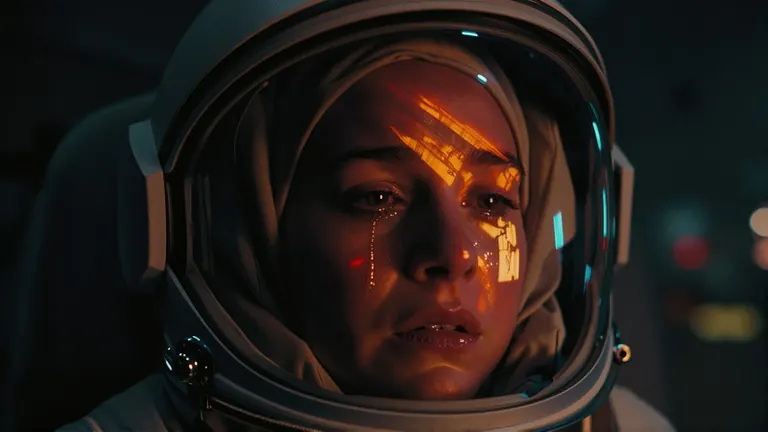
very close-up cinematic movie still frame — female astronaut’s helmet dominating the frame, interior visor reflecting an explosion in fiery orange and red hues with smoke trails streaking across surface, single tear visible on outer edge of visor or dripping down from cheek inside helmet, dark very low light environment with only faint ambient glow illuminating contours of helmet and facial features through transparent visor, shallow depth of field blurring background while keeping reflection and tear in sharp focus, mood somber and emotionally charged — sadness conveyed by tear’s path and explosion’s implied loss or sacrifice, no text or signage visible beyond what is reflected (e.g., distant control panel or spacecraft interior), color grading leans toward deep blacks with high contrast highlights on visor edges and tear, film grain texture subtly present for cinematic realism, background indistinct — possibly dark metallic walls of a spaceship corridor or damaged module.
Overview
Cinematic Shot (Z-Image-Turbo v1.0) by ZyloO is a style
LoRA
that adds cinematic color grading, contrast and framing. No trigger word is needed, though cinematic or cinematic still image helps. It was trained on landscape-orientation images.
Reference
Name | Type | What it is |
|---|
AD

No install required - run AI models on the cloud
BitVector Prism is the easiest way to start: pick a model, type a prompt and generate in a clean web app, with nothing to configure. BitVector is also available on Discord and on the web (SpyGlass).
Step by step
- Write a film-still prompt with a lens and grade.
- Attach at 0.8.
- Landscape canvas.
- 8 steps.
- Add cinematic still image if the grade is weak.
Examples
Period still
cinematic still image, a woman in a fur coat and ushanka stands in a snowy square holding a hand-painted sign that says 'Buzz for Comrade', vintage Soviet posters behind, 2.39:1, teal and amber grade.
Cinematic Shot 0.8
Road
cinematic still image, a pickup truck on a desert highway at dusk, long shadows, dust, anamorphic flare.
Cinematic Shot 0.9
Creative idea: storyboard set
Six wide frames of a lighthouse keeper's day, same grade words, different times of day.
Tips
- Teal-orange, bleach bypass and Kodachrome are useful grade words.
- Full-body wide shots match its training.
Troubleshooting
Portrait canvases look off
Why it happens
Landscape training.
How to fix it
Use landscape ratios.
Grade too heavy
Why it happens
Weight 1.0 plus grade words.
How to fix it
0.7.
AD

No install required - run AI models on the cloud
PirateDiffusion is Telegram only and built for pros: thousands of models, LoRAs and workflows driven by chat commands, with unlimited generation on a fixed price plan.

Questions
Trigger?
None needed.
Krea 2?
zy_cinematic version.
Links and sources
Models in this guide

Written by
Captain
Related guides
Models
DetailDeamonZ slider for Z-Image Turbo: from ultra-clean to detail explosion
AiMetatron's DetailDeamonZ is a true detail slider for Z-Image Turbo and Base: negative weights pile on texture, positive weights clean the image. Learn the -1.5 to 1.5 range, step counts and ideas.
By Captain
2026-10-01

Models
Character Design Sheet helper for Z-Image Turbo: three views and a color palette
YeiYeiArt's Character Design Sheet LoRA produces turnaround sheets with multiple perspectives and a color palette swatch on Z-Image Turbo. Learn the CharacterDesignIZT trigger, the prompt structure and ideas for game and animation design.
By Captain
2026-10-01
Models
NiceGirls UltraReal Asian edition for Z-Image Turbo: natural East Asian portraits
The Asian edition of Danrisi's NiceGirls UltraReal gives Z-Image Turbo natural, unretouched portraits of East Asian women with phone-photo realism. Learn weight, prompt style and candid ideas.
By Captain
2026-10-03
Models
Midjourney Luneva Cinematic LoRA for Z-Image Turbo: cinematic vibe without a fixed style
luneva's Cinematic LoRA gives Z-Image Turbo a Midjourney-like cinematic look and extra detail across themes. Learn the weight, the fp32-unet FlowMatch fix, long-prompt advice and ideas.
By Captain
2026-10-01
More guides

Cloud services
Flat fee vs tokens: why unlimited plans like Graydient.ai are the best value for AI creators in 2026
A ranked cost comparison, with prices checked on 8 October 2026, of flat-fee unlimited plans like Graydient.ai against token and credit pricing from Midjourney, Leonardo, fal.ai, Replicate, Runway and Kling: what 1,000 images and 1,000 videos a month really cost on each, and why one fixed fee for unlimited images, video, audio, Grok LLM chat and web apps is the best value for creators who iterate.
By Captain
2026-10-08

Models
FLUX.1 Dev: how to prompt it, best settings and creative ideas
A practical guide to FLUX.1 Dev by Black Forest Labs: natural-language prompting, guidance and step settings, LoRA stacking, text rendering and prompt ideas that play to its strengths.
By Captain
2026-09-30

Models
Stable Diffusion XL 1.0: prompts, settings and what it still does best
How to get the most out of the official SDXL 1.0 base model: native resolutions, CFG and sampler settings, the refiner, negative prompts and ideas for styles where SDXL still shines.
By Captain
2026-10-01

Models
Stable Diffusion 1.5: the classic model, prompted properly
Stable Diffusion 1.5 is still worth knowing: the right resolution, CFG and sampler, how to use its huge library of LoRAs and embeddings, and creative prompt ideas suited to a 512-pixel model.
By Captain
2026-10-02

Models
FLUX.2 Dev: prompting the newest Black Forest Labs model
FLUX.2 Dev brings larger prompts, better text, stronger realism and multi-reference editing. This guide covers the turbo workflow, guidance and resolution settings, prompt structure and ideas that use its new strengths.
By Captain
2026-10-03
Models
Qwen-Image: long prompts, perfect text and bilingual posters
Qwen-Image is the model to reach for when the words in the picture matter. Learn how to write its long descriptive prompts, render English and Chinese text accurately, set CFG and steps, and explore layout-heavy creative ideas.
By Captain
2026-09-29

Model
Trends
.ai
© ModelTrends.ai
|
© 2026
|
All Rights Reserved