
Product Design (minimalism eddiemauro) LORA
7996°
<product-minimal>
แอปที่รองรับแท็ก ModelTrends ช่วยให้คุณรัน/ติดตั้งโมเดลได้โดยการคัดลอกโค้ดนี้ไปใส่ในคำสั่งของคุณโดยไม่ต้องตั้งค่า มองหาไอคอนของเราในแอปที่รองรับ เช่น Prism (ด้านล่าง)
รันโมเดลนี้
ข้อเสนอ / โฆษณา

Easy Creator (Prism) เว็บ
ไม่จำกัด · ค่าธรรมเนียมคงที่
เหมาะสำหรับผู้เริ่มต้นที่สุด เวิร์กโฟลว์ทรงพลัง เรียนรู้ง่าย

PirateDiffusion Telegram
ไม่จำกัด · ค่าธรรมเนียมคงที่
สร้างวิดีโอ รูปภาพ บุคลิกแชทที่กำหนดเอง และอื่นๆ

Pro studio (SpyGlass) เว็บ
ไม่จำกัด · ค่าธรรมเนียมคงที่
เรียกดูโมเดล เรนเดอร์ และปรับแต่งได้จากทุกเบราว์เซอร์หรือโทรศัพท์

Discord bot (Vector)
ไม่จำกัด · ค่าธรรมเนียมคงที่
เพิ่ม Vector ในเซิร์ฟเวอร์ของคุณหรือเข้าร่วม Vector Discord สร้างอะไรก็ได้!

Unified Editor เว็บ
ไม่จำกัด · ค่าธรรมเนียมคงที่
ตัวแก้ไขภาพและวิดีโอ: เรนเดอร์ แก้ไข อัปสเกล และอื่นๆ ในหน้าเดียว

Civitai เว็บ
จ่ายตามการใช้
สร้างบนเว็บไซต์ของ Civitai; ทุกภาพใช้ Buzz เครดิต

แอปในเครื่อง
ต้องตั้งค่า
ติดตั้งโปรแกรมในเครื่องถ้าคอมพิวเตอร์ของคุณแรงพอ

ModelDuel เว็บ
จ่ายตามการใช้
สร้างพรอมต์เดียวกันบนโมเดลเช็คพอยต์/เบสได้สูงสุด 50 โมเดลพร้อมกัน

บันทึกจากผู้สร้าง
Before to use
-
You have to know how works Stable Diffusion. I recommend using Automatic1111 like an interface to launch the model.
-
This is a model trained on SD 1.5 model, so you have to consider that it is not perfect. I have to make so much testing before to arrive to a stable generation. I will enhance the model when a better base model arrives (like SD XL new one).
-
This is a LORA model, so it is recommended to use like an extension of a Checkpoint. I recommend you to use realistic dataset models.
-
I recommend you to follow me on my instagram account, where I will explain about AI image generation:
Intro
PRODUCT DESIGN (minimalism-eddiemauro) LORA: Hi, I’m a product and car designer, and I’m so excited to test with AI, I think is a good tool for designing. This tool (Lora) is so useful for the design process (shapes-ideas generation), but more than that it helps so much to refine aesthetically. Also, you can turn sketch and 3D schemes into render style. I created a basic Lora and tested it with so many kinds of checkpoints, and the result was a different type of "minimalism". The style is with more contrast (taken from Deliberate and Dreamshaper), and preserves the minimalism style. It is the officially Lora General model centered from my checkpoint of minimalism.
If you want to support my work and help me to upload more models (with better quality), you can do it by entering here and donating, I would greatly appreciate it:
Installation
-
I use Automatic1111, the best UI for Stable Diffusion image generation, so I recommend you to install locally or use it online with some Colab or other hosting. You can find online instructions or videos to do that. If you are going to install locally, you can and I recommend you to have at least a 6-8 Gb of VRAM Graphic Card (nvidia) to have a stable interface and launch with “Microsoft Edge” because you will have problems on “Google Chrome”. Try also to install “medvram” or “lowvram” options besides “xformers” (search online how to).
-
This is a Lora model. You can how to install it. It is just to download a file and put it inside Lora file models. The Lora file extension is “.safetensor”, and mostly the size is lower than a Checkpoint (that could be more than a gigabit).
-
You have to install also a Checkpoint model to use with, select one focused on realism visualization or 3D/render aspect.
-
Please for image creation you have to follow all my recommendations, if you don't, it is impossible to generate a good image quality. Also, you have to consider that from today AI image generation is not so consistent and perfect, you have to invest time to get it and make plenty of tests.
Recommendations for image generation
-
Checkpoint best models: SD 1.5 based models. It is mandatory to use with a checkpoint called , , , or , so download first, install and load inside SD UI.
-
Activation token/caption: Inside prompt space, the first word has to be: “emauromin”or “emauromin style” to activate the style. It is mandatory, if you don't do it, it will not work properly.
-
Another recommended prompting: Inside prompt you can use those words that will enhance the image generation: in the positive space, “futuristic, finely detailed, purism, ue 5, a computer rendering, minimalism, octane render, 4k”; in the negative space: “(worst quality:2), (low quality:2), (normal quality:2), lowres, ((monochrome)), ((grayscale)), cropped, text, jpeg artifacts, signature, watermark, username, sketch, cartoon, drawing, anime, duplicate, blurry, semi-realistic, out of frame, ugly, deformed”. You can also watch the image metadata of example images here and simulate the prompt.
-
Textual inversion/embedding or Lora tool recommended: I consider that “EasyNegative” is one best of textual inversion for negative prompt space, you should use it. and install it, putting the file inside “embeddings”. You can use it also “Detail Tweaker” to even reduce the details of the image, for that, you have to , install like a Lora and use it inside positive prompt with a value of “-0.5”. Use it when you realize the checkpoint used has so many details, but not when you see that minimalism is on it. This can change the shape of objects considerably.
-
Lora's weight: I'm trying to enhance the model, for now, this model works fine from 0.7 to 1, the most you increase the value, minimalism is higher. Sometimes the values 0.8-0.9, adapt better than 1.
-
VAE: This depends on what checkpoint are you using. Mostly it is recommended to use the “vae-ft-mse-840000-ema-pruned” Stable Diffusion standard.
-
Clip Skip: It was trained on 2, so use 2.
-
Steps and CFG: It is recommended to use Steps from “20-40” and CFG scale from “6-8”, the ideal is: steps 30, CFG 7. For next models, those values could change.
-
Sampler: I use mostly “EulerA”, “DPM++SDE Karras” or “DPM++2S a”. Euler tends to be simpler and more creative. Make experimentation with other samplers if you like.
-
Batch: In txt2img try to put a value of 4 to generate more than 1 image and watch the generations. If you have a good graphic card, you can use “Batch size”, this will create at same time 4 images, increasing generation time; but if your computer cannot handle this, change to “Batch count” that will create 4 images in a row (not a same time), but generation time will be more.
-
Image aspect: Try to use these dimensions: 512x512, 768x512, 512x768, but even you can experiment with different. Don't generate bigger images because the style could be lost, if you want to create a bigger image, use hires.fix in txt2img mode, img2img increase method or Ultimate SD Upscale script extension + ControlNet, or just upscaling with GAN models.
-
Create bigger images: There are 4 different methods to create large images in Stable Diffusion, you can check online how to. For first method “txt2img hires.fix”, I recommend you to use upscale model called “4x-UltraSharp”, just “.pth” file, and then installing it, putting inside “E
คำทริกเกอร์
emauromin style
SHA256
3002FF124811B48001176D6B4072FA14A2A6F5843B52F3650C4429843E389F1B
Ranking badge
Updated Oct 22, 2026

Made this model? Show this badge on your page.
Paste it into your Hugging Face card or Civitai description.
แนวโน้มความนิยมของ Product Design (minimalism eddiemauro) LORA
คะแนนความร้อน, 12 เดือนล่าสุด
คะแนนความนิยม
7,996°
สัปดาห์นี้
▬
0.0%
7,998° ตอนนั้น, 7,996° ตอนนี้
เดือนนี้
▼
0.2%
8,003° ตอนนั้น, 7,996° ตอนนี้
ปีที่ผ่านมา
▼
1.9%
8,079° ตอนนั้น, 7,996° ตอนนี้
7,000°
ค่าพื้นฐาน
มาตรวัดมีช่วงตั้งแต่ 0° ถึง 9,999° ทุกอย่างต่ำกว่า 7,000° จะเก็บไว้สำหรับโมเดลที่ยังไม่มีแหล่งข้อมูลรายงาน ซึ่งใช้ตัวเลขแทนที่ตรงนั้นเพื่อให้รายการครบถ้วน 7,000° คือจุดเริ่มต้นของข้อมูลที่วัดได้: โมเดลที่มีข้อมูลจริงแต่แทบไม่มีการดาวน์โหลดจะอยู่ที่ค่าพื้นฐานนี้ และการวัดจะเติมองศาเพิ่มขึ้นด้านบน ค่าพื้นฐานไม่ได้บอกอะไรเกี่ยวกับโมเดลเลย; มีแค่องศาที่เพิ่มขึ้นด้านบนเท่านั้นที่บอกความแตกต่างระหว่างโมเดลแต่ละตัว
+1,167°
ดาวน์โหลดจาก Civitai
ดาวน์โหลด 7,770 ครั้งของเวอร์ชันนี้บน Civitai การดาวน์โหลดเป็นส่วนประกอบที่สำคัญที่สุดและนับบนมาตราส่วนลอการิทึม: การดาวน์โหลดสิบเท่าจะเพิ่ม 300° เท่ากัน ดังนั้นโมเดลที่ดาวน์โหลดล้านครั้งจะไม่ร้อนกว่าที่ดาวน์โหลดพันครั้งถึงพันเท่า แหล่งดาวน์โหลดหกแหล่งแบ่งส่วนนี้ตามสัดส่วนการดาวน์โหลดของแต่ละแหล่ง
+438°
ยอดถูกใจ
828 ถูกใจและโหวตบวกจากแหล่งต่างๆ การถูกใจมีน้ำหนักเท่าครึ่งหนึ่งของการดาวน์โหลด ตามมาตราส่วนลอการิทึมเดียวกัน
−609°
อายุ
−609° เพราะน้ำหนัก SD15 ออกมาในปี 2022 โมเดลทุกตัวสืบทอดอายุของน้ำหนักที่สร้างขึ้น: 150° ต่อปี สูงสุด 750° และจะเพิ่มขึ้นเรื่อยๆ จนถึงจุดนั้น ถ้าไม่มีส่วนนี้ อันดับบนสุดจะเป็นเช็คพอยต์ของปี 2022 และ 2023 ที่ได้เปรียบจากดาวน์โหลดที่สะสมมาหลายปี
แสดงรายละเอียด
ทุกตัวเลขบนเว็บไซต์นี้ตรวจสอบได้ คะแนนความนิยมของโมเดลนี้คือ 7,996° และนี่คือการสร้างคะแนนทีละส่วน พร้อมยอดรวมที่เพิ่มขึ้นหลังจากแต่ละส่วน: ค่าพื้นฐาน, จำนวนองศาที่แต่ละแหล่งข้อมูลเพิ่ม, โบนัสสำหรับประเภทของโมเดล และการลดคะแนนตามอายุของน้ำหนัก สีต่างๆ คือช่วงของกราฟด้านบน คำศัพท์ท้ายบทความอธิบายคำทุกคำ
- 1เริ่มที่ค่าพื้นฐานทำไมต้อง 7,000° ไม่ใช่ศูนย์: มาตรวัดมีช่วงตั้งแต่ 0° ถึง 9,999° ส่วนที่ต่ำกว่า 7,000° ถูกสงวนไว้สำหรับโมเดลที่ยังไม่มีแหล่งข้อมูลรายงาน ซึ่งใช้ตัวเลขแทนที่ตรงนั้นเพื่อให้รายการครบถ้วนและไม่แซงหน้าโมเดลที่มีข้อมูล 7,000° คือจุดเริ่มต้นของข้อมูลที่วัดได้ โมเดลที่มีข้อมูลจริงแต่แทบไม่มีดาวน์โหลดจะอยู่ที่นี่ ทุกอย่างที่ตามมาคือการวัด และพื้นที่ด้านบนค่าพื้นฐานมีสิบขั้นตอนดาวน์โหลดที่เพิ่มขึ้นสิบเท่าที่ 300° ต่อขั้น ค่าพื้นฐานเหมือนกันสำหรับทุกโมเดล ดังนั้นมันจึงไม่ตัดสินอะไร; องศาที่เพิ่มขึ้นด้านบนต่างหากที่ตัดสิน7,000°ยอดรวมที่กำลังคำนวณ
- 2เพิ่มจำนวนการดาวน์โหลด7,770 เทียบเท่าการดาวน์โหลดทั้งหมด จาก ดาวน์โหลดจาก Civitai การดาวน์โหลดเพิ่มขึ้นสิบเท่าจะเพิ่ม 300° เท่ากัน ดังนั้นขนาดจึงสำคัญแต่ไม่ใช่ทุกอย่าง+1,167°8,167°ยอดรวมที่กำลังคำนวณ
- 3เพิ่มจำนวนไลก์828 ไลก์และการกดถูกใจ มีน้ำหนักครึ่งหนึ่งของการดาวน์โหลด+438°8,605°ยอดรวมที่กำลังคำนวณ
- 4ลบอายุออกน้ำหนัก SD15 ออกมาในปี 2022: 150° ต่อปี สูงสุด 750° เพิ่มขึ้นจนถึงตอนนั้น−609°7,996°ยอดรวมที่กำลังคำนวณ
- =คะแนนความร้อนตำแหน่งของโมเดลนี้ในทุกลิสต์ของเว็บไซต์นี้ ไม่มีอะไรปรับแต่งเพิ่มเติม7,996°
คำศัพท์: คำที่ใช้ที่นี่
- คะแนนความร้อน
- ตัวเลขเดียวที่บอกว่าโมเดลถูกใช้และต้องการมากแค่ไหนตอนนี้ ตั้งแต่ 0° ถึง 9,999° ทุกลิสต์ที่บอกว่าร้อนแรงที่สุดจะเรียงตามคะแนนนี้เท่านั้น
- พื้นฐาน
- 7,000° คือจุดเริ่มต้นของทุกโมเดลที่มีข้อมูลจริง สเกลตั้งแต่ 0° ถึง 9,999° ส่วนที่ต่ำกว่าพื้นฐานสงวนไว้สำหรับตัวแทน (โมเดลที่ไม่มีข้อมูล) เพื่อให้โมเดลที่มีข้อมูลอยู่เหนือกว่า พื้นฐานเหมือนกันสำหรับทุกคนและไม่ตัดสินอะไร คะแนนที่สูงกว่าพื้นฐานคือการวัดผล
- เทียบเท่าการดาวน์โหลด
- ทุกอย่างที่คะแนนนับเป็นการดาวน์โหลด รวมกัน: การดาวน์โหลดจริง, ผู้แชร์แต่ละคนในทอร์เรนต์นับเป็น 1,000, ภาพ AI Horde แต่ละภาพ และแต่ละครั้งที่ใช้งานในเว็บไซต์สร้างภาพ
- สเกลลอการิทึม
- นับเป็นสิบ ไม่ใช่หน่วยเดียว: การเพิ่มจาก 1,000 เป็น 10,000 การดาวน์โหลดจะเพิ่มคะแนนเท่ากับการเพิ่มจาก 10,000 เป็น 100,000 เพื่อไม่ให้โมเดลใหญ่แย่งพื้นที่ทั้งหมด
- ไลก์
- การกดถูกใจและไลก์จากทุกแหล่ง มีค่าน้ำหนักครึ่งหนึ่งของการดาวน์โหลดในสเกลลอการิทึม
- อัตราการนำไปใช้
- จำนวนการดาวน์โหลดต่อวันที่โมเดลได้รับตอนนี้ วัดจากความต่างระหว่างสองครั้งที่อ่านข้อมูล น้ำหนักเป็นหนึ่งในสี่ของการดาวน์โหลด
- วัดได้และประมาณ
- วัดได้หมายถึงมีการอ่านค่าจากแหล่งที่มาสองครั้งและความแตกต่างนั้นเป็นของจริง ประมาณหมายถึงรู้แค่ยอดรวมของวันนี้เท่านั้น ส่วนอดีตจะถูกกระจายไปตามอายุของโมเดล; เว็บไซต์จะบอกว่ากำลังแสดงแบบไหน
- Seeder
- คนที่เก็บสำเนาน้ำหนักไว้บนออนไลน์เพื่อให้คนอื่นดาวน์โหลดผ่านทอร์เรนต์ หรือกระจกที่โฮสต์ทำแบบเดียวกัน แต่ละคนจะนับเป็น 1,000 ดาวน์โหลด
- AI Horde
- เครือข่ายอาสาสมัครที่สร้างภาพฟรีบนคอมพิวเตอร์ที่บริจาค จำนวนภาพที่สร้างด้วยโมเดลแต่ละตัวเป็นข้อมูลสาธารณะ และแต่ละภาพนับเป็นหนึ่งดาวน์โหลด
- เว็บไซต์สร้างภาพ
- เว็บไซต์ที่โฮสต์สำเนาโมเดลของตัวเองและให้คนสร้างภาพ เช่น PixAI, SeaArt และ Yodayo การดาวน์โหลดของพวกเขานับเหมือนกับ Civitai และแต่ละการสร้างภาพนับเป็นหนึ่งดาวน์โหลด
- โทเค็น OpenRouter
- โมเดลข้อความที่ให้บริการผ่าน API เช่น Claude หรือ GPT ไม่มีน้ำหนักให้ดาวน์โหลด ดังนั้นการใช้งานจะวัดจากโทเค็น: ชิ้นส่วนข้อความที่อ่านและเขียนผ่าน OpenRouter ซึ่งเป็นเกตเวย์ที่แอปหลายตัวใช้ใน 30 วันที่ผ่านมา ทุก 10,000,000 โทเค็นนับเป็นการดาวน์โหลดหนึ่งครั้ง แหล่งข้อมูล: OpenRouter (openrouter.ai/rankings), CC BY 4.0.
- โมเดลเต็ม (checkpoint)
- น้ำหนักโมเดลเอง ไฟล์ที่สร้างภาพได้ด้วยตัวเอง ได้รับโบนัสเพราะส่วนเสริมขึ้นอยู่กับมัน
- LoRA และ embedding
- ไฟล์เสริมขนาดเล็กที่ช่วยปรับน้ำหนักของคนอื่นให้ไปในสไตล์ ตัวละคร หรือแนวคิดเฉพาะ มันไม่สามารถทำงานได้เอง
- ตระกูลและน้ำหนัก
- ฐานที่โมเดลสร้างขึ้น เช่น SD 1.5, SDXL, Flux หรือ Wan โมเดลทุกตัวจะสืบทอดวันที่ปล่อยน้ำหนักของตระกูล
- อายุ
- ลดคะแนนตามระยะเวลาที่น้ำหนักของตระกูลถูกปล่อยออกมา: 150° ต่อปี สูงสุด 750° มันเก็บดาวน์โหลดเก่าที่สะสมมาหลายปีจากการแช่แข็งบนสุดของรายการ
- บูสต์ตระกูล
- แรงกระตุ้นเล็กๆ ที่จำกัดสำหรับ LoRA ของตระกูลที่เว็บไซต์นี้กำลังผลักดันอยู่ตอนนี้ จะแสดงในรายละเอียดเสมอ
- คะแนนสำรอง
- ตัวเลขที่มั่นคงต่ำกว่าค่าขั้นต่ำที่ให้กับโมเดลที่ยังไม่มีรายงานแหล่งที่มา เพื่อให้รายการครบถ้วน มันจะไม่จัดอันดับสูงกว่าโมเดลที่มีข้อมูล
- ใหม่! (ช่วงเวลาปลอดภัย)
- โมเดลที่มีอายุน้อยกว่า 7 วันจะแสดงคำว่า ใหม่! แทนคะแนนและจะไม่มีอันดับ โมเดลจะเริ่มคำนวณคะแนนตั้งแต่วันแรก แต่โมเดลที่อายุเพียงวันเดียวจะเติบโตเร็วที่สุด ดังนั้นถ้าไม่รอ โมเดลอันดับ #1 ของสัปดาห์จะเป็นโมเดลที่เพิ่งออกมาเมื่อวานแทนที่จะเป็นโมเดลที่อยู่ได้นานหนึ่งสัปดาห์
- แนวโน้ม
- การเติบโตของโมเดลในช่วงเวลาหนึ่งเทียบกับการเติบโตของโมเดลทั่วไปในช่วงเวลาเดียวกัน เร็วกว่าปกติหมายถึงเพิ่มขึ้น ช้ากว่าหมายถึงลดลง
- โมเดลทั่วไป
- จุดกึ่งกลางของแคตตาล็อก: ครึ่งหนึ่งของโมเดลที่มีตัวเลขเติบโตเร็วกว่าในช่วงเวลา ครึ่งหนึ่งช้ากว่า
ความนิยมของโมเดลนี้เปลี่ยนไปอย่างไรเมื่อเทียบกับแคตตาล็อกทั้งหมด: การเติบโตของการดาวน์โหลด ไลก์ และการใช้งานในแต่ละช่วงเวลา วัดเทียบกับการเติบโตเฉลี่ยของโมเดลทั่วไปในช่วงเวลาเดียวกัน พร้อมคะแนนความร้อนในเวลานั้น ถ้าอยู่เหนือการเติบโตเฉลี่ยคือเพิ่มขึ้น ต่ำกว่าคือถดถอย ข้อมูลในอดีตสร้างจากยอดรวมปัจจุบัน วันแรกของโมเดล และความเร็วดาวน์โหลดที่วัดได้ถ้ามีสองจุดข้อมูล โมเดลที่ยังไม่มีในช่วงเริ่มต้นจะแสดงเป็น n/a
ตัวอย่างผลงาน
พรอมต์และการตั้งค่าที่ผู้สร้างผลงานเหล่านี้บน Civitai แบ่งปันไว้ เลือกผลงานเพื่อดูว่าสร้างขึ้นอย่างไร
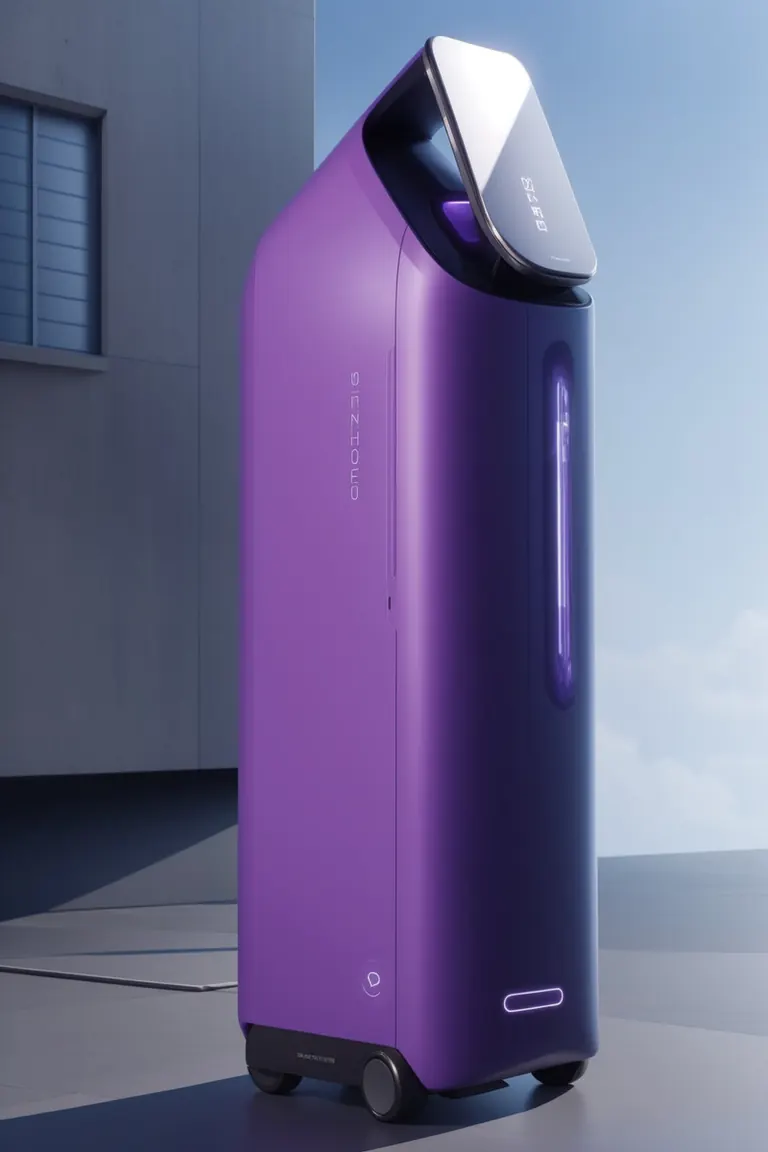

การตั้งค่า
Sampler
Euler a
จำนวนสเต็ป
30
Guidance
8
Seed
108753904
ขนาด
1024x1216
Clip skip
2
พรอมต์
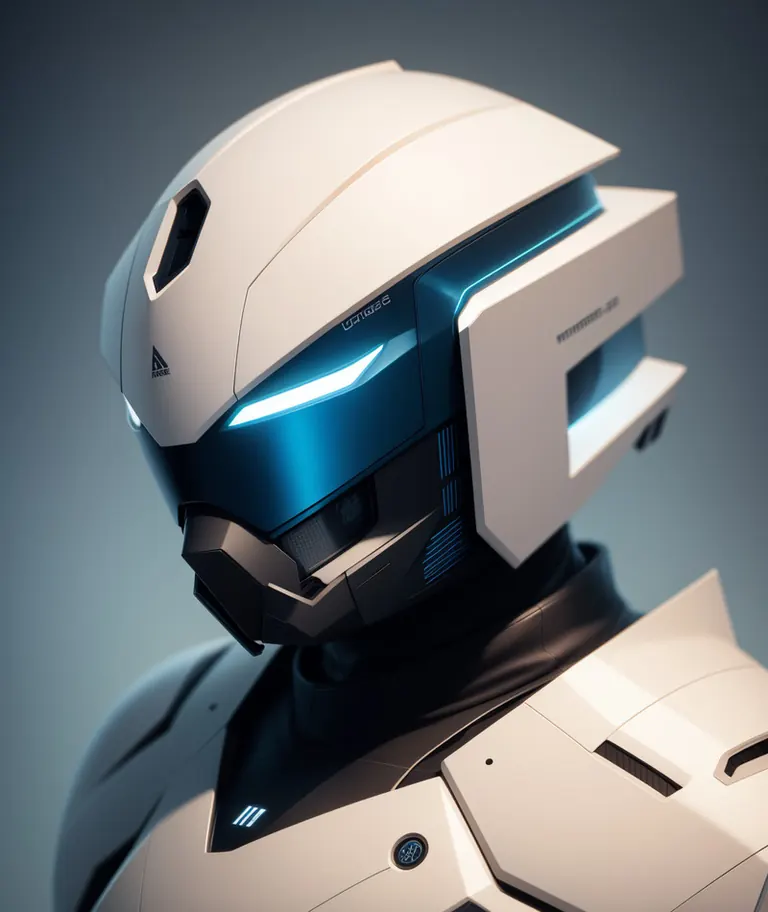
emauromin style, futuristic helmet, finely detailed, purism, ue 5, a computer rendering, minimalism, octane render, 4k <lora:eddiemauroLora2:0.6>
พรอมต์เชิงลบ
(worst quality:2), (low quality:2), (normal quality:2), lowres, normal quality, bad_prompt, bad_prompt2, ((monochrome)), ((grayscale)), cropped, text, jpeg artifacts, signature, watermark, username, EasyNegative,sketch, cartoon, drawing, anime, duplicate, blurry, semi-realistic, out of frame, worst quality, ugly, low quality, deformed, multiple objetcs
การตั้งค่า
Sampler
Euler a
จำนวนสเต็ป
30
Guidance
9
Seed
2213332203
ขนาด
768x1152
Clip skip
2
พรอมต์
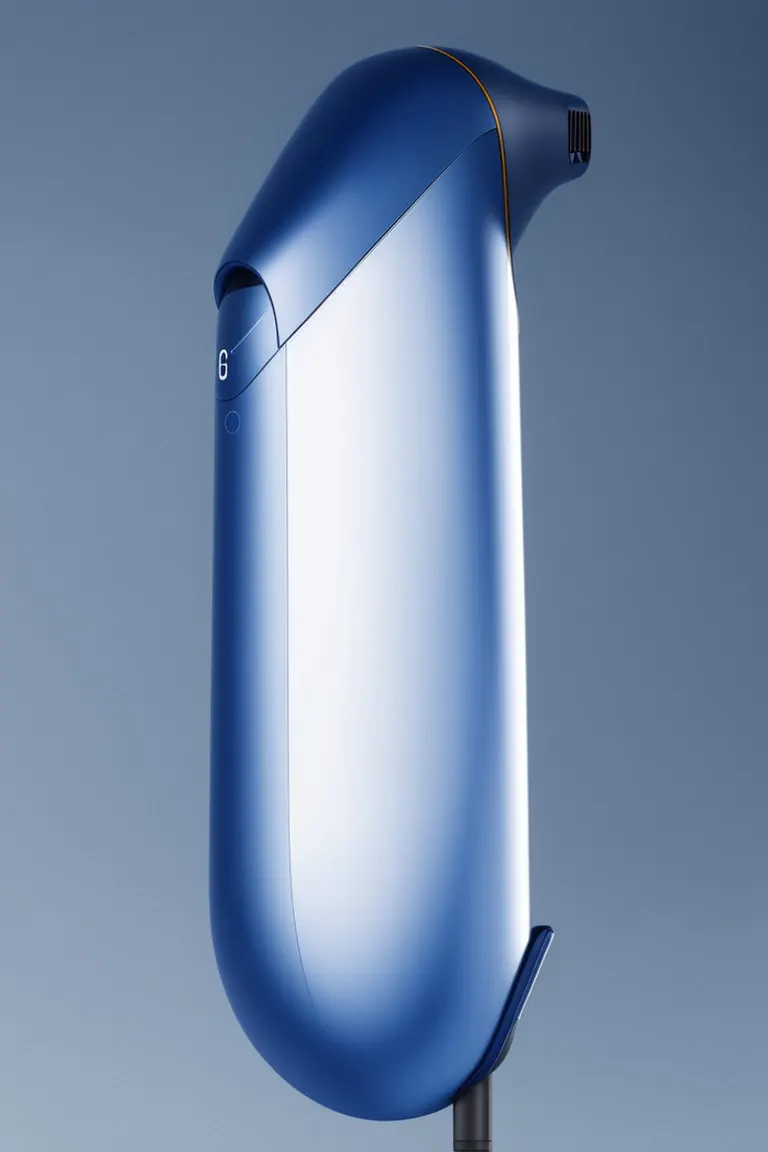
emauromin style, futuristic hair dryer, finely detailed, purism, ue 5, a computer rendering, minimalism, octane render, 4k <lora:eddiemauroLora2:0.8>
พรอมต์เชิงลบ
EasyNegative, (worst quality:2), (low quality:2), (normal quality:2), lowres, ((monochrome)), ((grayscale)), cropped, text, jpeg artifacts, signature, watermark, username, sketch, cartoon, drawing, anime, duplicate, blurry, semi-realistic, out of frame, ugly, deformed, weird colors
การตั้งค่า
Sampler
Euler a
จำนวนสเต็ป
30
Guidance
8
Seed
3384491526
ขนาด
1624x1020
Clip skip
2
พรอมต์
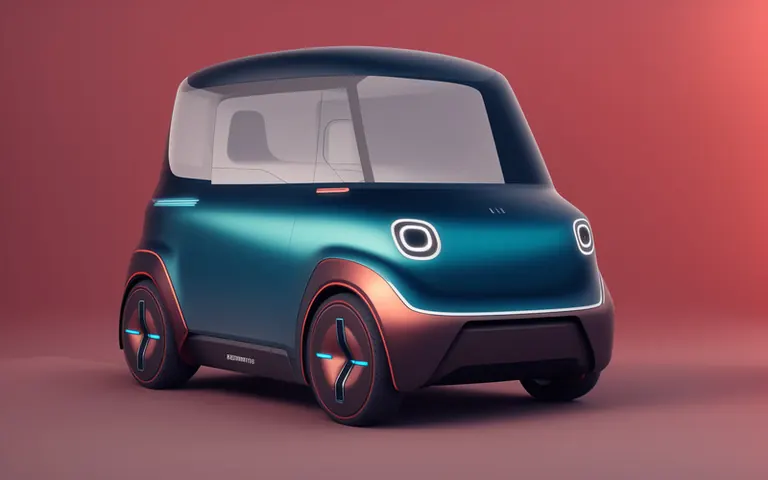
emauromin style, futuristic vehicle, finely detailed, purism, ue 5, a computer rendering, minimalism, octane render, 4k <lora:eddiemauroLora2:0.8>
พรอมต์เชิงลบ
(worst quality:2), (low quality:2), (normal quality:2), lowres, normal quality, bad_prompt, bad_prompt2, ((monochrome)), ((grayscale)), cropped, text, jpeg artifacts, signature, watermark, username, EasyNegative,sketch, cartoon, drawing, anime, duplicate, blurry, semi-realistic, out of frame, worst quality, ugly, low quality, deformed, multiple objetcs
การตั้งค่า
Sampler
Euler a
จำนวนสเต็ป
30
Guidance
7
Seed
319860765
ขนาด
1024x1536
Clip skip
2
พรอมต์
emauromin style, modern vacuum, purple, finely detailed, purism, ue 5, a computer rendering, minimalism, octane render, 4k <lora:eddiemauroLora2:0.9>
พรอมต์เชิงลบ
EasyNegative, (worst quality:2), (low quality:2), (normal quality:2), lowres, ((monochrome)), ((grayscale)), cropped, text, jpeg artifacts, signature, watermark, username, sketch, cartoon, drawing, anime, duplicate, blurry, semi-realistic, out of frame, ugly, deformed, weird colors
รันในเครื่อง

eddiemauroLora2.safetensors
การดาวน์โหลดให้บริการโดย Civitai ผู้สร้างบางรายกำหนดให้เข้าสู่ระบบ Civitai ก่อน





Product Design (minimalism eddiemauro) LORA เป็นLoRAสำหรับตระกูล Stable Diffusion 1.5 ที่อยู่ใน ModelTrends.ai แคตตาล็อกแบบอ่านอย่างเดียวของโมเดล AI สร้างภาพ วิดีโอ และข้อความแบบโอเพนซอร์ส เปรียบเทียบกับโมเดล Stable Diffusion 1.5 อื่น ๆ ดูคะแนนความร้อนแรงเพื่อติดตามเทรนด์ และเปิดบน PirateDiffusion หรือ BitVector เพื่อลองใช้
โมเดล Stable Diffusion 1.5 เพิ่มเติมLoRA Stable Diffusion 1.5 เพิ่มเติมออกแบบกราฟิกยานพาหนะการออกแบบเรนเดอร์ 3dออกแบบรถยนต์รถยนต์สินค้าวัตถุ
เรียกดูตามตระกูลโมเดล

โมเดล Text / LLM
434

โมเดล Anima
528

โมเดล Chroma
19
โมเดล Fibo
2
โมเดล Flux
1,496

โมเดล Flux 2 / Klein
1,239

โมเดล Flux 3
3

โมเดล Moss
3

โมเดล Iris
1

โมเดล MiniMax H3
364

โมเดล Hunyuan
204

โมเดล Ideogram
20
โมเดล Krea2
717

โมเดล Qwen
20
โมเดล Qwen2
47

โมเดล Ltx2
153