Light Slider for Krea 2: deepen shadows while the subject stays lit
Topic: Models

By Captain
Published 2026-09-30
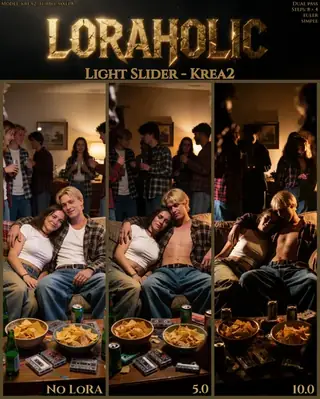
Loraholic's Light Slider darkens the darkest parts of a Krea 2 scene while keeping focus areas lit, a contrast-style control. Learn the range, two-pass advice and when to use the Brightness slider instead.
Overview
The
Light Slider
for
Krea 2
prioritizes the darkest parts of the scene: positive values deepen shadows and raise contrast while the focal areas keep some light. It is different from the author's Brightness Slider, which shifts exposure of the whole image.
The author's caution: light
LoRAs
always degrade quality a little, so use prompting as the main light control and the slider for a final push. The samples were made with a two-pass workflow where the LoRA ran only on the first pass.
Reference
Name | Type | What it is |
|---|---|---|
LoRA weight | -5 to 8 | 2-3 for moody scenes. |
Trigger | none | |
Passes | first pass only | Keeps quality high in two-pass workflows. |
Steps / guidance | 8 / 1 | |
Alternative | Brightness Slider | For overall exposure. |
AD

No install required - run AI models on the cloud
BitVector Prism is the easiest way to start: pick a model, type a prompt and generate in a clean web app, with nothing to configure. BitVector is also available on Discord and on the web (SpyGlass).
Step by step
- Describe the light in the prompt first (single candle, moonlight).
- Add the Light Slider at 2 on the first pass.
- Generate and compare.
- Push to 4 for noir scenes.
- Use -2 for a flatter, overcast look.
Examples
Noir
A detective in a trench coat under a single streetlamp, fog, 35mm, black and white.
Light Slider 4
Storybook
A whimsical hand-painted storybook illustration of a cheerful granny washing a graphics card in her kitchen sink, warm window light.
Light Slider 1.5
Creative idea: candlelit still life
A pewter jug, bread and grapes on a dark table lit by one candle, Dutch painting style.
Light Slider 3
Tips
- Low-key portraits and noir scenes are the use case.
- Combine with the Wetness slider for rainy night streets.
- Keep subjects lit by naming the key light.
- Check the author's prompting guide for perspective and zoom.
Troubleshooting
Crushed blacks
Why it happens
Weight above 5.
How to fix it
3 and describe fill light.
Soft details
Why it happens
LoRA on all passes.
How to fix it
First pass only.
AD

No install required - run AI models on the cloud
PirateDiffusion is Telegram only and built for pros: thousands of models, LoRAs and workflows driven by chat commands, with unlimited generation on a fixed price plan.

Questions
Light or Brightness?
Light for contrast and shadows; Brightness for exposure.
Trigger?
None.
Links and sources
Models in this guide
Written by
Captain
Related guides
Models
UltraReal for Krea 2 and Klein 9B: texture back into smooth AI images
vizsumit's UltraReal LoRAs reduce the soft, smooth AI look and add real texture and detail, especially for close-ups and clothing. Learn versions, weights and prompts.
By Captain
2026-10-02
Models
Krea2 Melancholy v2: cinematic, restrained, emotional realism
zidius's Melancholy LoRA for Krea 2 produces contemplative, cinematic imagery with subdued palettes, shallow depth of field and emotional restraint. Learn its zidiusArt trigger, weight and ideas for quiet scenes.
By Captain
2026-10-03
Models
Fat/Skinny Weight Slider for Krea 2: body weight as a number
Loraholic's Weight Slider adjusts body mass in Krea 2 across a -10 to 10 range designed for predictability. Learn how to use it, stability notes and ideas for character design and fitness illustration.
By Captain
2026-10-01
Models
Krea2 Enhancer: cleaner detail and lighting for any Krea 2 style
vrgamedevgirl's Krea2 Enhancer LoRA polishes Krea 2 images across realistic, anime, product and fantasy styles without changing the prompt's intent. Learn the weight, workflow and ideas.
By Captain
2026-09-30
More guides

Models
FLUX.1 Dev: how to prompt it, best settings and creative ideas
A practical guide to FLUX.1 Dev by Black Forest Labs: natural-language prompting, guidance and step settings, LoRA stacking, text rendering and prompt ideas that play to its strengths.
By Captain
2026-09-30

Models
Stable Diffusion XL 1.0: prompts, settings and what it still does best
How to get the most out of the official SDXL 1.0 base model: native resolutions, CFG and sampler settings, the refiner, negative prompts and ideas for styles where SDXL still shines.
By Captain
2026-10-01

Models
Stable Diffusion 1.5: the classic model, prompted properly
Stable Diffusion 1.5 is still worth knowing: the right resolution, CFG and sampler, how to use its huge library of LoRAs and embeddings, and creative prompt ideas suited to a 512-pixel model.
By Captain
2026-10-02

Models
FLUX.2 Dev: prompting the newest Black Forest Labs model
FLUX.2 Dev brings larger prompts, better text, stronger realism and multi-reference editing. This guide covers the turbo workflow, guidance and resolution settings, prompt structure and ideas that use its new strengths.
By Captain
2026-10-03

Models
Qwen-Image: long prompts, perfect text and bilingual posters
Qwen-Image is the model to reach for when the words in the picture matter. Learn how to write its long descriptive prompts, render English and Chinese text accurately, set CFG and steps, and explore layout-heavy creative ideas.
By Captain
2026-09-29

Models
SDXL-Lightning: four-step generation on any SDXL checkpoint
ByteDance's SDXL-Lightning LoRA turns a 30-step SDXL render into a 4-step one. Learn the step counts, the CFG you must use, the sampler, and how to combine it with your favorite checkpoints and style LoRAs.
By Captain
2026-09-30

Model
Trends
.ai
© ModelTrends.ai
|
Made in Japan
|
© 2026