Height Slider for Krea 2: age-safe height changes
Topic: Models

By Captain
Published 2026-10-03
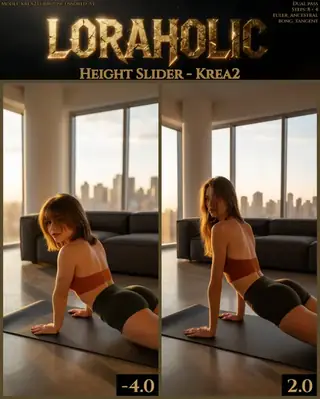
Loraholic's Height Slider changes a subject's height in Krea 2 without altering age. Learn the -4 to 3 range, the note about women at high values and ideas for character line-ups.
Overview
The
Height Slider
(
Krea2
v1) is an age-safe slider
LoRA
: it makes subjects taller or shorter without pushing them younger or older. On Krea 2 the author recommends -4.0 to 3.0; the
Z-Image
version runs -10 to 10. At values above 2.5, women can start to look more masculine.
Full-body framing is where it shows; the author's prompting guide covers getting the right perspective.
Reference
Name | Type | What it is |
|---|---|---|
LoRA weight | -4 to 3 | ±2 noticeable. |
Trigger | none | |
Framing | full body | Include a reference object or doorway. |
Steps / guidance | 8 / 1 | |
Combination | Weight / Age sliders | Stacks. |
AD

No install required - run AI models on the cloud
BitVector Prism is the easiest way to start: pick a model, type a prompt and generate in a clean web app, with nothing to configure. BitVector is also available on Discord and on the web (SpyGlass).
Step by step
- Full-body prompt with a height reference (a doorway, a friend).
- Generate, keep seed.
- Slider at +2 for taller, -2 for shorter.
- Watch facial masculinity on women above 2.5.
- Combine with the Weight slider for a complete build.
Examples
Line-up
A full-body cinematic photograph of a 28-year-old man standing centered in a doorway, calm neutral posture, eye level.
Height Slider -2, 0, +2
Low angle
A low-angle full-body portrait of a woman in a long coat on marble steps, looking up at her.
Height Slider +1.5
Creative idea: fantasy races
Same seed: a traveler in a cloak beside a signpost; -4 for a halfling, +3 for a tall elf.
Tips
- Low camera angles exaggerate the effect; eye level shows it honestly.
- Use a doorway or counter for scale.
- Great for character line-ups in design work.
- Keep clothing described so proportions read.
Troubleshooting
Women look masculine
Why it happens
Above 2.5.
How to fix it
Stay at or below 2.5.
No effect
Why it happens
Close framing.
How to fix it
Full body with a reference object.
AD

No install required - run AI models on the cloud
PirateDiffusion is Telegram only and built for pros: thousands of models, LoRAs and workflows driven by chat commands, with unlimited generation on a fixed price plan.

Questions
Z-Image version?
Yes, -10 to 10.
Trigger?
None.
Links and sources
Models in this guide
Written by
Captain
Related guides
Models
Aesthetic Amateur Photo Krea V4: everyday phone-photo realism
powerpuff's Aesthetic Amateur Photo LoRA makes Krea 2 images feel like real smartphone and social-media photos: sharper details, brighter colors, casual framing. Learn weight, prompts and ideas.
By Captain
2026-09-29
Models
Krea 2 Weight Slider v2 by alcaitiff: a compact body-weight control
alcaitiff's Weight Slider for Krea 2 adjusts body weight with a simple -3 to 3 range where 2 is usually enough. Learn how it compares with the Loraholic slider and ideas for using it.
By Captain
2026-09-30
Models
Canon UltraReal for Krea 2: the color and bokeh of an old full-frame flagship
Danrisi's Canon UltraReal LoRA reproduces the rich colors, rendering and bokeh of photographs taken with a Canon 1Ds on 28-500mm lenses. Learn the c2n0n trigger, weight and why detailed prompts matter.
By Captain
2026-10-01
Models
Caucasian / Asian ethnicity slider for Krea 2: use the lowest value that works
Loraholic's ethnicity slider shifts facial features between Caucasian and East Asian appearance in Krea 2. Learn the -5 to 4 range, why low values are recommended and how to use it responsibly for character design.
By Captain
2026-10-02
More guides

Models
FLUX.1 Dev: how to prompt it, best settings and creative ideas
A practical guide to FLUX.1 Dev by Black Forest Labs: natural-language prompting, guidance and step settings, LoRA stacking, text rendering and prompt ideas that play to its strengths.
By Captain
2026-09-30

Models
Stable Diffusion XL 1.0: prompts, settings and what it still does best
How to get the most out of the official SDXL 1.0 base model: native resolutions, CFG and sampler settings, the refiner, negative prompts and ideas for styles where SDXL still shines.
By Captain
2026-10-01

Models
Stable Diffusion 1.5: the classic model, prompted properly
Stable Diffusion 1.5 is still worth knowing: the right resolution, CFG and sampler, how to use its huge library of LoRAs and embeddings, and creative prompt ideas suited to a 512-pixel model.
By Captain
2026-10-02

Models
FLUX.2 Dev: prompting the newest Black Forest Labs model
FLUX.2 Dev brings larger prompts, better text, stronger realism and multi-reference editing. This guide covers the turbo workflow, guidance and resolution settings, prompt structure and ideas that use its new strengths.
By Captain
2026-10-03

Models
Qwen-Image: long prompts, perfect text and bilingual posters
Qwen-Image is the model to reach for when the words in the picture matter. Learn how to write its long descriptive prompts, render English and Chinese text accurately, set CFG and steps, and explore layout-heavy creative ideas.
By Captain
2026-09-29

Models
SDXL-Lightning: four-step generation on any SDXL checkpoint
ByteDance's SDXL-Lightning LoRA turns a 30-step SDXL render into a 4-step one. Learn the step counts, the CFG you must use, the sampler, and how to combine it with your favorite checkpoints and style LoRAs.
By Captain
2026-09-30

Model
Trends
.ai
© ModelTrends.ai
|
Made in Japan
|
© 2026