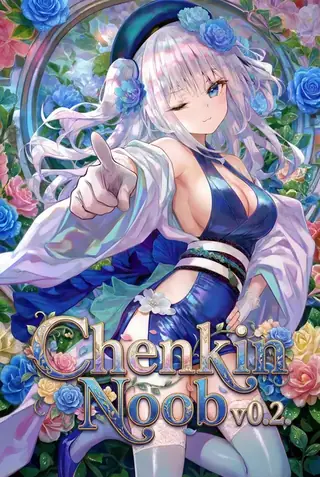
ChenkinNoob XL v0.2: a NoobAI fine-tune for game art and illustration
Topic: Models

By Captain
Published 2026-09-30
The ChenkinNoob team's CKXL fine-tunes NoobAI XL 1.1 toward cleaner aesthetics and fewer AI artifacts for game art and illustration workflows. Learn its prompting, settings and ideas.
Overview
Chenkin Noob XL (CKXL) v0.2 is a diffusion
checkpoint
fine-tuned from Laxhar/noobai-XL-1.1 by the independent ChenkinNoob team (not an official Laxhar release). Later versions (v0.5, trained on top of v0.2 with a ~12M dataset) target improved aesthetics, fewer common AI artifacts and practical usability for game art and illustration.
Reference
Name | Type | What it is |
|---|---|---|
Prompt | tags | |
CFG | 4-6 | |
Steps / sampler | 25-30, Euler a | |
Clip Skip | 2 | |
Negative | short |
AD

No install required - run AI models on the cloud
BitVector Prism is the easiest way to start: pick a model, type a prompt and generate in a clean web app, with nothing to configure. BitVector is also available on Discord and on the web (SpyGlass).
Step by step
- (masterpiece), (best quality), (ultra-detailed), amazing quality, very aesthetic, then subject.
- Add illustration, perfect composition, intricate details.
- CFG5, 28 steps.
- Hires fix 1.5x at 0.4.
- Try monochrome sketch prompts; it handles lineart well.
Examples
Concept
(masterpiece), (best quality), (ultra-detailed), amazing quality, very aesthetic, illustration, perfect composition, intricate details, absurdres, a mysterious wandering wizard in a sci-fi post-apocalyptic wasteland, tattered cloak, glowing staff
Sketch
1girl, adult, profile, messy hair, holding a red apple, smirk, looking at viewer, black background, sketch, monochrome, pencil drawing lineart, dynamic lighting
Creative idea: item cards
(masterpiece), (best quality), game item illustration, an ornate healing potion bottle, glowing liquid, simple dark background, intricate details
Tips
- Sci-fi post-apocalyptic character concepts fit its game-art goal.
- Sketch, monochrome, pencil drawing lineart tags produce clean concept sketches.
- Character names via NoobAI knowledge.
- Dynamic lighting tag adds drama.
Troubleshooting
Artifacts
Why it happens
High CFG.
How to fix it
CFG 4-5; consider the newer v0.5.
AD

No install required - run AI models on the cloud
PirateDiffusion is Telegram only and built for pros: thousands of models, LoRAs and workflows driven by chat commands, with unlimited generation on a fixed price plan.

Questions
Official NoobAI?
No, an independent team building on Laxhar's open model.
LoRAs?
Links and sources
Models in this guide
Written by
Captain
Related guides
Models
Hyphoria Real v0.9: prompt adherence meets realism on Illustrious
ecaj's Hyphoria Real merges realistic Illustrious models into Hyphoria for lifelike results with strong prompt adherence and fewer retries. Learn settings, prompt structure and ideas for semi-real character shots.
By Captain
2026-10-03
Models
TrendCraft Style Detailer v2.4 for Illustrious and NoobAI: community-tuned polish
janxd's TrendCraft is a style detailer LoRA trained on top-rated community images to make Illustrious and NoobAI renders look post-ready. Learn weight, prompt pairing and ideas.
By Captain
2026-09-29
Models
CAT - Citron Anime Treasure IL v10: bright, flat-color anime
CitronLegacy's CAT is a colorful, flat-shaded anime checkpoint for Illustrious and NoobAI. Learn its quality strings, the merge lineage, settings and ideas for vivid character art.
By Captain
2026-10-03
Models
MiaoMiao RealSkin EPS v1.4: realistic skin texture on Illustrious anime
MIAOKA's MiaoMiao RealSkin brings translucent, textured skin and strong composition to Illustrious anime without complex prompts. Learn its focus on limb stability, settings and ideas for semi-real portraits.
By Captain
2026-09-30
More guides

Models
FLUX.1 Dev: how to prompt it, best settings and creative ideas
A practical guide to FLUX.1 Dev by Black Forest Labs: natural-language prompting, guidance and step settings, LoRA stacking, text rendering and prompt ideas that play to its strengths.
By Captain
2026-09-30

Models
Stable Diffusion XL 1.0: prompts, settings and what it still does best
How to get the most out of the official SDXL 1.0 base model: native resolutions, CFG and sampler settings, the refiner, negative prompts and ideas for styles where SDXL still shines.
By Captain
2026-10-01

Models
Stable Diffusion 1.5: the classic model, prompted properly
Stable Diffusion 1.5 is still worth knowing: the right resolution, CFG and sampler, how to use its huge library of LoRAs and embeddings, and creative prompt ideas suited to a 512-pixel model.
By Captain
2026-10-02

Models
FLUX.2 Dev: prompting the newest Black Forest Labs model
FLUX.2 Dev brings larger prompts, better text, stronger realism and multi-reference editing. This guide covers the turbo workflow, guidance and resolution settings, prompt structure and ideas that use its new strengths.
By Captain
2026-10-03

Models
Qwen-Image: long prompts, perfect text and bilingual posters
Qwen-Image is the model to reach for when the words in the picture matter. Learn how to write its long descriptive prompts, render English and Chinese text accurately, set CFG and steps, and explore layout-heavy creative ideas.
By Captain
2026-09-29

Models
SDXL-Lightning: four-step generation on any SDXL checkpoint
ByteDance's SDXL-Lightning LoRA turns a 30-step SDXL render into a 4-step one. Learn the step counts, the CFG you must use, the sampler, and how to combine it with your favorite checkpoints and style LoRAs.
By Captain
2026-09-30

Model
Trends
.ai
© ModelTrends.ai
|
Made in Japan
|
© 2026