
Model
.ai
tracking open ai models

ArtiWaifu Diffusion

8192°
ArtiWaifu Diffusion
Created by
Euge_
on Civitai

ArtiWaifu Diffusion 2 by Euge_ writes: We have released the ArtiWaifu Diffusion model, designed to generate aesthetically pleasing and faithfully restored anime-style illustrations. Basic Usage CFG scale: 5-11. Recommended is 7.5. Resolution: Area (= width x height) around 1024x1024. Not lower than 256x256, and resolutions where both length and width are multiples of 32. Sampling method: Euler A (20+ steps) or DPM++ 2M Karras (~35 steps) Here are some recommended scenarios for using negative prompt: Watermark: signature, logo, artist name; Quality: worst quality, lowres, ugly, abstract;…ArtiWaifu Diffusion 2 by Euge_ writes: We have released the ArtiWaifu Diffusion model, designed to generate aesthetically pleasing and faithfully restored anime-style illustrations. Basic Usage CFG scale: 5-11. Recommended is 7.5. Resolution: Area (= width x height) around 1024x1024. Not lower than 256x256, and resolutions where both length and width are multiples of 32. Sampling method: Euler A (20+ steps) or DPM++ 2M Karras (~35 steps) Here are some recommended scenarios for using negative prompt: Watermark: signature, logo, artist name; Quality: worst quality, lowres, ugly, abstract; Style: real life, 3d, celluloid, sketch, draft; Human anatomy: deformed hand, fused fingers, extra limbs, extra arms, missing arm, extra legs, missing leg, extra digits, fewer digits. Trigger Words Add trigger words to your prompts to inform the model about the concept you want to generate. Trigger words can include character names, artistic styles, scenes, actions, quality, etc. Attention: See the Model Details of each version for full lists of trigger words.

Creator notes
ArtiWaifu Diffusion We have released the ArtiWaifu Diffusion model, designed to generate aesthetically pleasing and faithfully restored anime-style illustrations. The AWA Diffusion is an iteration of the Stable Diffusion XL model, mastering over 9000 artistic styles and more than 6000 anime characters (version 2.0), generating images through trigger words. As a specialized image generation model for anime, it excels in producing high-quality anime images, especially in generating images with highly recognizable styles and characters while maintaining a consistently high-quality aesthetic expression. News - 2024/08/31: 📢 Announcement: Trigger words list of each version is now moved to the About This Version panel, which is on the right hand side of the model page. - 2024/08/30: ArtiWaifu Diffusion 2.0 version is released on , , () and . Model Details The AWA Diffusion model is fine-tuned from Stable Diffusion XL, with a selected dataset of 2.5M (version 2.0) high-quality anime images, covering a wide range of both popular and niche anime concepts. AWA Diffusion employs our most advanced training strategies, enabling users to easily induce the model to generate images of specific characters or styles while maintaining high image quality and aesthetic expression. Usage Guide This guide will (i) introduce the model's recommended usage methods and prompt writing strategies, aiming to provide suggestions for generation, and (ii) serve as a reference document for model usage, detailing the writing patterns and strategies for trigger words, quality tags, rating tags, style tags, and character tags. Basic Usage - CFG scale: 5-11. Recommended is 7.5. - Resolution: Area (= width x height) around 1024x1024. Not lower than 256x256, and resolutions where both length and width are multiples of 32. - Sampling method: Euler A (20+ steps) or DPM++ 2M Karras (~35 steps) Due to the special training method, AWA's optimal inference step count are higher than regular values. As the inference steps increase, the quality of the generated images can continue to improve... ❓ Question: Why not use the standard SDXL resolution? 💡 Answer: Because the bucketing algorithm used in training does not adhere to a fixed set of buckets. Although this does not conform to positional encoding, we have not observed any adverse effects. Prompting Strategies All text-to-image diffusion models have a notoriously high sensitivity to prompt, and AWA Diffusion is no exception. Even a misspelling in the prompt, or even replacing spaces with underscores, can affect the generated results. AWA Diffusion encourages users to write prompt in tags separated by comma + space ( ,). Although the model also supports natural language descriptions as prompt, or an intermix of both, the tag-by-tag format is more stable and user-friendly. When describing a specific ACG concept, such as a character, style, or scene, we recommend users choose tags from the and replace underscores in the Danbooru tags with spaces to ensure the model accurately understands your needs. For example, bishop_(chess) should be written as bishop (chess), and in inference tools like AUTOMATIC1111 WebUI that use parentheses to weight prompt, all parentheses within the tags should be escaped, i.e., bishop \(chess\). Tag Ordering Including AWA Diffusion, most diffusion models better understand logically ordered tags. While tag ordering is not mandatory, it can help the model better understand your needs. Generally, the earlier the tag in the order, the greater its impact on generation. Below is an example of tag ordering. The example organizes the order of tags, prepends and because style and subject are the most important to the image. Subsequently, other tags are added in order of importance. Lastly, aesthetic tags and quality tags are positioned at the end to further emphasize the aesthetics of the image: art style (by xxx) -> character (1 frieren (sousou no frieren)) -> race (elf) -> composition (cowboy shot) -> painting style (impasto) -> theme (fantasy theme) -> main environment (in the forest, at day) -> background (gradient background) -> action (sitting on ground) -> expression (expressionless) -> main characteristics (white hair) -> other characteristics (twintails, green eyes, parted lip) -> clothing (wearing a white dress) -> clothing accessories (frills) -> other items (holding a magic wand) -> secondary environment (grass, sunshine) -> aesthetics (beautiful color, detailed) -> quality (best quality) -> secondary description (birds, cloud, butterfly) Tag order is not set in stone. Flexibility in writing prompt can yield better results. For example, if the effect of a concept (such as style) is too strong and detracts from the aesthetic appeal of the image, you can move it to a later position to reduce its impact. Negative Prompt Negative prompt are not necessary for AWA Diffusion. If you use negative prompt, it is not the case that the more negative prompt, the better. They should be as concise as possible and easily recognizable by the model. Too many negative words may lead to poorer generation results. Here are some recommended scenarios for using negative prompt: - Watermark: signature, logo, artist name; - Quality: worst quality, lowres, ugly, abstract; - Style: real life, 3d, celluloid, sketch, draft; - Human anatomy: deformed hand, fused fingers, extra limbs, extra arms, missing arm, extra legs, missing leg, extra digits, fewer digits. Trigger Words Add trigger words to your prompts to inform the model about the concept you want to generate. Trigger words can include character names, artistic styles, scenes, actions, quality, etc. Attention: See the Model Details of each version for full lists of trigger words. Tips for Trigger Word - Typos: The model is very sensitive to the spelling of trigger words. Even a single letter difference can cause a trigger to fail or lead to unexpected results. - Bracket Escaping: Pay attention
Trigger words
SEE INTRODUCTION
见介绍部分
3,265 downloads · 425 likes on Civitai
SHA256
7CBF111F4AC615E8DCFB489605529F8F218E34D91005EF2021E954C3AA5C3452
ArtiWaifu Diffusion Popularity Trend
Heat score, last 12 months
Heat score
8,192°
This week
▼
0.5%
8,195° then, 8,192° now
This month
▼
2.2%
8,203° then, 8,192° now
Past year
▼
25.5%
8,329° then, 8,192° now
ArtiWaifu Diffusion: Heat score, last 12 months7,000°7,473°7,946°8,419°8,892°Oct 2025Dec 2025Mar 2026May 2026Aug 2026Oct 20268,192°ModelTrends.ai
7,000°
Floor
The scale runs from 0° to 9,999°. Everything below 7,000° is kept for models no source reports on yet, which carry a stand-in number there so lists stay complete. 7,000° is where measured data begins: a model with real data but almost no downloads sits at the floor, and the measurements fill the degrees above it. The floor says nothing about the model; only the degrees above it do, and they are what separates one model from another.
+714°
Civitai downloads
3,265 downloads of this exact version on Civitai. Downloads are the heaviest ingredient and are counted on a log scale: ten times the downloads adds the same 300°, so a model with a million downloads is not a thousand times hotter than one with a thousand. The six download sources share that one term, split between them in proportion to their counts.
+411°
Generation sites
1,906 downloads and generation runs of this model's copies on PixAI. Each run counts as one download, and their downloads count like Civitai's; all of it shares the download term.
+397°
Likes
440 likes and thumbs up across the sources. A like weighs half a download, on the same log scale.
+17°
Adoption rate
About 1 downloads a day, measured between two readings of the sources, never guessed from a lifetime average. Speed weighs a quarter of the download term, so a fresh surge shows without letting a one-day spike outrank years of use.
+150°
Full model
+150° because this is a full model: a checkpoint, the weights themselves. A LoRA or an embedding is an add-on to someone else's weights and does not outrank a checkpoint of equal popularity.
−497°
Age
−497° because the SDXL weights came out in 2023. Every model inherits the age of the weights it is built on: 150° a year, up to 750°, and it keeps growing until then. Without it the top of the list would be 2022 and 2023 checkpoints on the strength of downloads that had years to pile up.
Show detailed breakdown
Every number on this site can be checked. This model's heat score is 8,192°, and here it is built one ingredient at a time, with the running total after each: the floor, the degrees each source adds, the bonus for the kind of model and what the age of its weights takes away. The colors are the bands of the chart above. The glossary at the end defines every term.
  1. 1
    Start at the floor.
    Why 7,000° and not zero: the scale runs from 0° to 9,999°, and the part below 7,000° is reserved for models no source reports on yet, which carry a stand-in number there so the lists stay complete and never outrank a model with data. 7,000° is where measured data begins. A model with real data but almost no downloads sits here; everything that follows is measurement, and the room above the floor holds ten tenfold steps in downloads at 300° each. The floor is the same for every model, so it decides nothing; the degrees above it do.
    7,000°
    running total
  2. 2
    Add the downloads.
    5,171 download-equivalents in all, from Civitai downloads, Generation sites. Ten times the downloads adds the same 300°, so size matters but never runs away with the score.
    +714° Civitai downloads
    +411° Generation sites
    +1,125°
    8,125°
    running total
  3. 3
    Add the likes.
    440 likes and thumbs up, at half the weight of a download.
    +397°
    8,522°
    running total
  4. 4
    Add the adoption rate.
    About 1 downloads a day right now, measured between two readings, at a quarter of the weight.
    +17°
    8,539°
    running total
  5. 5
    Bonus for a full model.
    A checkpoint carries the weights themselves; add-ons do not outrank one of equal popularity.
    +150°
    8,689°
    running total
  6. 6
    Take off the age.
    The SDXL weights came out in 2023: 150° a year, up to 750°, growing until then.
    −497°
    8,192°
    running total
  7. =
    The heat score.
    Where this model stands on every list of this site. Nothing else adjusts it.
    8,192°
Glossary: the terms used here
Heat score
One number for how much a model is used and wanted right now, from 0° to 9,999°. Every list on this site that says hottest is sorted by it and nothing else.
Floor
The 7,000° every model with real data starts from. The scale runs from 0° to 9,999°; the part below the floor is reserved for stand-ins (models without data), so that a model with data always ranks above one without. The floor is the same for everyone and decides nothing; the degrees above it are the measurement.
Download-equivalents
Everything the score treats as a download, added up: downloads themselves, each torrent seeder as 1,000, each AI Horde image and each run on a generation site as one.
Log scale
Counting by tens, not by ones: going from 1,000 to 10,000 downloads adds the same degrees as going from 10,000 to 100,000. It keeps giants from crowding out everything else.
Likes
Thumbs up and likes from every source, worth half a download each on the log scale.
Adoption rate
How many downloads a day a model gets right now, from the difference between two readings of a source. A quarter of the weight of the download term.
Measured and estimated
Measured means two readings of a source exist and the difference is real. Estimated means only today's total is known and the past is spread over the model's life; the site says which one it is showing.
Seeder
Someone who keeps a copy of the weights online for others to download over a torrent, or a hosted mirror doing the same. Each one counts as 1,000 downloads.
AI Horde
A volunteer network that generates images for free on donated computers. The number of images it has made with a model is public, and each counts as one download.
Generation sites
Sites that host their own copies of a model and let people generate with it, such as PixAI, SeaArt and Yodayo. Their downloads count like Civitai's and each generation run as one download.
OpenRouter tokens
A text model served through an API, such as Claude or GPT, has no weights to download, so its usage is measured in tokens: the pieces of text it read and wrote through OpenRouter, a gateway many apps use, over the last 30 days. Every 10,000,000 tokens count as one download. Source: OpenRouter (openrouter.ai/rankings), CC BY 4.0.
Full model (checkpoint)
The weights themselves, the file that generates on its own. It gets a bonus because add-ons depend on it.
LoRA and embedding
Small add-on files that steer someone else's weights toward a style, a character or a concept. They cannot run alone.
Family and weights
The base a model is built on, such as SD 1.5, SDXL, Flux or Wan. Every model inherits the release date of its family's weights.
Age
Degrees taken off for how long ago the family's weights came out: 150° a year, up to 750°. It keeps old downloads that had years to pile up from freezing the top of the list.
Family boost
A small, bounded nudge for LoRAs of a family this site is pushing forward right now, always listed in the breakdown.
Stand-in score
A stable number below the floor given to a model no source reports on yet, so lists stay complete. It never ranks above a model with data.
New! (grace period)
A model less than 7 days old shows New! instead of a score and holds no place in the rankings. Its score is computed from day one, but a model one day old grows faster than anything, so without the wait the week's #1 would always be whatever came out yesterday rather than what held up for a week.
Trend
How a model's growth over a period compares with the typical model's growth over the same period. Faster than typical reads as a rise, slower as a fall.
Typical model
The middle of the catalog: half the models with a figure grew faster over the period, half slower.

How this model's popularity has moved against the rest of the catalog: its growth in downloads, likes and usage over each period, measured against the typical model's growth over the same period, with its heat score at the time. Above the typical growth reads as a rise, below it as a fall. The past is reconstructed from today's totals, the model's first day and its measured download speed where two readings exist; a model that did not exist at the start of a period shows n/a.
Example renders
Prompts and settings shared by the people who made these renders on Civitai. Pick a render to see how it was made.
Settings
Sampler
Euler a
Steps
28
Guidance
7
Size
832x1216
Prompt
amazing quality, by fajyobore, beautiful color, detailed, sci-fi city background, 1 ayanami rei, upper body, backless, white plugsuit, from behind, night, dark light, arm support, sitting
Negative prompt
worst quality, abstract, clumsy pose, deformed hand, fused fingers, extra digits, fewer digits, multi views, disfigured, ugly, bad weapon anatomy, artist name, extra legs
Settings
Sampler
Euler a
Steps
28
Guidance
7
Size
832x1216
Prompt
amazing quality, (super detailed:1.3), beautiful color, by void, by novelance, cel shading style, photorealistic style, photo background, lighthouse, 1girl, solo, 1 hatsune miku, closed eyes, :d, white dress, sundress, sitting, hand on headwear, floating hair, happy, expressions, detailed hands and fingers, sun hat, wind, water, shoes, dove, blue sky, clouds, sea, sunshine, bricks, lens flare, best lighting and shadow
Negative prompt
worst quality, abstract, clumsy pose, deformed hand, fused fingers, extra digits, fewer digits, fewer fingers, extra fingers, extra arm, missing arm, extra leg, missing leg, signature, artist name, multi views, disfigured, ugly, messy
Settings
Sampler
DPM++ SDE Comfy
Steps
10
Guidance
1
Seed
539330135
Size
1248x1824
Prompt
Noises test at 10 steps, this is YX sampler not DPM SDE.
Settings
Sampler
GOD MODE++
Steps
20
Guidance
2
Seed
352904182
Size
896x1152
Prompt
1girl, solo, gawr gura, blue eyes, fins, multicolored hair, gawr gura \(1st costume\), shark tail, shark hood, bloop \(gawr gura\), blue hair, animal hood, sharp teeth, blue hoodie, open mouth, white footwear, grey hair, streaked hair, shark girl, hoodie, underwater, bubble, looking at viewer, from below, foreshortening, <lora:saraki:0.8>
Settings
Sampler
Euler a
Steps
28
Guidance
8
Seed
1536121977
Size
800x1200
Clip skip
2
Prompt
8k, best quality, masterpiece, (ultra-detailed), (high detailed skin), (by nanoless, by misumi \(macaroni\):0.25), solo, flower, amazing quality, very aesthetic, by 3gs, by kionaoki, by rella, by au_\(d_elete\), <lora:jiandoe-A3-Tanger:0.8>, jiandoe, pointy ears, 1girl, thighhighs, solo, shirt, skirt, black hair, glasses, torn clothes, short hair, white shirt, sitting, looking at viewer, breasts, holding, crossed legs, pencil skirt, indoors, collared shirt, bangs, black skirt, torn thighhighs, index finger raised, thighs, tongue out, smile, tentacles, from below, green eyes, dress shirt, tongue, tail, brown thighhighs, clipboard, large breasts, pen, desk, heart, short sleeves, earrings, jewelry, <lora:neg101-000008:0.5>,
Negative prompt
lowres, (bad), text, error, fewer, extra, missing, worst quality, jpeg artifacts, low quality, watermark, unfinished, displeasing, oldest, faceless, bad background, -neg, AissistXLv2-neg, NEGATIVE_HANDSPO, NEGATIVE_HANDSXL, negativeXL_D, zPDXLrl-neg,
Settings
Sampler
Euler a
Steps
27
Guidance
7
Seed
1139311488
Size
832x1216
Prompt
amazing quality, flat color style,by yurano \(upao\),,wanke,(1girl:1.4),long hair,solo,cat ears,cat tail,beautiful color,amazing quality,aesthetic,blurry background,pastel colors BREAK short_hair_with_long_locks,Wisteria theme, close-up, [:black bow:0.2],black gloves, sexy small smile,hand up, [:black shirt:0.13][:,short hair:0.19]
Negative prompt
worst quality, abstract, clumsy pose, deformed hand, fused fingers, extra digits, fewer digits, multi views, disfigured, ugly, bad weapon anatomy, artist name, buildings, extra legs,[:bow:0.2][:,necklace:0.25]
Settings
Sampler
Euler a
Steps
28
Guidance
7
Size
832x1216
Prompt
solid white ground, 1 souryuu asuka langley, perspective, upside-down, reaching towards viewer, open hand, red pilot suit, red plugsuit, red bodysuit, lying, on back, long hair, messy hair, blank stare, lips, upper body, feet out of frame, half-closed eyes, amazing quality, sunshine, beautiful color, (by baihuahua|by trickortreat|by as109|by wlop|by shiroski)
Negative prompt
worst quality, abstract, clumsy pose, deformed hand, fused fingers, extra digits, fewer digits, fewer fingers, extra fingers, extra arm, missing arm, extra leg, missing leg, signature, artist name, multi views, disfigured, ugly, messy, multiple brows, high heels
Settings
Sampler
Euler a
Steps
28
Guidance
7
Size
832x1216
Prompt
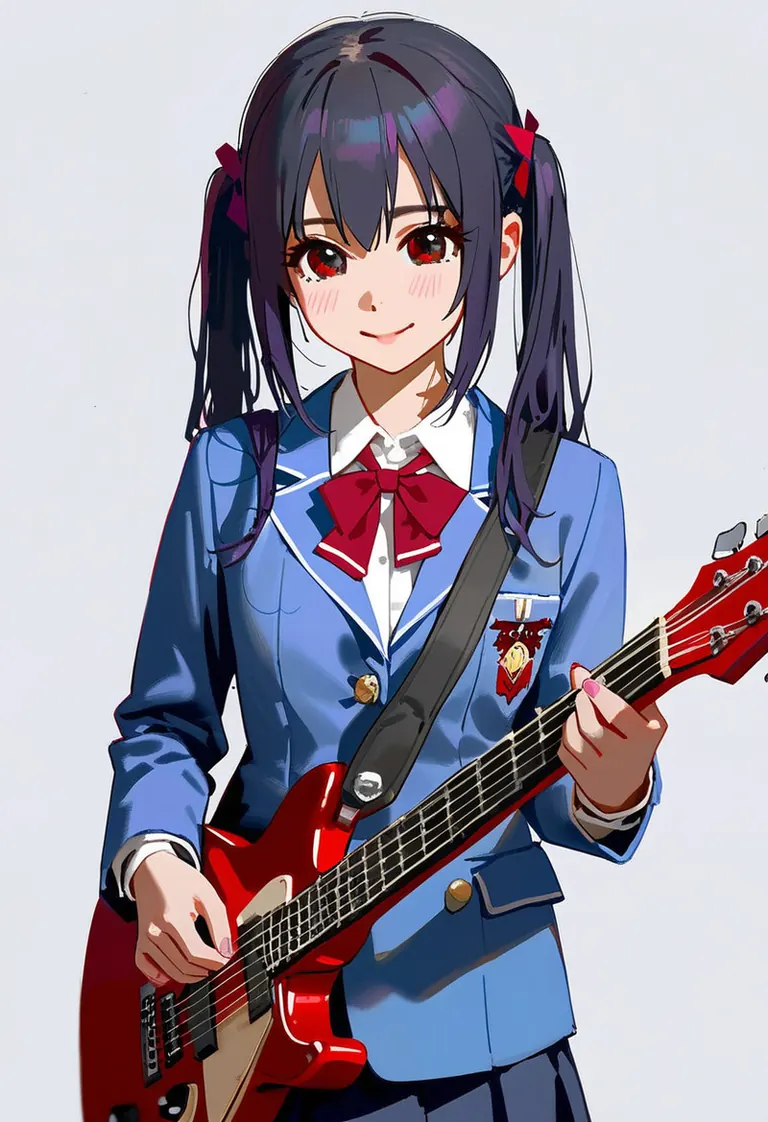
amazing quality, (by trickortreat|by as109|by shiroski|by nixeu|by baihuahua), impasto style, 1girl, solo, 1 nakano azusa, white background, school uniform, playing red guitar, very detailed, amazing quality
Negative prompt
worst quality, abstract, clumsy pose, deformed hand, fused fingers, extra digits, fewer digits, fewer fingers, extra fingers, extra arm, missing arm, extra leg, missing leg, signature, artist name, multi views, disfigured, ugly, bad weapon anatomy, messy
Run Locally
artiwaifuDiffusion_v20.safetensors
6.46 GB · SafeTensor · fp16 · full
Downloads are served by Civitai. Some creators ask for a Civitai login first.