Klein Base-to-Turbo LoRA: control how turbo your Flux.2 Klein is
Topic: Models

By Captain
Published 2026-10-02
anyMODE's Base-to-Turbo LoRA adds the turbo behavior back to Flux.2 Klein base checkpoints with adjustable strength, so you can choose speed versus CFG control. Learn how it was made, weights and workflows.
Overview
Klein 4B/9B
Base to Turbo
LoRA
(9B rank 128) by anyMODE was created by subtracting the Klein base weights from the Klein turbo weights and extracting the difference as a LoRA. Applied to the base
checkpoint
it adds turbo back, and its strength controls how much turbo (and therefore how much
CFG
still applies).
This lets you keep the base model's trainability and LoRA compatibility while dialing in few-step generation.
Reference
Name | Type | What it is |
|---|---|---|
LoRA weight | 0.3-1.0 | 1.0 = full turbo; 0.5 = half. |
Steps | 4-8 at 1.0; 12-16 at 0.5 | |
Guidance | 1 at full turbo; 2-3 at partial | |
Base | Klein 9B base | 4B version exists. |
Combination | base LoRAs | Realism and style LoRAs trained on base. |
AD

No install required - run AI models on the cloud
BitVector Prism is the easiest way to start: pick a model, type a prompt and generate in a clean web app, with nothing to configure. BitVector is also available on Discord and on the web (SpyGlass).
Step by step
- Add Base-to-Turbo at 1.0, 6 steps, guidance 1 for speed.
- For more prompt control, 0.5 at 14 steps, guidance 2.5.
- Compare both on the same seed.
- Keep the setting that balances speed and adherence.
Examples
Full turbo
Vintage analog film photograph, low-angle Dutch tilt close-up of a woman with short wavy dark hair and bold makeup posing in front of brightly lit vending machines at night.
Base-to-Turbo 1.0, 6 steps, guidance 1
Half turbo
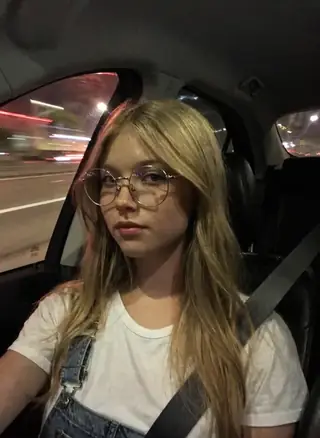
Professional photography, film grain, a portrait of an adult woman in a clean white polo shirt in the back seat of a car, soft window light.
Base-to-Turbo 0.5, 14 steps, guidance 2.5
Creative idea: speed ladder
Same prompt at weights 0.25, 0.5, 0.75, 1.0 with matching steps to find your preferred trade-off.
Tips
- Pair with Lenovo UltraReal Klein for fast realism.
- Vintage film and Dutch-tilt prompts show how well composition survives at low steps.
- Do not combine with the turbo checkpoint itself.
Troubleshooting
Burnt colors
Why it happens
Guidance too high at full turbo.
How to fix it
Guidance 1 at 1.0.
Noisy output
Why it happens
Too few steps for a partial weight.
How to fix it
Raise steps as weight drops.
AD

No install required - run AI models on the cloud
PirateDiffusion is Telegram only and built for pros: thousands of models, LoRAs and workflows driven by chat commands, with unlimited generation on a fixed price plan.

Questions
Why not just use the turbo checkpoint?
Base-trained LoRAs and adjustable CFG.
4B?
Yes, a 4B version exists.
Links and sources
Models in this guide

Written by
Captain
Related guides
Models
Klein Anatomy / Quality Fixer v1.5: a slider that corrects Flux.2 Klein anatomy
l226's Anatomy Fixer for Flux.2 Klein 9B is a concept slider that fixes hands, limbs and glitches at weights 2-3 while keeping the seed. Learn how it works, the right weight and when to use v1.0 instead.
By Captain
2026-09-30
Models
Lenovo UltraReal for Flux.2 Klein 9B: film realism on the newest Flux
Danrisi's Lenovo UltraReal build for Flux.2 Klein 9B Base adds real-camera texture, grain and color to Klein renders. Learn weights, the l3n0v0 trigger, settings and ideas for portraits and avant-garde fashion.
By Captain
2026-09-29

Models
FLUX.2 Dev: prompting the newest Black Forest Labs model
FLUX.2 Dev brings larger prompts, better text, stronger realism and multi-reference editing. This guide covers the turbo workflow, guidance and resolution settings, prompt structure and ideas that use its new strengths.
By Captain
2026-10-03
More guides

Models
FLUX.1 Dev: how to prompt it, best settings and creative ideas
A practical guide to FLUX.1 Dev by Black Forest Labs: natural-language prompting, guidance and step settings, LoRA stacking, text rendering and prompt ideas that play to its strengths.
By Captain
2026-09-30

Models
Stable Diffusion XL 1.0: prompts, settings and what it still does best
How to get the most out of the official SDXL 1.0 base model: native resolutions, CFG and sampler settings, the refiner, negative prompts and ideas for styles where SDXL still shines.
By Captain
2026-10-01

Models
Stable Diffusion 1.5: the classic model, prompted properly
Stable Diffusion 1.5 is still worth knowing: the right resolution, CFG and sampler, how to use its huge library of LoRAs and embeddings, and creative prompt ideas suited to a 512-pixel model.
By Captain
2026-10-02

Models
Qwen-Image: long prompts, perfect text and bilingual posters
Qwen-Image is the model to reach for when the words in the picture matter. Learn how to write its long descriptive prompts, render English and Chinese text accurately, set CFG and steps, and explore layout-heavy creative ideas.
By Captain
2026-09-29

Models
SDXL-Lightning: four-step generation on any SDXL checkpoint
ByteDance's SDXL-Lightning LoRA turns a 30-step SDXL render into a 4-step one. Learn the step counts, the CFG you must use, the sampler, and how to combine it with your favorite checkpoints and style LoRAs.
By Captain
2026-09-30
ComfyUI
ComfyUI nodes: documentation and troubleshooting
Plain-language documentation for the ComfyUI nodes people use most: what each node does, every input and output, how to wire it, the settings that matter, and the errors it throws with the fix for each one.
By Captain
2026-06-02

Model
Trends
.ai
© ModelTrends.ai
|
Made in Japan
|
© 2026