
Flux Social Media Image Generator (PsiClone's ArtForge MasterKit)
7933°
<social-media-image-flux>
Các ứng dụng hỗ trợ thẻ ModelTrends cho phép bạn chạy/cài đặt mô hình bằng cách sao chép mã này vào lệnh nhắc mà không cần thiết lập. Tìm biểu tượng của chúng tôi trong các ứng dụng hỗ trợ, như Prism (bên dưới).

Chạy mô hình này
Ưu đãi / Quảng cáo

Easy Creator (Prism) Web
Không giới hạn · phí cố định
Tốt nhất cho người mới bắt đầu. Quy trình làm việc mạnh mẽ, dễ học.

PirateDiffusion Telegram
Không giới hạn · phí cố định
Tạo video, hình ảnh, nhân vật chat tùy chỉnh và nhiều hơn nữa.

Pro studio (SpyGlass) Web
Không giới hạn · phí cố định
Duyệt mô hình, render và chỉnh sửa từ bất kỳ trình duyệt hay điện thoại nào.

Discord bot (Vector)
Không giới hạn · phí cố định
Thêm Vector vào máy chủ của bạn hoặc tham gia Discord của Vector. Tạo mọi thứ!

Unified Editor Web
Không giới hạn · phí cố định
Trình chỉnh sửa cho hình ảnh và video: render, chỉnh sửa, nâng cấp và nhiều hơn nữa trên một trang.

Civitai Web
Trả theo lượt dùng
Tạo ảnh trên trang Civitai; mỗi ảnh trả bằng Buzz credits.

Ứng dụng cục bộ
Cần thiết lập
Cài đặt các chương trình local nếu máy tính của bạn có phần cứng đủ mạnh.

ModelDuel Web
Trả theo lượt dùng
Tạo cùng một lệnh trên tối đa 50 mô hình checkpoint/cơ sở cùng lúc.
Thuê GPU trên đám mây

Mới với LoRA? Hướng dẫn từng bước: cách sử dụng Flux và Flux 2 LoRA trên Graydient
BY Psi_Clone - Flux - Social Media Image Generator PsiClone's ArtForge MasterKit
Ghi chú của tác giả
Please Show your love & Support if you find my resources useful -
❤ ❤
This Lora is part of my ArtForge MasterKit -
Please note this model is currently in the experimental stage which is why it is released under early access! Please share your valuable feedback once you download and test it out!
Please read the guide below and Please please follow the prompt structure for the best results! If you find any other prompt structure and guidance keywords that work better for this please do share them!
I have prepared a custom dataset for this, which means some of the images in the dataset are created using Photoshop and Illustrator, while some dataset items are acquired from free sources.
Every image is Captioned via Joy Caption to create base captions, then each caption file undergoes manual tweaking because Joy Caption is not perfect yet, we Humans are! (Not for long tho ;)
The Flux - Social Media Image Generator LoRa is designed to assist creators in generating visually striking social media post ideas with ease. This model is perfect for conceptualizing post layouts, designing aesthetic visuals, and creating inspiration for brand messaging. However, it is important to note that this LoRa works as an idea generator and may not be used as a final output for social media posts. The model excels at providing creative layouts and visual concepts, which can then be refined and polished externally.
The Flux - Social Media Image Generator LoRa is currently undergoing fine-tuning and dataset adjustments to enhance its effectiveness. As you experiment with different prompts and settings, you’ll find it to be a valuable tool in the brainstorming process for your social media content.
Key Features:
-
Conceptual Layouts: Generate creative and visually appealing social media post ideas that can be further refined for professional use.
-
Experimental Model: As an ongoing project, this model is constantly evolving, making it ideal for generating rough drafts and creative inspirations.
-
Guidance for Text and Graphics Placement: Get recommendations for text placements, graphic elements, and visual arrangements to create stunning post layouts.
How to Use:
Trigger Word:
-
The trigger word for this LoRa is "a social media image post", but the model may function well without it. For best results, use this phrase to prompt the model’s intended behavior.
Prompt Structure for Best Results:
1. Main Visual Description: Start your prompt with a clear description of the main visual elements (e.g., “A sleek, elegant perfume bottle placed on satin fabric with soft, ambient lighting”).
2. Text Placement: Specify where you want the text to be placed, along with the style (e.g., “Top Center Text Placement: ‘Indulge in Sensuality’ in a soft, flowing script”).
3. Additional Text Elements: Include any secondary text or branding elements and their positions (e.g., “Bottom Right Text Placement: ‘Discover the Essence’ next to a perfume bottle icon”).
4. Graphic Elements and Style: Add design details that complement the overall theme, such as decorative shapes, lines, or icons (e.g., “Soft, flowing lines and delicate abstract shapes that mimic the curves of the body and the flow of perfume”).
2. Advanced Prompting Tips:
-
Guidance Scale: Experiment with the guidance scale between 3.0 and 4.5. This range allows the model to stay creative while still adhering to the visual structure of a social media post.
-
LoRa Strength: Keep the LoRa strength between 0.6 and 1.0 for optimal results. This ensures the model generates layouts with clear, visually appealing elements without overwhelming the design.
3. Sample Prompt:
-
Main Visual: A sleek, elegant perfume bottle placed on satin fabric with soft, ambient lighting. A silhouette of a person gently touching their neck, emphasizing sensuality through body language rather than revealing imagery.
Top Center Text Placement: ‘Indulge in Sensuality’ in a soft, flowing script.0
Bottom Right Text Placement: ‘Discover the Essence’ in smaller, elegant text next to a perfume bottle icon.
Graphic Elements: Soft, flowing lines and delicate abstract shapes that mimic the curves of the body and the flow of perfume. Light sparkles in the background to give a luxurious feel.
Từ kích hoạt
a social media image post
SHA256
4FC4DAE34D04867BD2053AFCA597D4BF2C9F9F5D8CEECC0AD5C752ADCB111979
Ranking badge
Updated Oct 22, 2026

Made this model? Show this badge on your page.
Paste it into your Hugging Face card or Civitai description.
Xu hướng phổ biến của Flux Social Media Image Generator (PsiClone's ArtForge MasterKit)
Điểm nhiệt, 12 tháng gần đây
Điểm nhiệt
7,933°
Tuần này
▲
0.3%
7,935° lúc đó, 7,933° bây giờ
Tháng này
▲
1.4%
7,939° lúc đó, 7,933° bây giờ
Năm qua
n/a
Chưa phát hành/được theo dõi
7,000°
Điểm sàn
Thang điểm chạy từ 0° đến 9.999°. Mọi thứ dưới 7,000° dành cho các mô hình chưa có nguồn nào báo cáo, chúng mang một số thay thế ở đó để danh sách luôn đầy đủ. 7,000° là nơi bắt đầu dữ liệu đo được: một mô hình có dữ liệu thật nhưng gần như không có lượt tải sẽ đứng ở điểm sàn, và các số đo sẽ cộng dồn trên đó. Điểm sàn không nói gì về mô hình; chỉ có các độ trên nó mới phân biệt được các mô hình với nhau.
+927°
Lượt tải Civitai
1,229 lượt tải phiên bản chính xác này trên Civitai. Lượt tải là yếu tố nặng nhất và được tính trên thang logarit: tăng gấp mười lượt tải cộng thêm 300°, nên mô hình có một triệu lượt tải không nóng gấp nghìn lần mô hình có một nghìn lượt tải. Sáu nguồn lượt tải chia sẻ chung một điều kiện này, phân bổ theo tỷ lệ lượt tải của họ.
+340°
Lượt thích
185 lượt thích và bấm ngón tay cái trên các nguồn. Một lượt thích được tính bằng nửa lượt tải, trên cùng thang logarit.
−334°
Tuổi
−334° vì trọng số Flux được phát hành vào 2024. Mỗi mô hình thừa hưởng tuổi của trọng số nó dựa trên: 150° mỗi năm, tối đa 750°, và nó tiếp tục tăng cho đến đó. Nếu không có điều này, top danh sách sẽ là các checkpoint 2022 và 2023 dựa trên lượt tải tích tụ nhiều năm.
Hiển thị phân tích chi tiết
Mọi con số trên trang này đều có thể kiểm tra được. Điểm nhiệt của mô hình này là 7,933°, và đây là cách nó được xây dựng từng thành phần một, với tổng điểm chạy sau mỗi bước: điểm sàn, số độ mà mỗi nguồn đóng góp, điểm thưởng cho loại mô hình và điểm trừ theo tuổi của trọng số. Màu sắc tương ứng với các dải trên biểu đồ phía trên. Phần chú giải ở cuối định nghĩa mọi thuật ngữ.
- 1Bắt đầu từ điểm sàn.Tại sao là 7,000° chứ không phải 0: thang điểm chạy từ 0° đến 9.999°, và phần dưới 7,000° dành cho các mô hình chưa có nguồn báo cáo, mang số thay thế để danh sách đầy đủ và không bao giờ vượt trên mô hình có dữ liệu. 7,000° là nơi bắt đầu dữ liệu đo được. Một mô hình có dữ liệu thật nhưng gần như không có lượt tải đứng ở đây; mọi thứ tiếp theo là đo lường, và phần trên điểm sàn có mười bước tăng gấp mười lần lượt tải, mỗi bước 300°. Điểm sàn giống nhau cho mọi mô hình, nên nó không quyết định gì; chỉ có các độ trên nó mới quyết định.7,000°tổng đang chạy
- 2Thêm lượt tải về.1,229 lượt tải tương đương tổng cộng, từ Lượt tải Civitai. Mười lần lượt tải thêm cùng 300°, nên kích thước quan trọng nhưng không bao giờ chiếm hết điểm.+927°7,927°tổng đang chạy
- 3Thêm lượt thích.185 lượt thích và giơ ngón tay cái, bằng một nửa trọng số của lượt tải.+340°8,267°tổng đang chạy
- 4Bỏ tuổi ra.Trọng số Flux ra mắt vào 2024: 150° mỗi năm, tối đa 750°, tăng dần cho đến lúc đó.−334°7,933°tổng đang chạy
- =Điểm nhiệt.Mô hình này đứng ở đâu trên mọi danh sách của trang này. Không có gì khác điều chỉnh nó.7,933°
Thuật ngữ: các từ dùng ở đây
- Điểm nhiệt
- Một số duy nhất cho biết mô hình được dùng và mong muốn thế nào hiện tại, từ 0° đến 9.999°. Mọi danh sách trên trang này nói về độ hot đều sắp xếp theo nó và không theo gì khác.
- Sàn điểm
- 7.000° là điểm bắt đầu cho mọi mô hình có dữ liệu thật. Thang điểm chạy từ 0° đến 9.999°; phần dưới sàn dành cho mô hình thay thế (mô hình không có dữ liệu), để mô hình có dữ liệu luôn xếp trên mô hình không có. Sàn điểm giống nhau cho tất cả và không quyết định gì; điểm trên sàn mới là thước đo.
- Tương đương lượt tải
- Tất cả những gì điểm số coi là lượt tải, cộng lại: lượt tải thật, mỗi người chia sẻ torrent tính 1.000, mỗi ảnh AI Horde và mỗi lượt chạy trên trang tạo ảnh tính một.
- Thang log
- Đếm theo chục, không phải theo đơn vị: từ 1.000 lên 10.000 lượt tải thêm cùng số điểm như từ 10.000 lên 100.000. Giúp tránh việc các mô hình lớn lấn át hết mọi thứ khác.
- Lượt thích
- Giơ ngón tay cái và lượt thích từ mọi nguồn, mỗi lượt bằng một nửa lượt tải trên thang log.
- Tỷ lệ áp dụng
- Bao nhiêu lượt tải mỗi ngày mà mô hình nhận được hiện tại, tính từ chênh lệch giữa hai lần đọc nguồn. Bằng một phần tư trọng số của lượt tải.
- Đã đo và ước tính
- Đã đo nghĩa là có hai lần đọc từ một nguồn và sự khác biệt là thật. Ước tính nghĩa là chỉ biết tổng số hôm nay và quá khứ được phân bổ trong suốt thời gian tồn tại của mô hình; trang web sẽ nói rõ đang hiển thị loại nào.
- Seeder
- Người giữ bản sao trọng số trực tuyến để người khác tải qua torrent, hoặc một bản sao lưu trữ làm điều tương tự. Mỗi người được tính là 1.000 lượt tải.
- AI Horde
- Một mạng lưới tình nguyện tạo ảnh miễn phí trên máy tính được hiến tặng. Số ảnh nó đã tạo với một mô hình được công khai, và mỗi ảnh được tính là một lượt tải.
- Trang tạo ảnh
- Các trang lưu trữ bản sao mô hình riêng và cho phép người dùng tạo ảnh, như PixAI, SeaArt và Yodayo. Lượt tải của họ được tính giống như Civitai và mỗi lần tạo ảnh được tính là một lượt tải.
- Token OpenRouter
- Mô hình văn bản phục vụ qua API, như Claude hoặc GPT, không có trọng số để tải xuống, nên sử dụng token để đo lường: các đoạn văn bản nó đọc và viết qua OpenRouter, một cổng kết nối nhiều ứng dụng sử dụng, trong 30 ngày qua. Mỗi 10,000,000 token tính là một lượt tải. Nguồn: OpenRouter (openrouter.ai/rankings), CC BY 4.0.
- Mô hình đầy đủ (checkpoint)
- Chính là trọng số, file tự tạo ảnh. Nó được cộng thêm điểm vì các add-on phụ thuộc vào nó.
- LoRA và embedding
- Các file add-on nhỏ giúp điều chỉnh trọng số của người khác theo phong cách, nhân vật hoặc ý tưởng. Chúng không thể chạy riêng.
- Gia đình và trọng số
- Nền tảng mà mô hình xây dựng trên đó, như SD 1.5, SDXL, Flux hoặc Wan. Mỗi mô hình kế thừa ngày phát hành của trọng số gia đình nó.
- Tuổi
- Điểm trừ dựa trên thời gian trọng số gia đình được phát hành: 150° mỗi năm, tối đa 750°. Nó giữ lại lượt tải cũ đã tích tụ nhiều năm bằng cách đóng băng đầu danh sách.
- Tăng gia đình
- Một đẩy nhỏ có giới hạn cho LoRA của một gia đình mà trang này đang ưu tiên, luôn được liệt kê trong phần phân tích.
- Điểm thay thế
- Một số ổn định dưới mức tối thiểu dành cho mô hình chưa có báo cáo nguồn, để danh sách luôn đầy đủ. Nó không bao giờ xếp trên mô hình có dữ liệu.
- Mới! (giai đoạn thử nghiệm)
- Mô hình dưới 7 ngày tuổi hiển thị Mới! thay vì điểm số và không được xếp hạng. Điểm số được tính từ ngày đầu tiên, nhưng mô hình mới một ngày tăng trưởng nhanh nhất, nên nếu không chờ đợi thì #1 tuần này sẽ luôn là mô hình mới ra hôm qua thay vì mô hình giữ vững trong tuần.
- Xu hướng
- Tốc độ tăng trưởng của mô hình trong một khoảng thời gian so với tốc độ tăng trưởng trung bình của mô hình khác trong cùng khoảng thời gian. Nhanh hơn trung bình là tăng, chậm hơn là giảm.
- Mô hình điển hình
- Giữa danh mục: một nửa mô hình có số liệu tăng nhanh hơn trong khoảng thời gian, một nửa tăng chậm hơn.
Cách mà độ phổ biến của mô hình này thay đổi so với phần còn lại của danh mục: sự tăng trưởng về lượt tải xuống, lượt thích và sử dụng qua từng giai đoạn, so với sự tăng trưởng điển hình của mô hình trong cùng giai đoạn, cùng với điểm nhiệt của nó lúc đó. Cao hơn mức tăng trưởng điển hình là tăng, thấp hơn là giảm. Quá khứ được tái tạo từ tổng số hiện tại, ngày đầu tiên của mô hình và tốc độ tải xuống đo được khi có hai lần đọc; mô hình không tồn tại vào đầu giai đoạn sẽ hiển thị n/a.
Ảnh mẫu
Prompt và thiết lập do những người tạo ra các ảnh này trên Civitai chia sẻ. Chọn một ảnh để xem nó được tạo như thế nào.

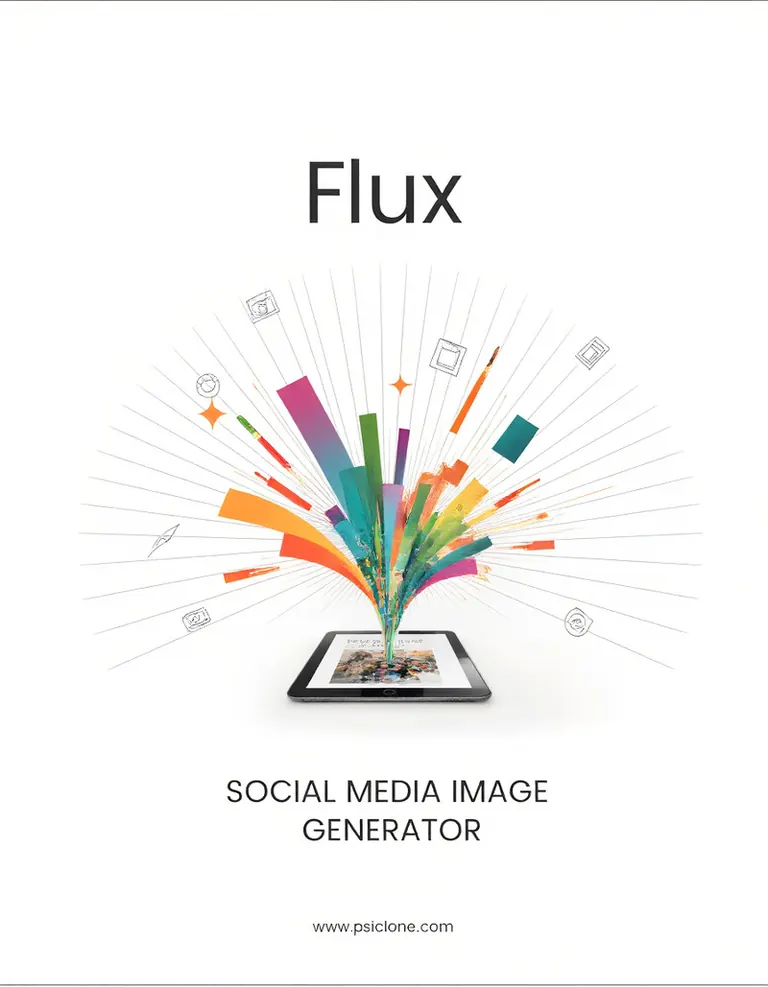
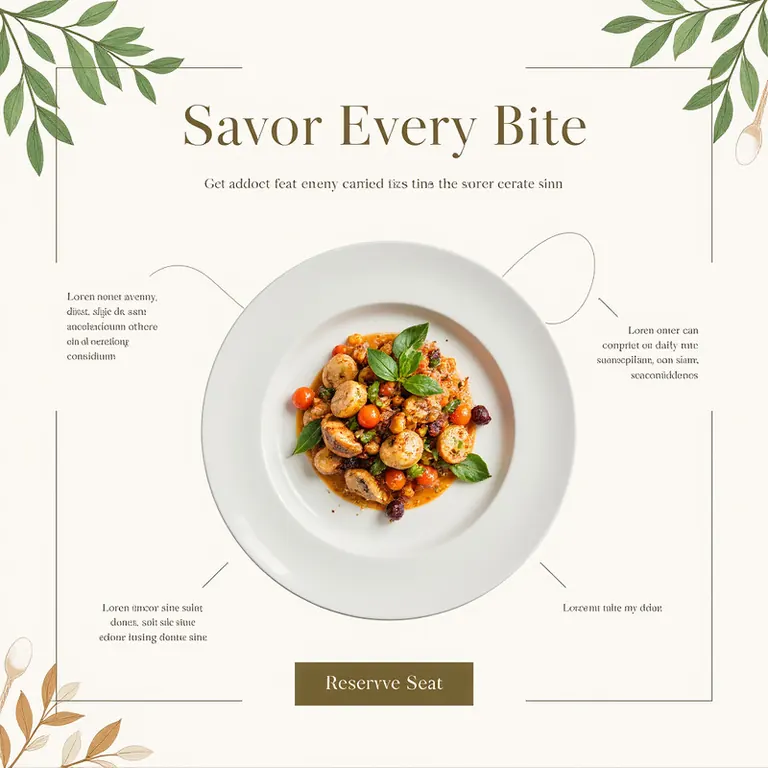


Thiết lập
Sampler
Undefined
Số bước
27
Guidance
3.5
Seed
286849741
Kích thước
832x1216
Clip skip
2
Trọng số đã dùng
1
Prompt
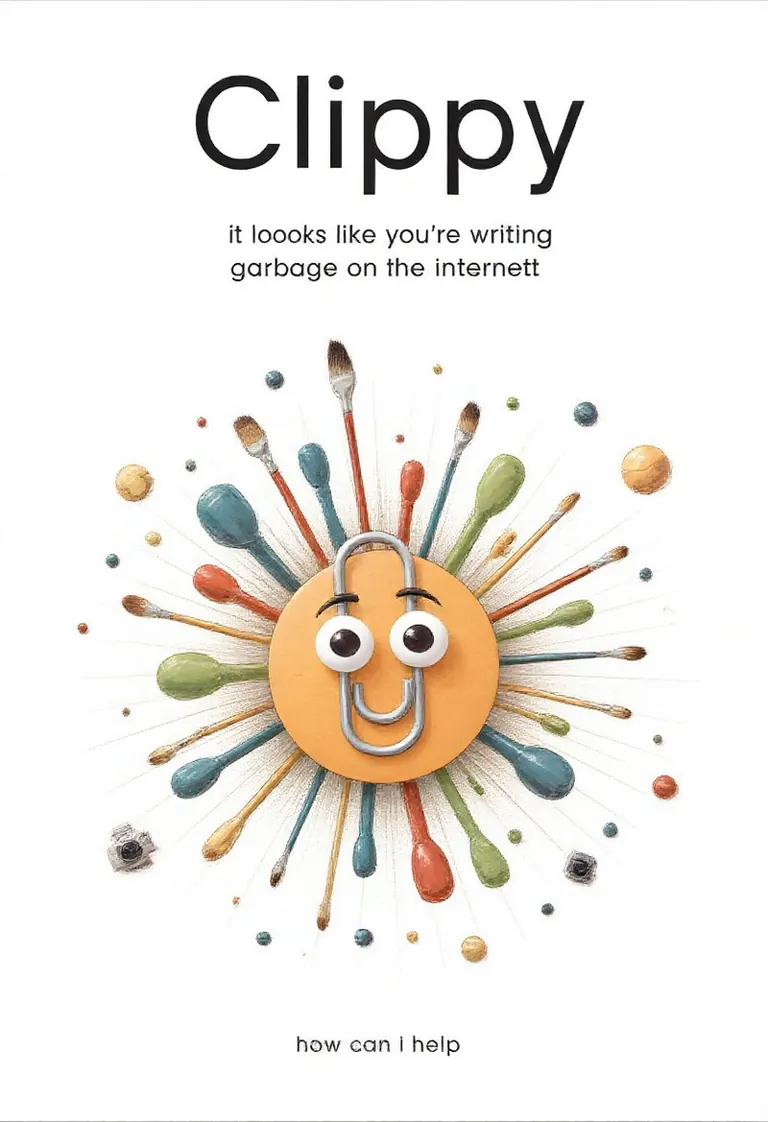
Main Visual: A colorful, abstract burst of shapes and lines emerging from the center, where a clippy is. Around the burst, small icons and creative elements (paintbrushes, text boxes, cameras) radiate outward, representing the limitless possibilities of social media design.
Top Text Placement: "Clippy" in bold, modern font with slight glow effects to make the title pop.
Bottom Text Placement: "it looks like you're writing garbage on the Internet"
The website at the bottom says "how can I help?"
Graphic Elements: Flowing lines, abstract shapes, and small icons scattered around the burst. Faint gradients of color give the image a vibrant, energetic feel, emphasizing the creative power of the tool.
Thiết lập
Sampler
Euler
Số bước
30
Guidance
1
Seed
3207713562
Kích thước
680x1024
Prompt
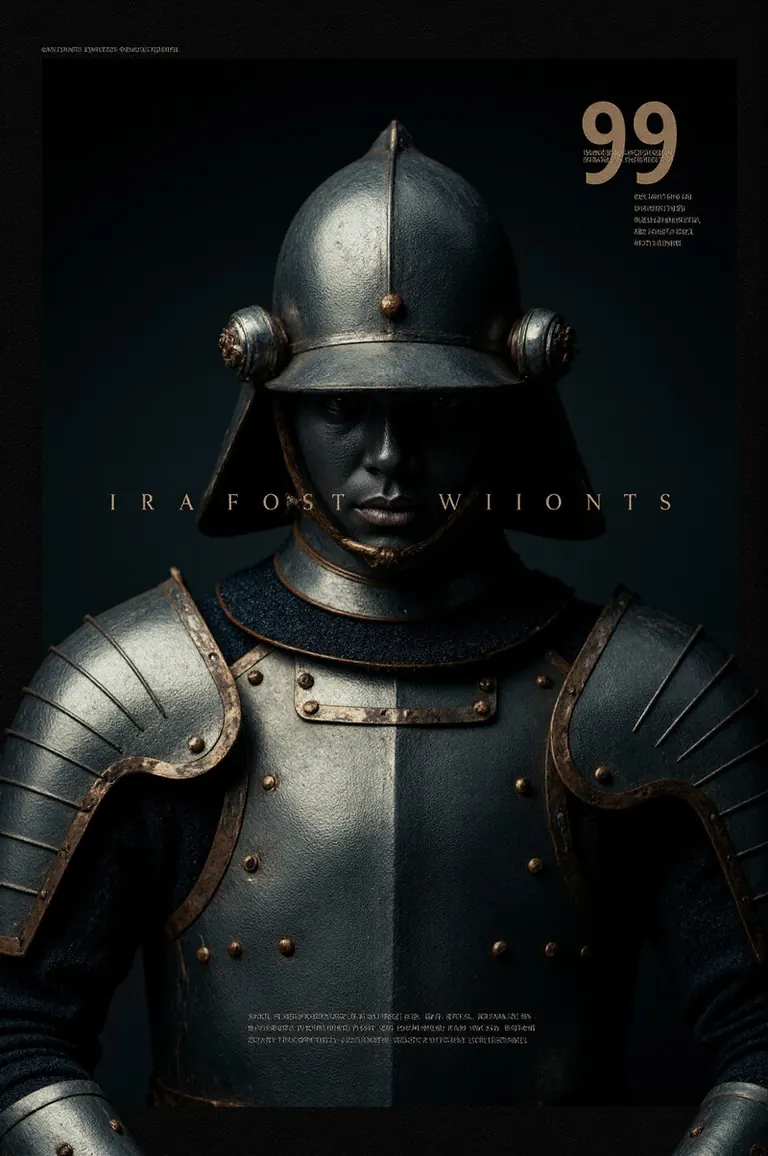
<lora:SocialMediaPostGenerator:1>,a social media image post,real photograph,super close-up,main visual:a steel armor,top center text placement:“hardest armor in the universe”,bottom big text placement:“99 men have been killed”,japanese minimalism,award-winning idea,award-winning poster design,background graphic elements:abstract lines that match the theme,dark,outside_border,
Thiết lập
Sampler
Euler
Số bước
30
Guidance
1
Seed
2874476837
Kích thước
680x1024
Prompt
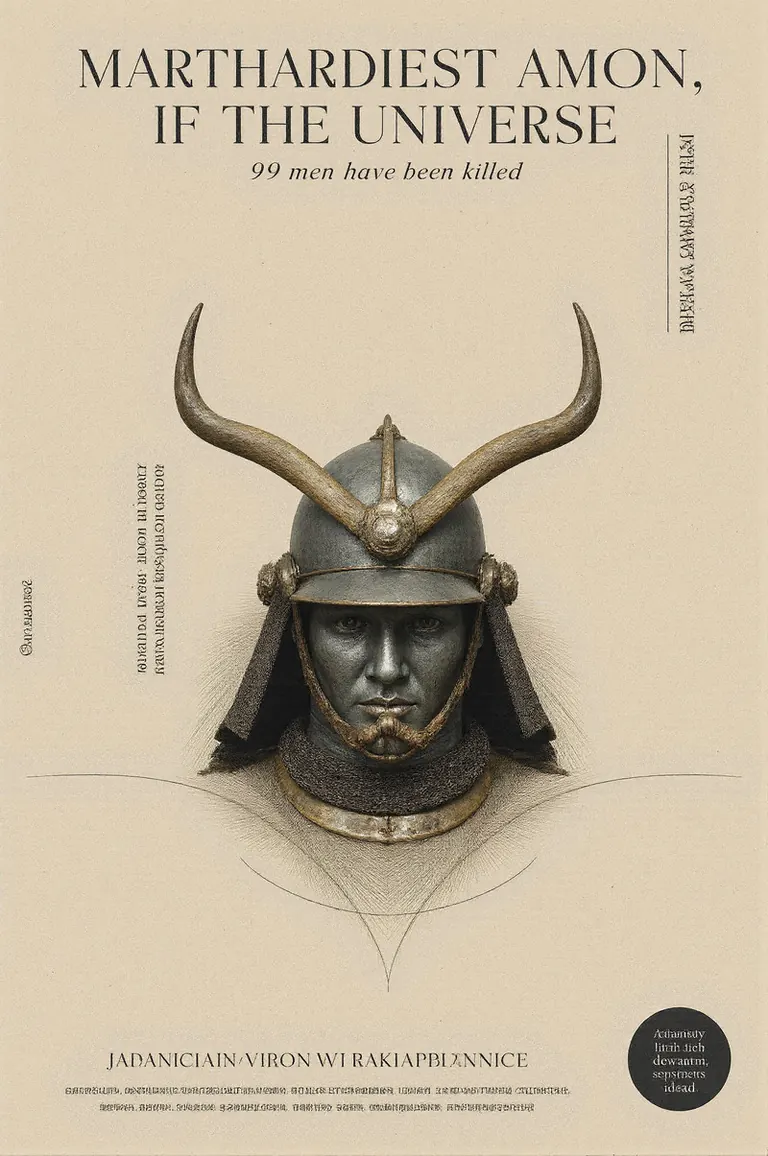
<lora:SocialMediaPostGenerator:1>,a social media image post,main visual:a steel armor,top center text placement:“hardest armor in the universe”,bottom big text placement:“99 men have been killed”,japanese minimalism,award-winning idea,award-winning poster design,graphic elements:abstract lines that match the theme,
Thiết lập
Sampler
Euler
Số bước
30
Guidance
1
Seed
3535287606
Kích thước
680x1024
Prompt
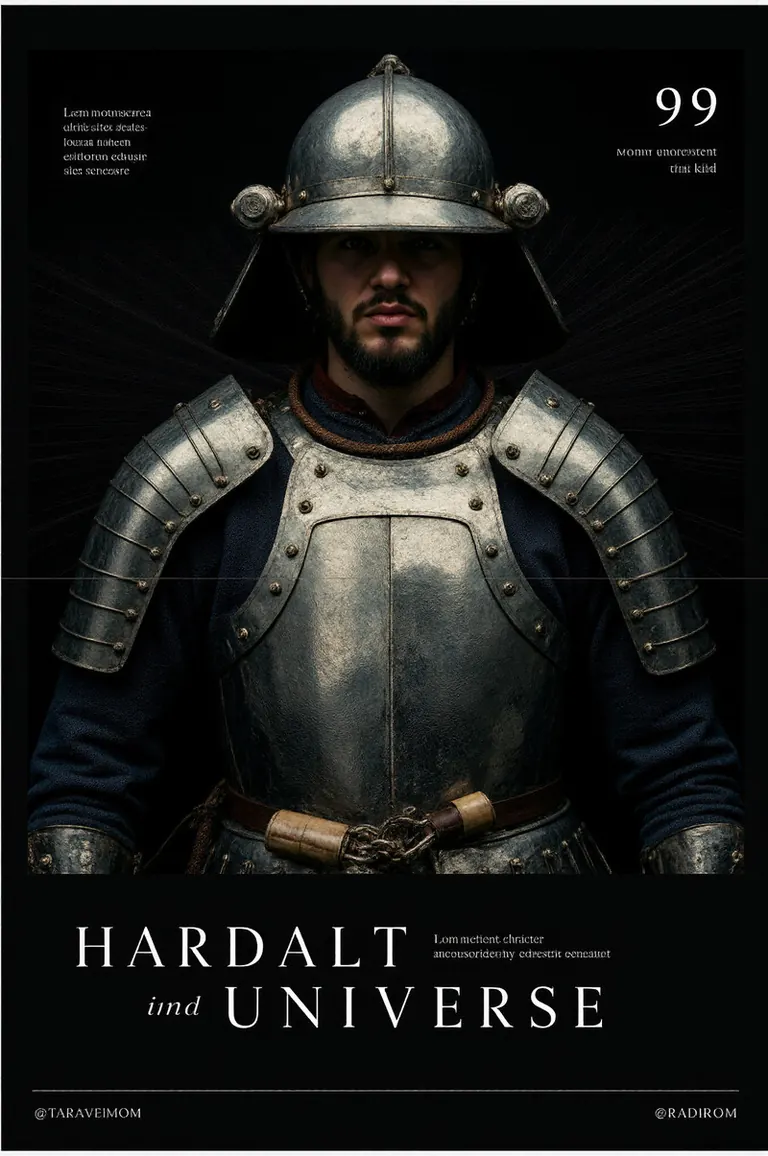
<lora:SocialMediaPostGenerator:1>,a social media image post,real photograph,super close-up,main visual:a steel armor,top center text placement:“hardest armor in the universe”,bottom big text placement:“99 men have been killed”,japanese minimalism,award-winning idea,award-winning poster design,background graphic elements:abstract lines that match the theme,dark,outside_border,an asymmetrical composition,
Thiết lập
Sampler
Euler
Số bước
36
Guidance
3.5
Seed
1068680807289749
Kích thước
896x1152
Prompt
Main Visual:
A serene spa setting featuring two lounge chairs side by side, surrounded by candles and essential oils. The image focuses on the atmosphere of calm and relaxation, without revealing imagery.
Top Center Text Placement:
"Rekindle & Relax" in a calming, minimalist font.
Bottom Left Text Placement:
"Book Your Couples Retreat" in smaller text next to a candle or lotus icon.
Graphic Elements:
Soft, flowing waves and abstract elements like candles and water drops around the edges to emphasize relaxation and intimacy.
Thiết lập
Sampler
Euler
Số bước
36
Guidance
4.5
Seed
435756296354982
Kích thước
896x1152
Prompt
Main Visual: A colorful, abstract burst of shapes and lines emerging from the center, where a tablet or smartphone screen displays a beautifully designed social media post. Around the burst, small icons and creative elements (paintbrushes, text boxes, cameras) radiate outward, representing the limitless possibilities of social media design.
Top Text Placement: "Flux" in bold, modern font with slight glow effects to make the title pop.
Bottom Text Placement: "Social Media Image Generator"
The website at the bottom says "www.psiclone.com"
Graphic Elements: Flowing lines, abstract shapes, and small icons scattered around the burst. Faint gradients of color give the image a vibrant, energetic feel, emphasizing the creative power of the tool.
Thiết lập
Sampler
Euler
Số bước
36
Guidance
3.5
Seed
1095621815114203
Kích thước
1024x1024
Prompt
Main Visual: A top-down view of a plated gourmet dish in the center. The table includes added graphical elements like a faint overlay of herbs and spices along the borders of the image to frame the plate.
Top Center Text Placement: "Savor Every Bite" in an elegant serif font, centered, with decorative lines flanking the text.
Bottom Right Text Placement: "Reserve Your Seat" in smaller, thin text, adding a sense of urgency with a subtle arrow pointing toward a call-to-action button.
Graphic Elements: Thin gold or copper lines separate the plate from the rest of the image, simulating a luxurious border. You can also use faint, abstract icons of cutlery to fill empty spaces.
Thiết lập
Sampler
Euler
Số bước
36
Guidance
3.5
Seed
622208687439305
Kích thước
1024x1024
Prompt
Main Visual: A red convertible parked in front of a neon-lit diner. Add subtle motion lines or exhaust graphics behind the car to enhance the dynamic feeling.
Text Placement:
Top Center: "Drive in Style" in bold, retro font, with neon glow effects around the text.
Bottom Left Corner: "Experience Classic Cool" in a smaller, italicized font, next to a car wheel or road icon.
Graphic Elements: Simple, retro-style icons like diner signs or fuel pumps near the borders, adding to the vintage atmosphere.
Chạy cục bộ

SocialMediaPostGenerator.safetensors
Tải xuống do Civitai cung cấp. Một số tác giả yêu cầu đăng nhập Civitai trước.






Flux Social Media Image Generator (PsiClone's ArtForge MasterKit) là một LoRA thuộc họ Flux được liệt kê trên ModelTrends.ai, danh mục chỉ đọc về các mô hình AI hình ảnh, video và văn bản mã nguồn mở. So sánh nó với các mô hình Flux khác, xem điểm độ hot để biết xu hướng và mở trên PirateDiffusion hoặc BitVector để dùng thử.
Duyệt theo họ mô hình

Mô hình Text / LLM
434

Mô hình Anima
528

Mô hình Chroma
19
Mô hình Fibo
2

Mô hình Flux
1,496
Mô hình Flux 2 / Klein
1,239
Mô hình Flux 3
3

Mô hình Moss
3

Mô hình Iris
1

Mô hình MiniMax H3
364

Mô hình Hunyuan
204

Mô hình Ideogram
20

Mô hình Krea2
717

Mô hình Qwen
20

Mô hình Qwen2
47

Mô hình Ltx2
153