
Background Detail Enhanced/Simplified 背景细节增强/简化
8019°
<background-tweak2>
ModelTrends 태그를 지원하는 앱에서는 이 코드를 프롬프트에 복사해 붙여넣기만 하면 별도 설정 없이 모델을 실행하거나 설치할 수 있어요. Prism(아래) 같은 지원 앱에서 아이콘을 찾아보세요.
모델 실행
제공 / 광고

Easy Creator (Prism) 웹
무제한 · 정액제
초보자에게 최적. 강력한 워크플로우, 낮은 학습 곡선.

PirateDiffusion 텔레그램
무제한 · 정액제
영상, 이미지, 맞춤형 채팅 페르소나 등 다양하게 만들어 보세요.

Pro studio (SpyGlass) 웹
무제한 · 정액제
어떤 브라우저나 휴대폰에서도 모델을 탐색하고 렌더링하며 수정하세요.

Discord bot (Vector) 디스코드
무제한 · 정액제
Vector를 서버에 추가하거나 Vector Discord에 참여하세요. 무엇이든 만들어 보세요!

Unified Editor 웹
무제한 · 정액제
이미지와 비디오 편집기: 한 페이지에서 렌더링, 편집, 업스케일 등 모두 가능합니다.

Civitai 웹
사용량별 결제
Civitai 사이트에서 생성; 이미지마다 Buzz 크레딧 사용.

로컬 앱
설정 필요
내 컴퓨터 성능이 되면 로컬 프로그램을 설치해.

ModelDuel 웹
사용량별 결제
한 번에 최대 50개의 체크포인트/기본 모델에서 동일한 프롬프트를 생성하세요.

Background Detail Enhanced/Simplified by ritansonoac554
제작자 노트
v2.0更新简介 Introducing V2.0
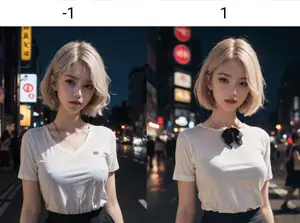
v2.0版本是一个效果更明显的版本,此模型可以更为显著地改变背景的细节,尤其体现在——模型权重为负时,你可以感受到背景被拉远且景色变模糊;当模型权重为正时,背景会被拉近并变清晰,可以清楚看到更多细节。你也可以在图生图中进行尝试。
This version offers more pronounced effects, allowing significant alterations to the background details. Particularly, when the model's weight is negative, you will experience a distant and blurred background effect. On the other hand, when the weight is positive, the background will be brought closer, becoming clearer, and revealing more intricate details. You can also try it in i2i.
v2.0版本的适用权重范围:推荐-0.8到0.8之间,当然对于2D模型你也可以尝试-1和1,这会使整体画风都发生变化,具体可以自行尝试。3D模型一般在-0.5到0.5之间就可以有非常明显的差别。
Recommended weight range for Version 2.0: It's suggested trying weights between -0.8 to 0.8. For 2D models, you can also experiment with -1 and 1, which will completely transform the overall art style. Feel free to explore and find the settings that suit your preferences. For 3D models, a weight range of -0.5 to 0.5 generally delivers highly noticeable differences in the output.
在-1.5权重左右可以变成特写近照(注意不要负太多,会严重影响画风)。可以通过关键词“xxx focus”来指定画面焦点。
It can be turned into a close-up photo at around -1.5 weight (be careful not to go too far beyond that, it can seriously affect the style). You can specify the focus of the screen by using the keyword "xxx focus".
v3.0更新简介 Introducing V3.0
在之前的v2.0版本中,随着背景细节的变化,人物在画面中的占比也会有比较明显的变化。这次的v3.0版本则是为了减少对【人物在画面中占比】的影响。因此,v2.0和v3.0都是推荐使用的版本,可以结合不同的需要来使用。
In the previous v2.0 version, there was a noticeable impact on the proportion of characters within the artwork as background details changed. The v3.0 version, however, aims to reduce the influence on the "proportion of characters within the artwork." Therefore, both v2.0 and v3.0 are recommended versions, and you can use them based on your specific needs.
v3.0版本的适用权重范围在不同底膜上有所不同。对于一些稍微过拟的底膜(例如一些脸型比较固定的真实系大模型),建议在±1.5权重的范围内使用此模型。对于一些比较泛用的底膜以及大部分的二次元底膜,都可以在±2权重的范围内使用此模型,一些情况下±3权重仍能保持画面不崩坏。换句话说,你实际上也可以将此模型作为一个大致检验底膜过拟程度的参考。
The applicable weight ranges for v3.0 vary depending on the base model. For some slightly overfitting base models (such as those with fixed facial features in realistic-style large models), it is advisable to use this model within the range of ±1.5 weights. For more general-purpose base models and the majority of 2D base models, you can use this model within the range of ±2 weights, and in some cases, ±3 weights can still maintain the integrity of the artwork. In other words, you can actually use this model as a rough gauge to assess the degree of overfitting of your base model.
在初次试验时,建议先从±1.5权重尝试,再根据效果调整至符合你预期的参数。
When initially experimenting, it's recommended to start with ±1.5 weights and then adjust the parameters to achieve the desired results.
这个LoRA的效果正如标题所说——可以增强/简化背景的细节、层次感。其在平面类、真实系模型上的作用略有不同。在2D模型上,该LoRA可通过控制权重来简化/增加背景的线条细节以及层次感;在真实系模型上,该LoRA可以控制背景建筑(负权重下)变得更远更模糊,或者(正权重下)变得更近更清晰以及增添实物。
This LoRA, as the title suggests, enhances/simplifies background details and adds depth to the image. Its effect varies slightly between 2D and realistic models. In 2D models, the LoRA can control the level of detail and depth in the background by adjusting the weight. In realistic models, it can make background buildings appear more distant and blurry (with negative weights) or closer and sharper (with positive weights), as well as adding objects.
此LoRA通过差异提取法制作,对画面中心的主体人物图像污染较少,基本不会改变人物构图,人物的细节不会随着背景的细节增强/简化而大幅改变。
This LoRA is created using differential extraction, resulting in minimal contamination of the main subject in the center of the image. It preserves the composition of the subject and ensures that the details of the person are not significantly altered by the enhancement/simplification of the background.
使用建议 Usage Guideline
-
LoRA权重在-2到2之间较好,负数权重与正数权重的效果如上文所述。
It is recommended to set LoRA weights between -2 and 2, as the effects of negative and positive weights have been described above.
-
希望你们能喜欢这个模型!通过微信(Anson_NgAu)联系我,支持我,或一起讨论!
I hope you enjoy this model. Feel free to contact me via WeChat (Anson_NgAu) to show your support or engage in discussions.
此LoRA和youkengi大佬的背景调整LoRA合用可以实现更显著的效果,并能带来额外的功能——拉远/拉进人物与镜头的距离。如下图所演示的,xy图为两个LoRA不同权重配合的结果,从左上角到右下角,背景细节逐步增强,层次逐渐变得丰富。
This LoRA, combined with the background adjustment LoRA from youkengi, can achieve more significant effects and provide additional functionality—adjusting the distance between the subject and the camera, either zooming out or zooming in. As demonstrated in the XY plot below, the results show the combination of two LoRAs with different weights. From the top left corner to the bottom right corner, the background details gradually enhance, and the depth becomes richer.
请访问如下链接查看youkengi的模型 Please visit the following link to view youkengi's model——
注 Note:
-
您不得将此模型及其衍生版本(如融合模型版本)托管于计划赚取收入或捐赠的网站/应用程序。如果您需要将此模型及其衍生版本用于商业目的(如生成式服务、售卖图片、将图片用于公开发表的文章或出版物等),请通过微信(Anson_NgAu)联系我。
You are not permitted to host this model or its merged versions on websites/applications that generate income or accept donations. If you intend to use this model or its merged versions for commercial purposes (such as generative services, selling generated images, using images for publicly published articles or publications, etc.), please contact me via WeChat (Anson_NgAu).
-
您不得直接售卖由此模型生成的图片,除非您对该图片进行了足够程度的人工修改,使其在法律意义上可以被完全判定为您的个人作品。如果您违反本条,所造成的一切法律后果由您个人承担,请恕本人概不负责。
You may not directly sell images generated by this model unless you have made sufficient manual modifications to the extent that the image can be legally considered your own work. If you violate this provision, you will be solely responsible for any legal consequences, and I cannot be held liable.
-
您可以将此模型及其衍生版本、通过此模型生成的图片自由用于免费/公益用途,包括免费的图片生成式服务。
You are free to use this model and its merged versions, as well as images generated by this model, for non-profit/charitable purposes, including free image generative services.
-
您可以自由融合此模型,如果您发布此模型的融合模型,还请您标注使用了此模型并附带链接,十分感谢!
You are allowed to merge this model freely. If you publish a merged mode
SHA256
910E5D54E9C3A34D2DE238C5C670654713EACFFB982991340156D24A70786B15
Ranking badge
Updated Oct 22, 2026

Made this model? Show this badge on your page.
Paste it into your Hugging Face card or Civitai description.
Background Detail Enhanced/Simplified 背景细节增强/简化 인기 추세
히트 점수, 지난 12개월
인기 점수
8,019°
이번 주
▬
0.0%
8,021° 당시, 8,019° 현재
이번 달
▲
0.1%
8,026° 당시, 8,019° 현재
지난 1년
▲
2.8%
8,093° 당시, 8,019° 현재
7,000°
기준점
점수는 0°부터 9,999°까지 있어. 7,000° 아래는 아직 어떤 출처에서도 보고되지 않은 모델들을 위해 남겨둔 영역이고, 그 모델들은 목록이 완성되도록 임시 점수를 받지. 7,000°가 실제 측정 데이터가 시작되는 지점이야: 실제 데이터는 있지만 다운로드가 거의 없는 모델은 기준점에 위치하고, 그 위로 측정된 점수가 쌓여. 기준점 자체는 모델에 대해 아무것도 말해주지 않고, 위에 쌓인 점수만이 모델 간 차이를 만들어.
+1,197°
Civitai 다운로드
Civitai에서 이 정확한 버전의 다운로드 수 9,727회. 다운로드가 가장 큰 비중이며 로그 스케일로 계산됩니다: 다운로드가 10배 증가하면 300°만큼 증가하므로 백만 다운로드 모델이 천 다운로드 모델보다 1000배 뜨겁지 않습니다. 여섯 다운로드 출처가 이 수치를 공유하며 각 출처 비중에 따라 분배됩니다.
+431°
좋아요
출처 전반에서 750개의 좋아요와 엄지 척이 있어. 좋아요 한 개는 다운로드 절반의 가치가 있고, 같은 로그 스케일로 계산돼.
−609°
연령
−609°는 SD15 가중치가 2022에 나왔기 때문이야. 모든 모델은 기반 가중치의 연령을 물려받아: 연간 150°, 최대 750°까지 점수가 깎이고, 그때까지 계속 커져. 이게 없으면 목록 상위가 2022년과 2023년 체크포인트로만 채워졌을 거야, 다운로드가 쌓일 시간이 있었으니까.
상세 내역 보기
이 사이트의 모든 숫자는 확인할 수 있어. 이 모델의 히트 점수는 8,019°이고, 여기서는 각 요소가 하나씩 더해지면서 누적 합계가 표시돼: 기준점, 각 출처가 더하는 점수, 모델 종류에 따른 보너스, 그리고 가중치의 연령이 빼는 점수. 색깔은 위 차트의 구간을 나타내. 마지막에 용어집에서 모든 용어를 정의해.
- 1기준점부터 시작해.왜 7,000°이고 0이 아닌지: 점수는 0°부터 9,999°까지 있고, 7,000° 아래는 아직 출처가 보고하지 않은 모델을 위해 남겨둔 영역이야. 그 모델들은 목록 완성을 위해 임시 점수를 받고, 데이터가 있는 모델보다 순위가 높지 않아. 7,000°가 실제 측정 데이터가 시작되는 지점이야. 실제 데이터가 있지만 다운로드가 거의 없는 모델은 여기 있고, 그 뒤로는 모두 측정된 점수야. 기준점 위에는 다운로드가 10배씩 늘어날 때마다 300°씩 10단계가 있어. 기준점은 모든 모델에 같아서 아무것도 결정하지 않고, 위 점수가 모델을 구분해.7,000°누적 합계
- 2다운로드 수를 더해.총 9,727개의 다운로드 동등치, Civitai 다운로드에서 나왔어. 다운로드가 10배 늘어나면 같은 300°가 더해지니까, 크기가 중요하지만 점수를 독차지하지는 않아.+1,197°8,197°누적 합계
- 3좋아요 수를 더해.750개의 좋아요와 엄지척, 다운로드의 절반 무게로 계산해.+431°8,628°누적 합계
- 4연령을 제외하세요.SD15 가중치는 2022에 나왔어: 연간 150°, 최대 750°까지, 그때까지 점점 커져.−609°8,019°누적 합계
- =히트 점수.이 모델이 이 사이트 모든 목록에서 어디에 있는지 보여줘. 다른 건 조정하지 않아.8,019°
용어집: 여기서 쓰는 말들
- 히트 점수
- 모델이 지금 얼마나 쓰이고 원하는지 한 숫자로 나타낸 거야, 0°부터 9,999°까지. 이 사이트에서 가장 인기 있는 목록은 모두 이 점수로 정렬돼.
- 기본 점수
- 실제 데이터가 있는 모든 모델이 시작하는 7,000°야. 점수는 0°부터 9,999°까지인데, 기본 점수 아래는 데이터 없는 모델(대체 모델)용으로 남겨둬서 데이터 있는 모델이 항상 위에 오도록 해. 기본 점수는 모두 같고 아무것도 결정하지 않아; 그 위 점수가 실제 측정치야.
- 다운로드 동등치
- 점수가 다운로드로 취급하는 모든 걸 합친 거야: 실제 다운로드, 토렌트 시더 1,000개씩, AI Horde 이미지와 생성 사이트 실행 1개씩.
- 로그 스케일
- 1씩이 아니라 10씩 세는 거야: 1,000에서 10,000 다운로드가 늘면 10,000에서 100,000 늘어난 것과 같은 점수가 더해져. 큰 모델이 다 차지하는 걸 막아줘.
- 좋아요
- 모든 출처의 좋아요와 엄지척, 로그 스케일에서 다운로드 절반 가치야.
- 채택률
- 두 번 측정한 차이로 계산한 지금 하루 다운로드 수야. 다운로드 항목 무게의 4분의 1이야.
- 측정 및 추정
- 측정은 두 번의 소스 읽기가 존재하고 그 차이가 실제라는 뜻이야. 추정은 오늘의 총합만 알고 과거는 모델의 전체 기간에 나눠서 보여주는 거야; 사이트에서 어떤 걸 보여주는지 알려줘.
- 시더
- 토렌트를 통해 다른 사람이 다운로드할 수 있도록 가중치 파일을 온라인에 보관하는 사람이나 호스팅 미러를 말해. 각각 1,000번 다운로드로 계산돼.
- AI 호드
- 기부받은 컴퓨터에서 무료로 이미지를 생성하는 자원봉사 네트워크야. 모델로 만든 이미지 수가 공개되고, 각각이 한 번의 다운로드로 계산돼.
- 생성 사이트
- PixAI, SeaArt, Yodayo 같은 모델 복사본을 직접 호스팅하고 사람들이 생성할 수 있게 하는 사이트들이야. 이들의 다운로드는 Civitai와 같고, 생성 한 번이 한 번의 다운로드로 계산돼.
- OpenRouter 토큰
- Claude나 GPT 같은 API를 통해 제공되는 텍스트 모델은 다운로드할 가중치가 없으므로, 지난 30일간 OpenRouter를 통해 읽고 쓴 텍스트 조각인 토큰 수로 사용량을 측정합니다. 10,000,000 토큰마다 다운로드 1회로 계산합니다. 출처: OpenRouter (openrouter.ai/rankings), CC BY 4.0.
- 전체 모델 (체크포인트)
- 가중치 자체, 혼자서 생성하는 파일이야. 애드온이 이걸 기반으로 하기 때문에 보너스 점수를 받아.
- LoRA와 임베딩
- 다른 사람의 가중치를 특정 스타일, 캐릭터, 개념 쪽으로 조정하는 작은 추가 파일이야. 혼자 실행할 수 없어.
- 패밀리와 가중치
- 모델이 기반으로 하는 것, 예를 들어 SD 1.5, SDXL, Flux, Wan 같은 거야. 모든 모델은 패밀리 가중치의 출시일을 물려받아.
- 연령
- 패밀리 가중치가 나온 지 얼마나 됐는지에 따라 점수를 깎아: 1년에 150°, 최대 750°까지. 오래된 다운로드는 리스트 상단 고정을 풀어 쌓이도록 해.
- 패밀리 부스트
- 이 사이트가 지금 밀고 있는 패밀리의 LoRA에 주는 작고 제한된 점수 조정으로, 항상 세부 내역에 표시돼.
- 대체 점수
- 아직 소스 보고가 없는 모델에 안정적으로 주는 최저 점수로, 리스트가 완전하게 유지되도록 해. 데이터가 있는 모델보다 절대 높게 평가되지 않아.
- 신규! (유예 기간)
- 7일 미만의 신규 모델은 점수 대신 '신규!' 표시가 나오며 순위에 포함되지 않습니다. 점수는 첫날부터 계산되지만, 하루 된 모델은 매우 빠르게 성장하므로 유예 기간 없이는 항상 어제 나온 모델이 이번 주 #1이 되어버립니다.
- 추세
- 한 기간 동안 모델의 성장 속도가 같은 기간의 일반 모델 성장 속도와 비교해서 어떤지 보여줘. 일반보다 빠르면 상승, 느리면 하락으로 봐.
- 일반 모델
- 카탈로그의 중간값: 수치가 있는 모델 중 절반은 기간 동안 더 빨리 성장했고, 절반은 더 느리게 성장했어.
이 모델의 인기가 카탈로그 다른 모델들과 비교해 어떻게 움직였는지 보여줘: 각 기간마다 다운로드, 좋아요, 사용량이 얼마나 늘었는지, 같은 기간 보통 모델의 성장과 비교해서, 그때의 히트 점수와 함께. 보통 성장보다 위면 상승, 아래면 하락으로 봐. 과거는 오늘까지의 총합, 모델 첫 날, 두 번 측정된 다운로드 속도로 재구성돼; 기간 시작에 없던 모델은 n/a로 표시돼.
예시 작품
Civitai에서 이 작품들을 만든 사람들이 공유한 프롬프트와 설정입니다. 작품을 선택하면 어떻게 만들어졌는지 볼 수 있습니다.
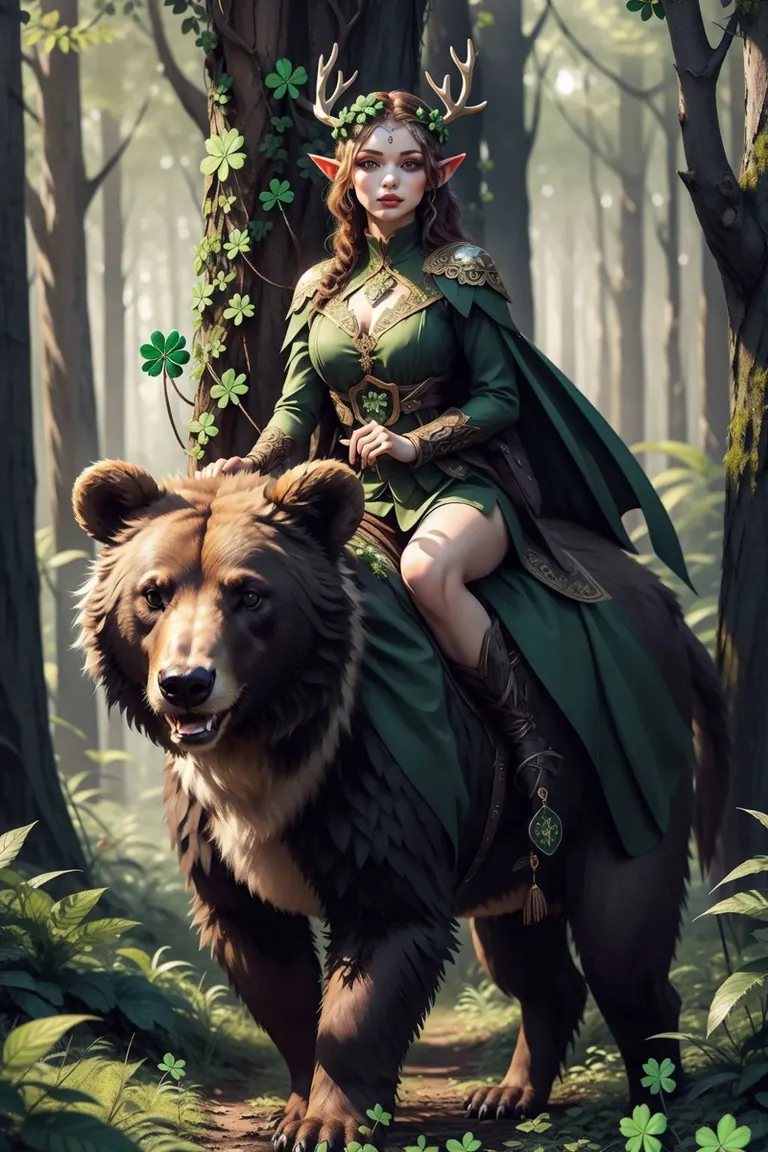


설정
샘플러
Euler a
스텝
20
가이던스
7
시드
731216471
크기
512x768
Clip skip
2
프롬프트
<lora:NonHentaiElf_v10:0.7>,1girl,druid under a big tree,elf,colthes made of four-leaf clover,<lora:LeafArt_v1_R32:0.4>,leafart,(clover:1.4),deer antlers,in the forest,riding on a bear,<lora:xl_more_art-full_v1:0.5>,<lora:extremely_detailed:0.4>,extremely detailed,<lora:BackgroundDetailEnhanced_Si_v3.0:0.4>,<lora:riding_a:0.4>,leaf clothing,holding wand,gorgeous,ornate,beautiful,looking at viewer,forest,perfect lighting,circlet,flower pileum,thighhighs,, (masterpiece, best quality, high quality, highres, ultra-detailed),
네거티브 프롬프트
easynegative,badhandv4,horse,, (worst quality, low quality, normal quality)
설정
샘플러
Euler a
스텝
20
가이던스
7
시드
2830435614
크기
512x768
Clip skip
2
프롬프트
<lora:NonHentaiElf_v10:0.8>,1girl,druid under a big tree,elf,colthes made of four-leaf clover,<lora:LeafArt_v1_R32:0.4>,leafart,(clover:1.4),deer antlers,in the forest,on a bear,<lora:xl_more_art-full_v1:0.5>,<lora:extremely_detailed:0.4>,extremely detailed,<lora:BackgroundDetailEnhanced_Si_v3.0:0.4>,, (masterpiece, best quality, high quality, highres, ultra-detailed),
네거티브 프롬프트
easynegative,badhandv4,, (worst quality, low quality, normal quality)
로컬에서 실행

Background Detail Enhanced_Si_v3.0.safetensors
Background_Detail_v3.safetensors
다운로드는 Civitai에서 제공합니다. 일부 제작자는 먼저 Civitai 로그인을 요구합니다.


![[Lah] Cute Social | SDXL & SD1.5 Cute Comic SD 1.5](https://media.modeltrends.ai/concepts/8401/thumb_20251105_134234.webp)

Background Detail Enhanced/Simplified 背景细节增强/简化은(는) Stable Diffusion 1.5 패밀리용 LoRA으로, 오픈 소스 AI 이미지·영상·텍스트 모델의 읽기 전용 카탈로그인 ModelTrends.ai에 등록되어 있습니다. 다른 Stable Diffusion 1.5 모델과 비교하고, 열기 점수로 트렌드를 확인하고, PirateDiffusion 또는 BitVector에서 열어 사용해 보세요.
모델 패밀리별로 보기

Text / LLM 모델
434
Anima 모델
528

Chroma 모델
19
Fibo 모델
2

Flux 모델
1,496

Flux 2 / Klein 모델
1,239

Flux 3 모델
3

Moss 모델
3

Iris 모델
1

MiniMax H3 모델
364
Hunyuan 모델
204

Ideogram 모델
20

Krea2 모델
717
Qwen 모델
20

Qwen2 모델
47

Ltx2 모델
153