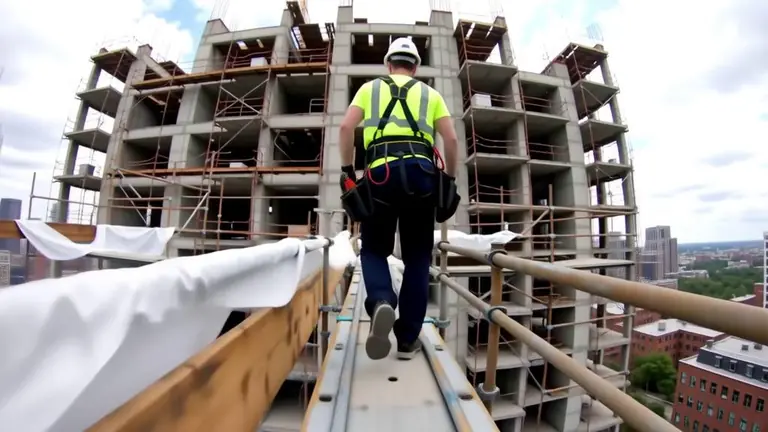
Automatické přehrávání
Spustit lokálně
[WAN2.2]Followcam_Redmond.zip
459 MB · Diffusers
Stahování zajišťuje Civitai. Někteří autoři vyžadují nejprve přihlášení na Civitai.


O tomto modelu
WAN · LoRA
by artificialguybr - [WAN2.2] FollowCam - Redmond - T2V-14B
Poznámky autora
💖 Support My Work & Explore More
If this model is useful to you, your support helps me keep publishing free models and open-source AI tools.
-
Patreon:
-
Ko-fi:
-
Buy Me a Coffee:
Discover more of my models, projects, and practical AI resources:
-
Portfolio: — models, projects, and experiments.
-
Prompt library: — curated prompts for image and language models.
-
AI tools directory: — a curated directory of useful AI tools.
-
Twitter/X: — new models announced here first.
Special Thanks: This project was made possible thanks to generous sponsorship and GPU time provided by Redmond Ai. We are grateful for their support in training this LoRA.
Followcam LoRA for Wan
Model Description
This LoRA creates immersive, continuous “follow camera” shots that put viewers directly in the action. It generates dynamic footage where the camera follows subjects through various environments - from lighthouse staircases during storms to underwater cave explorations, from high-speed motorcycle rides across salt flats to peaceful library cart journeys. The style creates a sense of presence and movement that makes viewers feel like they’re right there with the subject.
Trigger Words
The trigger phrase is FollowCam.
For best results, start your prompt with “FollowCam” followed by a description of a continuous tracking shot following a subject through an environment. The model will render these scenes with an immersive, action-oriented perspective.
Setup for ComfyUI
To use this LoRA in ComfyUI, simply place the file in your loras directory:
-
Download [WAN2.2]Followcam_Redmond_high_noise.safetensors and place it in ComfyUI/models/loras/
Ensure your ComfyUI environment is already configured to run Wan models.
Example Workflow (ComfyUI)
In your ComfyUI workflow, add a Load LoRA node after your base model loader.
-
Load your base Wan model.
-
Connect the output of the model loader to the model input of the Load LoRA node.
-
Select [WAN2.2]Followcam_Redmond_high_noise.safetensors in the Load LoRA node.
-
Connect the MODEL output of the LoRA node to your KSampler.
-
Adjust the strength_model as needed (0.8-1.0 is a good starting point).
Example Prompts
Here are some example prompts to get you started with Followcam:
-
FollowCam. A continuous wide-angle shot following a lighthouse keeper climbing the spiral staircase inside a towering coastal lighthouse during a storm.
-
FollowCam. A continuous first-person action shot from a chest-mounted camera as we follow a woman trail running through a dense, misty forest at dawn.
-
FollowCam. A continuous handheld wide-angle shot following a motorcyclist tearing across endless white salt flats under a blazing midday sun.
-
FollowCam. A continuous underwater POV shot from a wide-angle action camera (~14mm) as we follow a diver swimming through a narrow submerged cave system.
-
FollowCam. A continuous wide-angle shot as we follow a rider on horseback galloping through a foggy meadow at dawn.
Spouštěcí slova
FollowCam
SHA256
65D4256EF38B5F849F042FB0DD79FB23B27CF6FB97932EACC7C9F40ED1ED5BB6
ID modelu ModelTrends.ai
#18269
Nahlásit obsah
Ukázkové rendery
Prompty a nastavení sdílená lidmi, kteří tyto rendery vytvořili na Civitai. Vyberte render a uvidíte, jak vznikl.
Nastavení
Velikost
960x1408
Prompt
FollowCam. Following a mouse running through a tunnel. the mouse exits the tunnel and a cat approaches it.
Podobné modely
AI modely pro generování obrázků, videa a textu
followcam wan je LoRA pro rodinu Wan uvedený na ModelTrends.ai, katalogu open source AI modelů pro obrázky, video a text určeném jen ke čtení. Porovnejte ho s dalšími modely Wan, podívejte se na jeho skóre žhavosti a vyzkoušejte ho na PirateDiffusion nebo BitVector.
Procházet podle rodiny modelů

Modely Text / LLM
411

Modely Anima
509

Modely Chroma
14
Modely Flux
1,071

Modely Flux 2 / Klein
1,237

Modely MiniMax H3
331

Modely Hunyuan
197

Modely Ideogram
20

Modely Krea2
674

Modely Qwen
17
Modely Qwen2
36

Modely Ltx2
150

Modely Stable Diffusion 1.5
6,465

Modely Stable Diffusion XL 1.0
15,432
Modely Zimage
804

Modely Wan
919

Model
Trends
.ai
© ModelTrends.ai
|
Vyrobeno v Japonsku
|
© 2026