Run Locally
QI2.1_AnyAngle.safetensors
114 MB · SafeTensor · bf16
Downloads are served by Civitai. Some creators ask for a Civitai login first.


About This Model
QWEN2 · LoRAs
by lilylilith - AnyAngle - Arbitrary Camera Angles for Qwen Image 2.1 - Ensure that the Lora strength is set to 1. Additionally, use CFG 3.0 and 20 steps or more for the most optimal results.
Creator notes
☕️
Introduction
In AI image generation, it is typical that the camera angle is not correct, even after specifying it in the prompt. The new paradigm of image editing models such as Qwen Image Edit or FLUX.2 have made it easier to change the camera angle of an existing image, however most of the time it is relegated to fixed azimuths and elevations, which doesn't give you full creative control over an image. Additionally, the style of the image can drift with such dramatic camera angle changes. The AnyAngle lora is designed to improve upon this.
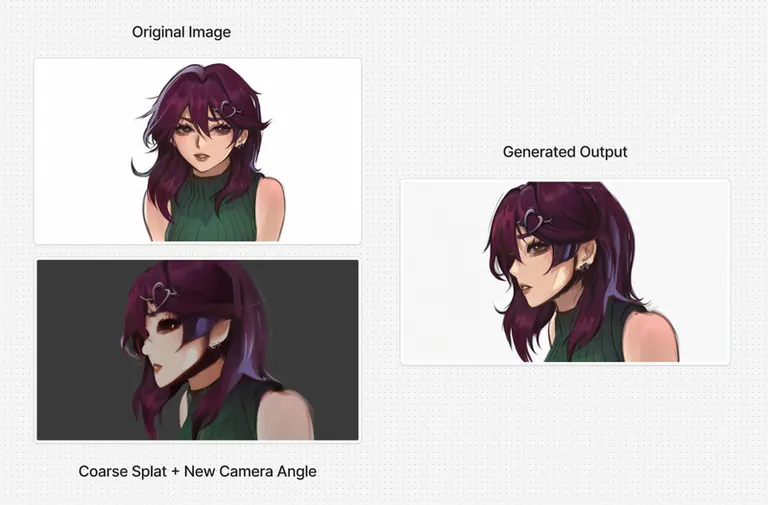
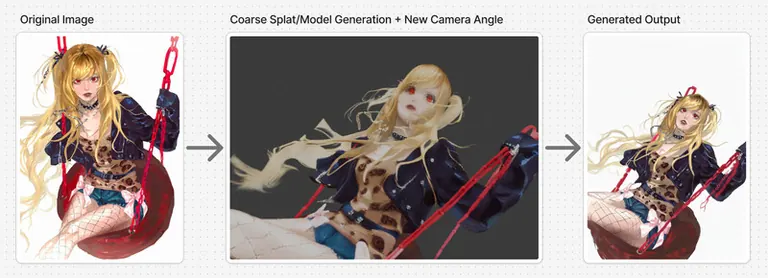
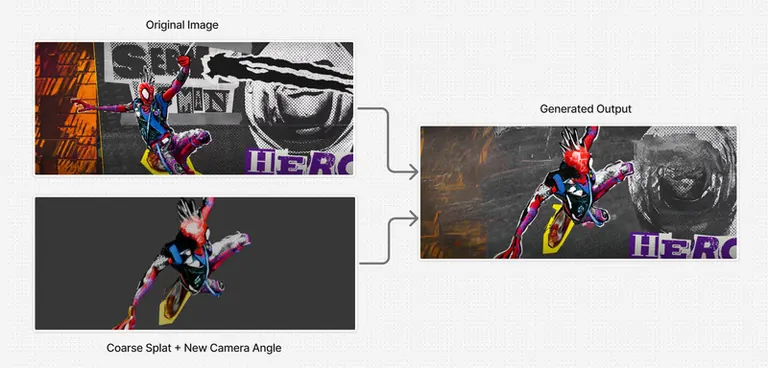
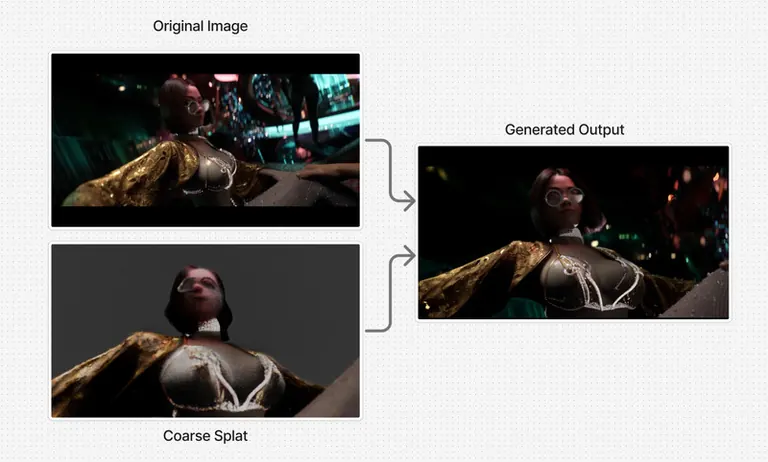
Here's how this works: We take the desired image and transform the scene into a Gaussian Splat (we use Tripo Splat, but any existing gaussian splat generator would work) or into 3D model (we use Trellis2, but any other 3D model generator would work, such as Pixal3d). We take that generated splat/model, and import it into Blender. After the import, we create a new Blender camera, change the camera angle to any desired angle, and export the image of the new to-be angle (coarse image). After, we plug that image as a reference as well as the original image into Qwen Image 2.1, and with the AnyAngle lora and edit prompt, the camera angle from the coarse image will transfer to the original image, maintaining style coherency.
So, summing it up, the process goes like this:
Original image --> Generate Gaussian Splat/3D model from image --> Import into Blender and adjust camera angle + render image --> Plug into Qwen Image 2.1 and render:
Usage
Follow the general process from above, and use the following edit prompt:
Change the camera angle from to .
The general connections should look like this:
Ensure that the Lora strength is set to 1. Additionally, use CFG 3.0 and 20 steps or more for the most optimal results. However, for boarding such as shot planning and general speedy inference, it is okay to use a turbo lora to reduce latency, however note there will be a slight hit to quality.
Training Regimen
We use various real blender renders--all stylistically diverse-- as well as the SOTA video model MiniMax H3 (for digital illustrations) for our dataset images. We gather images of an both an orignal image (anchor) and a frame at a different camera angle (target). We use the target image and generate a Gaussian Splat/3D model out of it, and we then use that data as the "coarse render" for a control image. We do this lots of times until we gather a good dataset, and then we train the lora for few thousand steps.
Essentially with this training ideology, we are able to consistently keep the style aligned as nothing is hallucinated (at least when it comes to the real Blender renders). However, to ensure that other styles such as illustration and sketch are able to be manipulated, we imploy MiniMax H3 image-to-video to do various turn-around "orbit" renders and camera manipulations where everything stays completely stationary and still, so that the alignment stays as consistent as possible.
Where it fails
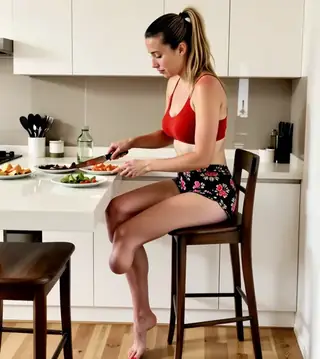
If the generated splat/3d model is not spacially aware or is too overly coarse (with extreme anatomy or facial deformation), there may be issues with spacial arrangement of items or malformed faces if faces are not well defined or the images are of low resolution. Take for example this image here:
The spacial arrangement of the table and ponytail is clearly misplaced, so the spacial arrangement of the output image is off. This issue can be fixed by manipulating the gaussian/3d model to be placed in the correct spot, or by having a more accurate gaussian splat of the scene (whereby using a ). Additionally, as time progresses there will be newer and better splat/3d model generators, so this issue will be progressively solved as time moves on.
Trigger words
Change the camera angle from <image2> to <image1>
SHA256
E4D7A0D44A45ED62DAABD0F2484A1A59046618A4C47E76B1EAB5E386A7A35D8A
ModelTrends.ai Model ID
#27549
Flag content
Example renders
Prompts and settings shared by the people who made these renders on Civitai. Pick a render to see how it was made.
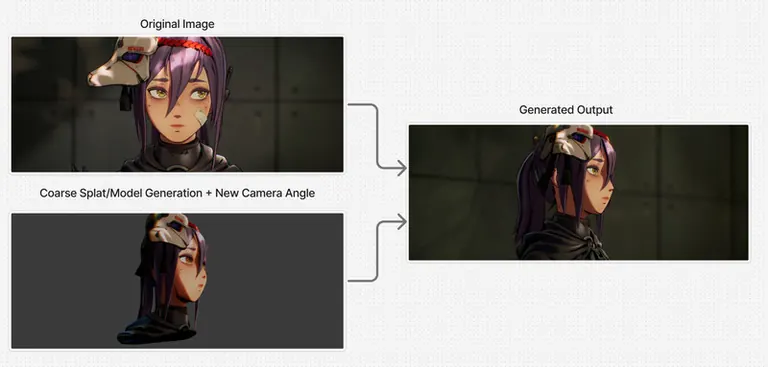
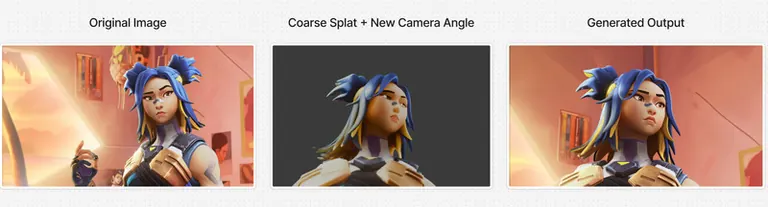
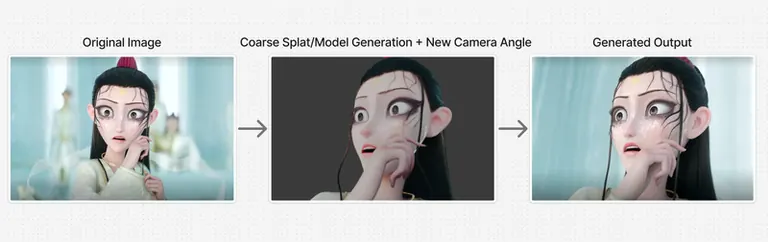
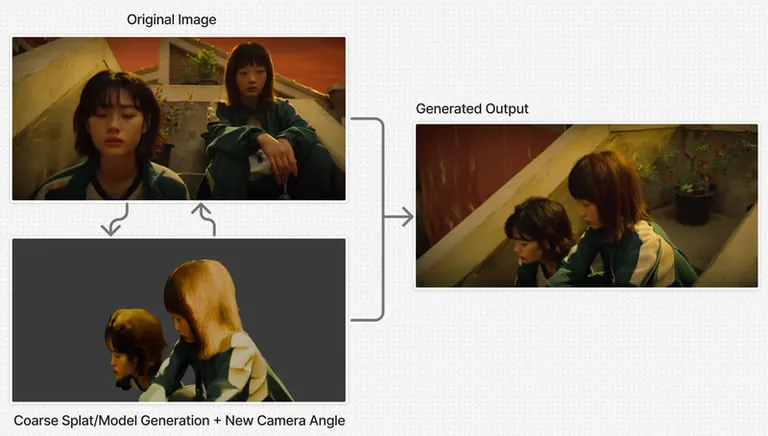
No prompt was shared with this render.
No prompt was shared with this render.
No prompt was shared with this render.
No prompt was shared with this render.
No prompt was shared with this render.
No prompt was shared with this render.
No prompt was shared with this render.
Settings
Size
1264x761
Prompt
Change the camera angle from <image2> to <image1>
AI Models for Image, Video & Text Generation
anyangle qwen2 is a LoRA for the Qwen2 family listed on ModelTrends.ai, a read-only catalog of open source AI image, video and text models. Compare it with other Qwen2 models, check its heat score to see how it is trending, and open it on PirateDiffusion or BitVector to try it.
Browse by Model Family
Text / LLM Models
411

Anima Models
509

Chroma Models
14

Flux Models
1,071
Flux 2 / Klein Models
1,237
MiniMax H3 Models
331
Hunyuan Models
197
Ideogram Models
20
Krea2 Models
674
Qwen Models
17
Qwen2 Models
36
Ltx2 Models
150
Stable Diffusion 1.5 Models
6,465
Stable Diffusion XL 1.0 Models
15,432
Zimage Models
804
Wan Models
919

Model
Trends
.ai
© ModelTrends.ai
|
Made in Japan
|
© 2026