Run Locally
1.1 Other Steps.zip
666 MB · Diffusers
qwen-edit-skin_1.1_000002750.safetensors
282 MB · SafeTensor
Downloads are served by Civitai. Some creators ask for a Civitai login first.


About This Model
QWEN · LoRAs
qwen-edit-skin v1.1 Trigger words: You should use make the subjects skin details more prominent and natural to trigger the image generation.
Creator notes
Finetuned LoRA for Enhanced Skin Realism in
Note: Check the version differences. In Version 1.1 as an example, I've also uploaded previous steps of this version training, so you can download from steps 1750 all the way to 2750 to suit your needs. I attached full comparison images across each LORA and each step count for you to see the sweet spot for your workflows.
You can also download the comparision workflow I made here:
This repository contains a finetuned Low-Rank Adaptation (LoRA) model designed to enhance the realism and detail of human skin in images. The LoRA has been trained on top of the powerful Qwen/Qwen-Image-Edit-2509 model, leveraging its advanced image editing capabilities to focus specifically on generating more natural and detailed skin textures.
This model was trained for 5000 steps on a local RTX 5090 using the AI-Toolkit. The resulting LoRA is ideal for photographers, digital artists, and anyone looking to improve the quality of human subjects in their generated or edited images.
Model Description
The qwen-edit-skin LoRA is a specialized finetuning of the Qwen/Qwen-Image-Edit-2509 base model. The base model is a versatile image editor with strong capabilities in multi-image editing and maintaining single-image consistency, particularly in preserving personal identity. This LoRA builds upon that foundation to specifically address the nuances of human skin, adding detail and realism that may not be present in the original generations.
The training was conducted using this fork of , a comprehensive suite for finetuning diffusion models. The process for curating the dataset involved reverse modification of subject skin details as follows:
-
Taking real images of versatile subject portraits with skin exposed
-
Captioning each of these as our “Target” (THE AFTER) images for the final outcome expected in a standard Qwen Edit workflow
-
Editing the image in Photoshop to add more gaussian blur and smoother skin tones, to make the skin texture, tone and pores less visible
-
These became our “Control” (The BEFORE) images for Qwen Edit training.
Training Details
The model was finetuned with the following key parameters, which can be found in the accompanying config.yaml file:
Hardware:
-
GPU: NVIDIA RTX 5090
Training Configuration:
-
Training Steps: 5000
-
Batch Size: 1
-
Gradient Accumulation: 1
-
Learning Rate: 1.0e-04
-
Optimizer: adamw8bit
-
Noise Scheduler: flowmatch
-
Resolution: The model was trained on a dataset with resolutions of 512, 768, and 1024 pixels.
-
Precision: bf16
Network Architecture:
-
Type: LoRA
-
Linear Rank & Alpha: 16
-
Convolutional Rank & Alpha: 16
The choice of adamw8bit as the optimizer is significant as it reduces the memory footprint of the training process, allowing for more efficient finetuning on consumer-grade hardware without sacrificing performance. The flowmatch noise scheduler is a modern approach that can lead to more efficient training and high-quality image generation.
A notable aspect of the LoRA architecture is that the alpha values for both linear and convolutional layers are set to be equal to their respective rank (16). This balanced approach is a common starting point for LoRA training, ensuring that the learned adaptations are applied with a proportional scaling factor, which can help in preventing overfitting while allowing the model to learn the desired new features effectively.
How to Use
To use this LoRA, you will need to load the base model Qwen/Qwen-Image-Edit-2509 and then apply the finetuned LoRA weights loaded as qwen-edit-skin.safetensors. Previous step versions of the weights are uploaded for reference but the final version is qwen-edit-skin.safetensors. You can also leverage the example workflow attached in the repo for ComfyUI to compare the results across different weights.
The recommended weight is between 1 and 1.5, the examples provided show weights up to 2 only to show the effect of the Lora with a strength considered too high for effect.
Intended Use
This LoRA is intended for creative and artistic purposes to enhance the realism of human skin in digital images. It can be used by:
-
Digital Artists: To add finer details and textures to the skin of their characters.
-
Photographers: For retouching and enhancing portraits.
-
AI Art Enthusiasts: To generate more lifelike images of people.
Limitations and Bias
This model is a finetuning of a large-scale, pre-trained model and may carry some of its inherent biases. The training dataset for this LoRA was focused on improving skin details and may not represent the full diversity of human skin tones and types equally. Users should be aware of this and use the model responsibly. The output of the model is influenced by the input prompt, and users are encouraged to use descriptive and inclusive language to guide the generation process.
Disclaimer: This model is intended for artistic and creative purposes. Users are responsible for the content they create and should adhere to ethical guidelines and respect the privacy and dignity of individuals.
Trigger words
You should use make the subjects skin details more prominent and natural to trigger the image generation.
SHA256
5EDFE35A85AB1895228AF5D9680EBC0644FC28B0683641969EE65E877F505A25
ModelTrends.ai Model ID
#18647
Flag content
Example renders
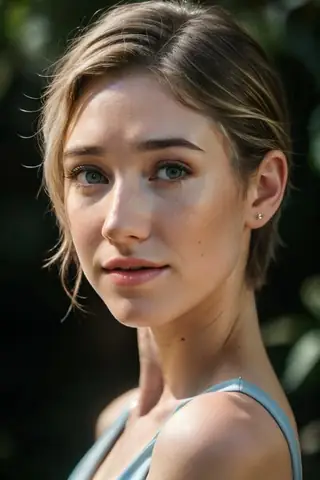
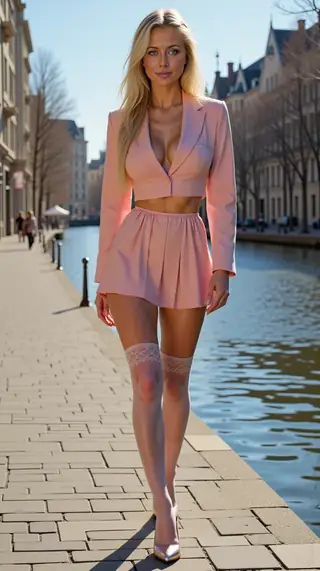
Prompts and settings shared by the people who made these renders on Civitai. Pick a render to see how it was made.
Settings
Sampler
Euler a
Steps
30
Guidance
6
Seed
6565765
Size
2048x2048
Prompt
best quality
Negative prompt
worst quality
Settings
Size
1472x2160
Prompt
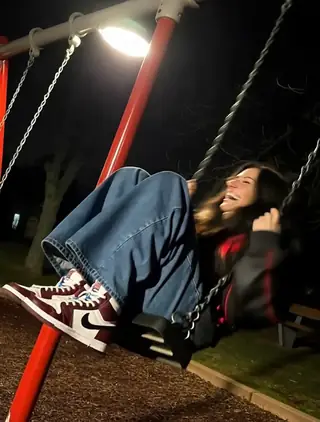
The young 20 years old woman’s hair is a cascade of rich caramel-brown waves, gathered high into an effortless ponytail with loose tendrils framing her cheekbones; the texture suggests silky sheen under studio-grade illumination. Her skin glows with a warm, porcelain tone—smooth yet subtly defined by natural contours. The red gown hugs every curve with precision—a satin-like material reflecting ambient glow along its décolletage and thigh-high slit, where folds ripple as though caught mid-motion. A thin, delicate chain necklace rests at her collarbone, catching glimpses of sunlight off its metallic links while resting against the smooth expanse of exposed backskin. She leans casually against a textured concrete wall composed of large, square tiles speckled with fine aggregate grains, their muted gray palette contrasting sharply with the dress's saturated hue. Light enters from above-left, casting long shadows beneath her arm and accentuating the sculpted arch of her spine—the highlight tracing down to the hemline where fabric drapes over hip bones without clinging or tearing. Her right hand gently brushes through her hair near temple, fingers slightly curled around strands that drape softly over one shoulder. The background recedes evenly behind her form, leaving foreground emphasis on the garment’s fluidity and body silhouette. Shot from a slight low angle, likely via a medium telephoto lens, this image isolates her figure within shallow focus—an ethereal blur enveloping distant walls while sharp detail lingers on lace-up straps, lip gloss gleam, and earlobe stud. Negative space stretches vertically beside her torso, drawing eyes upward toward gaze and downward past the skirt’s edge, creating vertical rhythm anchored only by subtle diagonal motion implied in posture. Depth appears layered but restrained, reinforcing intimacy despite urban backdrop. Reflections shimmer weakly off glossy surfaces nearby unseen—but none distract from the arresting center mass: human grace rendered static yet alive.
Settings
Steps
4
Guidance
1
Size
1472x2160
Prompt
A young woman with long, dark straight hair sits low on a reflective floor in an indoor shopping mall or retail space, her body angled slightly toward the viewer as she crouches with knees bent inward and feet planted firmly apart. She wears a cropped red corset-style top featuring lace-up detailing down the front and tied ribbon straps over each shoulder, paired with heavily distressed light-wash jeans that have large, frayed tears at both thighs. Her footwear consists of sparkling silver platform heels with transparent bases, catching ambient reflections off the polished tile beneath them. The setting includes white ceiling panels illuminated by bright overhead lights casting even illumination across the scene while creating subtle highlights along her outfit’s edges and skin contours; minimal shadowing suggests strong artificial lighting from above. In the blurred background, other shoppers can be seen walking through aisles lined with display shelves holding shoes or apparel, reinforcing the commercial context. The photograph appears to be taken from a very low angle—almost ground level—with tight framing emphasizing her legs, torso, and upper limbs, drawing attention primarily to her fashion-forward attire and confident posture despite being seated rather than standing. There's little discernible facial detail due to cropping near her mouth and chin area, but her lips are pursed faintly suggesting mild self-awareness or playful intent behind the pose. The overall tone feels modern and stylized for social media presentation, prioritizing bold visuals against clean architectural surroundings.
AI Models for Image, Video & Text Generation
skin11 qwen is a LoRA for the Qwen family listed on ModelTrends.ai, a read-only catalog of open source AI image, video and text models. Compare it with other Qwen models, check its heat score to see how it is trending, and open it on PirateDiffusion or BitVector to try it.
Browse by Model Family

Text / LLM Models
411

Anima Models
509

Chroma Models
14
Flux Models
1,071
Flux 2 / Klein Models
1,237

MiniMax H3 Models
331

Hunyuan Models
197

Ideogram Models
20

Krea2 Models
674

Qwen Models
17
Qwen2 Models
36
Ltx2 Models
150
Stable Diffusion 1.5 Models
6,465

Stable Diffusion XL 1.0 Models
15,432
Zimage Models
804

Wan Models
919

Model
Trends
.ai
© ModelTrends.ai
|
Made in Japan
|
© 2026