Run Locally
krea2 edit Anime to Real_000001500.safetensors
218 MB · SafeTensor · bf16
Downloads are served by Civitai. Some creators ask for a Civitai login first.


About This Model
KREA2 · LoRAs
by MengY_Madrigal - Anime to Realism
Creator notes
This LoRA was trained with AI Toolkit.
To use this AI Toolkit Krea 2 Edit LoRA in ComfyUI, install Ostris's custom node pack:
ComfyUI-Krea2-Ostris-Edit
This LoRA was trained with KV Cache enabled in AI Toolkit. When using it in ComfyUI, set kv_cache to ON in the Krea 2 Ostris Edit Model Patch node.
Using the example workflow with KV cache enabling
Prompt 1 – Natural photorealistic conversion
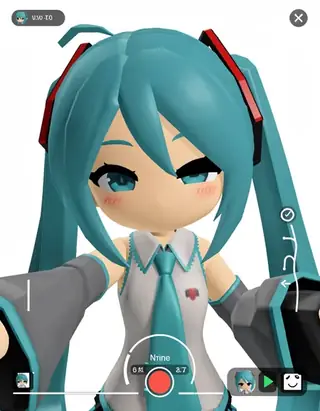
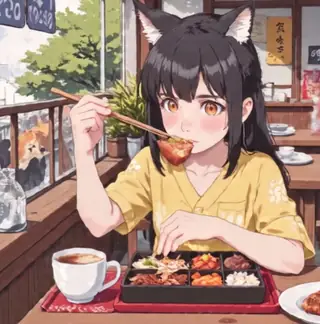
Convert the anime image into a natural photorealistic live-action photograph while preserving the exact subject count, age category, identity-defining features, pose, composition, clothing, objects, background, lighting, and colors.
```
Prompt 2 – High-end Cosplayer conversion
Convert the anime image into a premium high-end cosplay photograph of clearly adult cosplayers with polished beauty retouching, refined social-media filtering, cinematic color grading, realistic skin and fabric, while preserving the exact subject count, pose, composition, character features, costume design, objects, background, lighting, and colors.
H3 Anime-to-Live-Action LoRA (Experimental)
An experimental style-transfer LoRA built on H3, designed to transform anime-style video sequences into realistic live-action footage.
Important Usage Notes
-
Pair with Video Captioning (Recommended):
For best results, pair this LoRA with a video-captioning model (VLM) or provide a thorough description of every camera cut and shot transition in your prompt.
-
Multi-Shot Limitation:
If the prompt only covers a single frame or misses subsequent cuts, the LoRA may only apply the live-action conversion to the first shot (or the first two shots), failing to stylize later scenes.
-
You may need to use an audio refiner node to fix the audio
Tested Environments
-
Native H3 Base Model: Fully tested and verified.
-
H3 + Accelerated / Lightning LoRAs: Tested and verified; maintains style consistency even under fast, low-step setups.
Recommended Workflow
-
Captioning: Run your source anime clip through a video VLM to extract a full description covering scene transitions and camera dynamics.
-
Prompt Setup: Structure your prompt to account for every cut (e.g., Shot 1: ... -> Cut to Shot 2: ...)
For Qwen Image, you may use 3 three different prompt:
Natural photorealistic live-action style:
LumiReal, natural photorealistic live-action style.
Recreate the anime reference in a natural photorealistic live-action style, preserving the subjects, distinctive character features, pose, composition, clothing, objects, setting, lighting, and color palette.
Cosplay photography style:
LumiReal, polished high-end cosplay photography style.
Recreate the anime reference in a polished high-end cosplay photography style, with refined beauty retouching, cinematic color grading, realistic skin and fabric, while preserving the subjects, distinctive character features, pose, composition, clothing, objects, setting, and color palette.
Cinematic live-action style:
LumiReal, premium cinematic live-action style.
Recreate the anime reference in a premium cinematic live-action style, with attractive character casting, refined yet natural facial features, realistic skin texture, professional film lighting, believable environments, and scene-appropriate cinematic effects, while preserving the subjects, distinctive character features, pose, composition, clothing, objects, setting, and color palette.
Trigger words
Convert the anime image into a premium high-end cosplay photograph of clearly adult cosplayers with polished beauty retouching, refined social-media filtering, cinematic color grading, realistic skin and fabric, while preserving the exact subject count, pose, composition, character features, costume design, objects, background, lighting, and colors.
Convert the anime image into a natural photorealistic live-action photograph while preserving the exact subject count, age category, identity-defining features, pose, composition, clothing, objects, background, lighting, and colors.
SHA256
A9A916291D2E89D5DAF6C7900FB7D55138FC9EC1115603B6A4BBC614D3EA9B93
ModelTrends.ai Model ID
#27164
Flag content
Guides for this model
All guides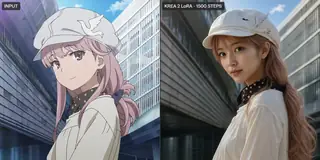

AI Models for Image, Video & Text Generation
anime to real krea2 is a LoRA for the Krea2 family listed on ModelTrends.ai, a read-only catalog of open source AI image, video and text models. Compare it with other Krea2 models, check its heat score to see how it is trending, and open it on PirateDiffusion or BitVector to try it.
Browse by Model Family

Text / LLM Models
411
Anima Models
509
Chroma Models
14
Flux Models
1,071
Flux 2 / Klein Models
1,237
MiniMax H3 Models
331
Hunyuan Models
197
Ideogram Models
20

Krea2 Models
674

Qwen Models
17
Qwen2 Models
36
Ltx2 Models
150
Stable Diffusion 1.5 Models
6,465
Stable Diffusion XL 1.0 Models
15,432
Zimage Models
804
Wan Models
919

Model
Trends
.ai
© ModelTrends.ai
|
Made in Japan
|
© 2026