Dramatic Lighting Slider: strong shadows and glowing highlights on Pony and Illustrious
Tema: Modelos

Por Captain
Publicado em 2026-10-03
klaabu's Dramatic Lighting Slider changes only the lighting, not the subject. Learn its weight ranges for anime and realistic checkpoints, the lighting words that pair with it and creative uses.
Esta página ainda não foi traduzida, por isso é exibida em inglês.
Visão geral
The
Dramatic Lighting Slider
is a
LoRA
for
Pony
, Illustrious and other
SDXL
anime or realistic checkpoints. It intensifies lighting: deeper shadows, glowing highlights, atmospheric environments, while leaving the subject's appearance alone. There is no trigger word; the weight is the dial.
The author recommends increments of 0.1, up to about 5.0 on anime models and up to 3.0 on realistic Pony models before the style starts to shift.
Referência
Nome | Tipo | O que é |
|---|---|---|
LoRA weight | 0.5-5.0 | Anime: up to 5.0. Realistic: up to 3.0. Start at 1.5. |
Trigger | none | Optional lighting words amplify it. |
Base | Pony / Illustrious | |
Prompt helpers | text | cinematic lighting, rim light, volumetric light, neon, candlelight |
CFG | checkpoint default | No change needed. |
AD

Sem instalação: rode modelos de IA na nuvem
BitVector Prism é a forma mais fácil de começar: escolha um modelo, digite um prompt e gere em um app web limpo, sem configurar nada. O BitVector também está disponível no Discord e na web (SpyGlass).
Passo a passo
- Generate your scene and note the seed.
- Add the slider at 1.5 and rerun the same seed.
- Add one lighting phrase that names the source (a single lantern, neon sign to the left).
- Raise in 0.5 steps until the shadows and highlights feel right.
- Back off if colors clip to pure black or white.
Exemplos
Anime night scene
masterpiece, best quality, 1girl, solo, umbrella, rainy alley, neon signs, reflections, cinematic lighting
Dramatic Lighting Slider 3.0
Realistic Pony
score_9, score_8_up, score_7_up, rating_safe, photo of a blacksmith at the forge, single orange light source, smoke, high contrast
Dramatic Lighting Slider 2.0
Creative idea: flat versus dramatic pair
A chess player at a cafe table, window light. Render at -1.0 and +3.0 on the same seed for a before-and-after.
Dicas
- It is strongest in night scenes and interiors with one light source.
- Combine with a detail LoRA at low weight; both leave the subject alone.
- Negative weights flatten lighting for a soft, overcast look.
- On realistic models stop at 3.0; beyond that the slider starts to change faces.
Solução de problemas
Blown highlights
Por que acontece
Weight too high for the checkpoint.
Como corrigir
Reduce by 0.5 and add soft or diffused to the lighting words.
Subject's face changed
Por que acontece
Over 3.0 on a realistic model.
Como corrigir
Stay within the recommended range.
AD

Sem instalação: rode modelos de IA na nuvem
O PirateDiffusion é exclusivo do Telegram e feito para profissionais: milhares de modelos, LoRAs e workflows por comandos de chat, com geração ilimitada a preço fixo.

Perguntas
Does it need a trigger word?
No. Optional lighting words help.
Does it work on SDXL base?
Yes, on most SDXL checkpoints; ranges may differ.
Links e fontes
Modelos deste guia
Escrito por
Captain
Guias relacionados
Modelos
CyberRealistic Pony v18 CoreShift: realistic Pony prompting
Cyberdelia's CyberRealistic Pony mixes Pony's control tags with photographic realism. Learn the score chain, the exact settings the author recommends, negative prompt, the companion embeddings and creative ideas.
Por Captain
2026-10-02
Modelos
CyberRealistic Pony v13: the settings and prompts that make it shine
Version 13 of CyberRealistic Pony is a favorite for cinematic environments and natural portraits. Learn Cyberdelia's recommended settings, the score chain, and ideas for atmospheric scenes.
Por Captain
2026-10-01
Modelos
DreamShaper XL 1.0: versatile fantasy and realism on SDXL
Lykon's DreamShaper XL 1.0 brings the famous DreamShaper look to SDXL: fantasy, portraits, cinematic scenes and illustration in one model. Learn its settings, prompt style and creative uses.
Por Captain
2026-10-01
Modelos
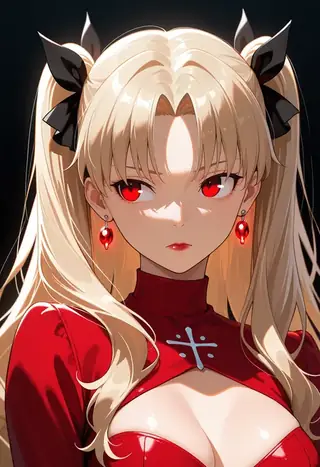
Prefect Illustrious XL v7: polished anime with soft lighting
Goofy_Ai's Prefect Illustrious XL v7 is tuned for clean, soft-lit anime illustration. Learn the author's settings (Clip Skip 1, Euler a, CFG 5-6), prompt template and creative ideas.
Por Captain
2026-10-02
Mais guias

Modelos
FLUX.1 Dev: how to prompt it, best settings and creative ideas
A practical guide to FLUX.1 Dev by Black Forest Labs: natural-language prompting, guidance and step settings, LoRA stacking, text rendering and prompt ideas that play to its strengths.
Por Captain
2026-09-30

Modelos
Stable Diffusion XL 1.0: prompts, settings and what it still does best
How to get the most out of the official SDXL 1.0 base model: native resolutions, CFG and sampler settings, the refiner, negative prompts and ideas for styles where SDXL still shines.
Por Captain
2026-10-01

Modelos
Stable Diffusion 1.5: the classic model, prompted properly
Stable Diffusion 1.5 is still worth knowing: the right resolution, CFG and sampler, how to use its huge library of LoRAs and embeddings, and creative prompt ideas suited to a 512-pixel model.
Por Captain
2026-10-02

Modelos
FLUX.2 Dev: prompting the newest Black Forest Labs model
FLUX.2 Dev brings larger prompts, better text, stronger realism and multi-reference editing. This guide covers the turbo workflow, guidance and resolution settings, prompt structure and ideas that use its new strengths.
Por Captain
2026-10-03

Modelos
Qwen-Image: long prompts, perfect text and bilingual posters
Qwen-Image is the model to reach for when the words in the picture matter. Learn how to write its long descriptive prompts, render English and Chinese text accurately, set CFG and steps, and explore layout-heavy creative ideas.
Por Captain
2026-09-29

Modelos
SDXL-Lightning: four-step generation on any SDXL checkpoint
ByteDance's SDXL-Lightning LoRA turns a 30-step SDXL render into a 4-step one. Learn the step counts, the CFG you must use, the sampler, and how to combine it with your favorite checkpoints and style LoRAs.
Por Captain
2026-09-30

Model
Trends
.ai
© ModelTrends.ai
|
Feito no Japão
|
© 2026