Wetness Slider for Krea 2: rain, sweat and sheen on demand
Topik: Model

Oleh Captain
Diterbitkan 2026-09-30
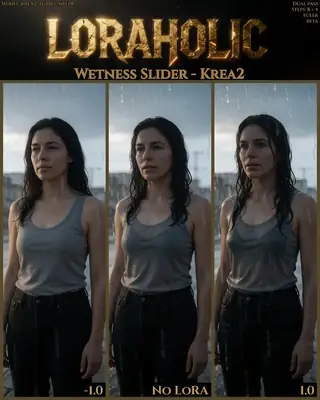
Loraholic's Wetness Slider adds or removes wetness on skin, hair and surfaces in Krea 2 with minimal side effects. Learn the safe ranges, the prompts that pair with it and creative uses from rain scenes to dewy product shots.
Halaman ini belum diterjemahkan, jadi ia dipaparkan dalam bahasa Inggeris.
Gambaran keseluruhan
The
Wetness Slider
for
Krea 2
exists because wetness is hard to prompt on this model, where the line between real and anime rendering is thin. Trained to affect the rest of the image as little as possible, it makes hair, skin, clothing and surfaces glisten at positive weights and dries them at negative weights.
Recommended ranges from the author: -1.0 to 1.0 as an always-on
LoRA
, -2.0 to 2.0 before side effects appear.
Rujukan
Nama | Jenis | Apakah ia |
|---|---|---|
LoRA weight | -2 to 2 | 0.8 for rain scenes; 1.5 for drenched. |
Trigger | none | Slider; words like rain, wet hair, droplets amplify it. |
Steps / guidance | 8 / 1 | Krea 2 defaults. |
Combination | free | Stacks with other Loraholic sliders. |
Ethnicity note | define it | Describe the subject explicitly; the author notes a slight bias at extreme values when undefined. |
AD

Tiada pemasangan diperlukan - jalankan model AI di awan
BitVector Prism ialah cara paling mudah untuk bermula: pilih model, taip prompt dan jana dalam aplikasi web yang bersih, tanpa apa-apa untuk dikonfigurasi. BitVector juga tersedia di Discord dan di web (SpyGlass).
Langkah demi langkah
- Generate the scene dry and keep the seed.
- Add the slider at 0.8 with rain or water in the prompt.
- Check hair tips, shoulders and ground reflections.
- Raise to 1.5 for storm scenes; use -1.0 to dry a scene the model made wet.
- Add the Light slider at 1.0 for glossy highlights.
Contoh
Rain portrait
A woman in a dark raincoat under a streetlight during heavy rain, wet hair, droplets on her face, 85mm.
Wetness Slider 1.2
Product
A glass of iced tea with lemon on a wooden table, backlit, condensation.
Wetness Slider 0.8
Creative idea: tiny planet
A 360-degree tiny planet of a wooden boardwalk after rain, puddle reflections, overcast sky.
Wetness Slider 1.0
Petua
- Wet surfaces need light to read; describe a light source.
- Negative values are handy for desert or dusty prompts where Krea 2 adds sheen by default.
- Product photography: 0.6 adds condensation to drinks.
- Keep within 2.0; beyond that textures smear.
Penyelesaian masalah
Skin looks oily instead of wet
Mengapa ia berlaku
Weight high with no water context.
Cara membaikinya
Add rain or water words and lower to 0.8.
Smeared textures
Mengapa ia berlaku
Weight beyond 2.
Cara membaikinya
Stay inside the range.
AD

Tiada pemasangan diperlukan - jalankan model AI di awan
PirateDiffusion hanya di Telegram dan dibina untuk profesional: beribu-ribu model, LoRA dan aliran kerja yang dipacu oleh arahan sembang, dengan penjanaan tanpa had pada pelan harga tetap.

Soalan
Z-Image version?
Exists, with ranges -1.5 to 1.5 (max -3 to 3).
Trigger?
None.
Pautan dan sumber
Model dalam panduan ini
Ditulis oleh
Captain
Panduan berkaitan
Model
Skin Detail Slider for Krea 2: alive-looking skin without changing the image
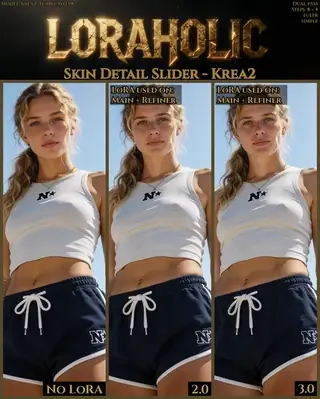
Loraholic's Skin Detail Slider adds pores, fine lines and natural variation to skin in Krea 2 without altering composition. Learn the range (0.5-3.5), where to apply it in multi-pass workflows and when not to use it.
Oleh Captain
2026-10-01
Model
Krea2 Enhancer: cleaner detail and lighting for any Krea 2 style
vrgamedevgirl's Krea2 Enhancer LoRA polishes Krea 2 images across realistic, anime, product and fantasy styles without changing the prompt's intent. Learn the weight, workflow and ideas.
Oleh Captain
2026-09-30
Model
Fat/Skinny Weight Slider for Krea 2: body weight as a number
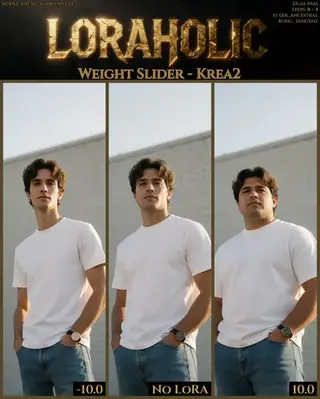
Loraholic's Weight Slider adjusts body mass in Krea 2 across a -10 to 10 range designed for predictability. Learn how to use it, stability notes and ideas for character design and fitness illustration.
Oleh Captain
2026-10-01
Model
Krea2 Melancholy v2: cinematic, restrained, emotional realism
zidius's Melancholy LoRA for Krea 2 produces contemplative, cinematic imagery with subdued palettes, shallow depth of field and emotional restraint. Learn its zidiusArt trigger, weight and ideas for quiet scenes.
Oleh Captain
2026-10-03
Lagi panduan

Model
FLUX.1 Dev: how to prompt it, best settings and creative ideas
A practical guide to FLUX.1 Dev by Black Forest Labs: natural-language prompting, guidance and step settings, LoRA stacking, text rendering and prompt ideas that play to its strengths.
Oleh Captain
2026-09-30

Model
Stable Diffusion XL 1.0: prompts, settings and what it still does best
How to get the most out of the official SDXL 1.0 base model: native resolutions, CFG and sampler settings, the refiner, negative prompts and ideas for styles where SDXL still shines.
Oleh Captain
2026-10-01

Model
Stable Diffusion 1.5: the classic model, prompted properly
Stable Diffusion 1.5 is still worth knowing: the right resolution, CFG and sampler, how to use its huge library of LoRAs and embeddings, and creative prompt ideas suited to a 512-pixel model.
Oleh Captain
2026-10-02

Model
FLUX.2 Dev: prompting the newest Black Forest Labs model
FLUX.2 Dev brings larger prompts, better text, stronger realism and multi-reference editing. This guide covers the turbo workflow, guidance and resolution settings, prompt structure and ideas that use its new strengths.
Oleh Captain
2026-10-03

Model
Qwen-Image: long prompts, perfect text and bilingual posters
Qwen-Image is the model to reach for when the words in the picture matter. Learn how to write its long descriptive prompts, render English and Chinese text accurately, set CFG and steps, and explore layout-heavy creative ideas.
Oleh Captain
2026-09-29

Model
SDXL-Lightning: four-step generation on any SDXL checkpoint
ByteDance's SDXL-Lightning LoRA turns a 30-step SDXL render into a 4-step one. Learn the step counts, the CFG you must use, the sampler, and how to combine it with your favorite checkpoints and style LoRAs.
Oleh Captain
2026-09-30

Model
Trends
.ai
© ModelTrends.ai
|
Dibuat di Jepun
|
© 2026