Caucasian / Asian ethnicity slider for Krea 2: use the lowest value that works
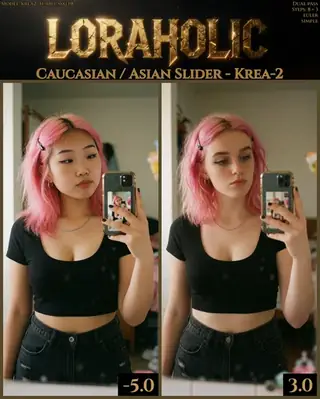
Loraholic's ethnicity slider shifts facial features between Caucasian and East Asian appearance in Krea 2. Learn the -5 to 4 range, why low values are recommended and how to use it responsibly for character design.
Topik: Model

Oleh Captain
Diterbitkan 2026-10-02
Halaman ini belum diterjemahkan, jadi ia dipaparkan dalam bahasa Inggeris.
Gambaran keseluruhan
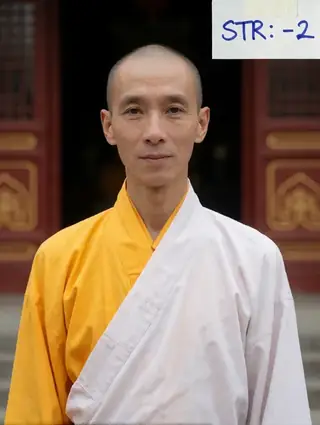
The Caucasian / Asian Slider for
Krea 2
is a rank-1 (7 MB) slider
LoRA
that moves a subject's features along an ethnicity axis. The author calls it stable but recommends using as low a strength as possible, because it does not stop once the subject reaches the look you want.
Recommended range: -5 to 4, more stable in the negatives. Describe the subject's heritage in words as well; the slider refines rather than defines.
Rujukan
Nama | Jenis | Apakah ia |
|---|---|---|
LoRA weight | -5 to 4 | Start at ±1. |
Trigger | none | |
Prompt | describe heritage | Words first, slider second. |
Steps / guidance | 8 / 1 | |
Combination | free |
AD

Tiada pemasangan diperlukan - jalankan model AI di awan
BitVector Prism ialah cara paling mudah untuk bermula: pilih model, taip prompt dan jana dalam aplikasi web yang bersih, tanpa apa-apa untuk dikonfigurasi. BitVector juga tersedia di Discord dan di web (SpyGlass).
Langkah demi langkah
- Describe the person including heritage and features.
- Generate and keep the seed.
- Apply ±1 and compare.
- Move in 0.5 steps; stop at the first value that matches.
- Keep identity words (freckles, a mole) to anchor the face.
Contoh
Portrait
A hyper-detailed photorealistic cowboy shot of a woman in her twenties with pale skin, sharp cheekbones and red cat-eye eyeliner, studio light.
Slider -1.0
Surreal painting
A surrealist dreamlike painting with soft ethereal lighting and dramatic contrasts, a young woman holding a floating key, intricate textures.
Slider +1.0
Creative idea: sibling set
Same seed, same prompt, slider at -1.5, 0 and +1.5 to design a family with shared features.
Petua
- Low values preserve lighting and composition; high values drift.
- Useful for consistent casting across a character set.
- Combine with Age or Hair sliders at low values only.
- Painting styles respond as well as photos.
Penyelesaian masalah
Features keep drifting
Mengapa ia berlaku
Weight too high.
Cara membaikinya
Lowest value that works, as the author says.
Identity lost
Mengapa ia berlaku
No anchoring words.
Cara membaikinya
Add distinctive features to the prompt.
AD

Tiada pemasangan diperlukan - jalankan model AI di awan
PirateDiffusion hanya di Telegram dan dibina untuk profesional: beribu-ribu model, LoRA dan aliran kerja yang dipacu oleh arahan sembang, dengan penjanaan tanpa had pada pelan harga tetap.

Soalan
Trigger?
None.
Z-Image version?
Not for this one; Krea 2 only.
Pautan dan sumber
Model dalam panduan ini
Ditulis oleh
Captain
Panduan berkaitan
Model
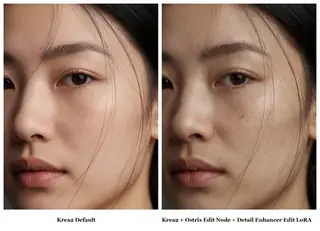
Elusarca's Krea 2 Detail Enhancer (Edit LoRA): sharpen an existing image
reverentelusarca's experimental edit LoRA uses Ostris's Krea 2 edit method to enhance detail in an existing image. Learn the enhance this image trigger, the recommended prompt, limitations and ideas.
Oleh Captain
2026-09-29
Model
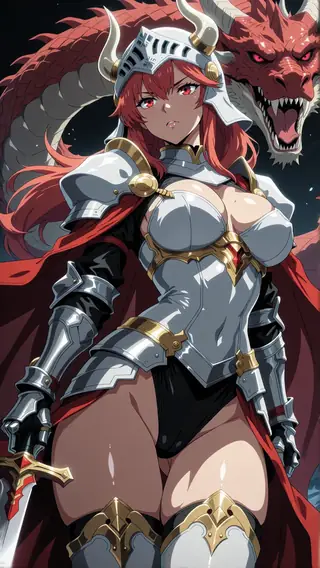
Anime Flat Style for Krea 2: bold cel-shaded 2D
Agino's Anime Flat Style LoRA gives Krea 2 clean anime artwork with bold flat colors and minimal shading. Learn weight, prompt structure and ideas for character designs and screencap-style scenes.
Oleh Captain
2026-10-02
Model
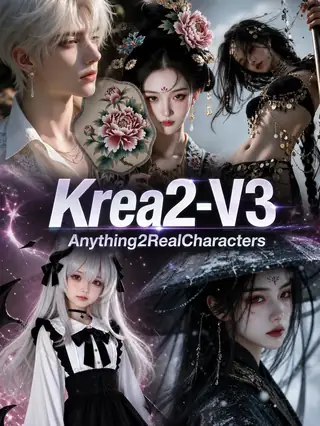
Anything2RealCharacters V3 for Krea 2: turn 2D art into photorealistic people
AIGC_Singularity's Anything2RealCharacters V3 is an image-to-image stylization LoRA that converts anime and artistic inputs into photoreal characters while keeping identity. Learn the workflow, denoise and ideas.
Oleh Captain
2026-10-03
Model
Krea 2 Weight Slider v2 by alcaitiff: a compact body-weight control
alcaitiff's Weight Slider for Krea 2 adjusts body weight with a simple -3 to 3 range where 2 is usually enough. Learn how it compares with the Loraholic slider and ideas for using it.
Oleh Captain
2026-09-30
Lagi panduan

Model
FLUX.1 Dev: how to prompt it, best settings and creative ideas
A practical guide to FLUX.1 Dev by Black Forest Labs: natural-language prompting, guidance and step settings, LoRA stacking, text rendering and prompt ideas that play to its strengths.
Oleh Captain
2026-09-30

Model
Stable Diffusion XL 1.0: prompts, settings and what it still does best
How to get the most out of the official SDXL 1.0 base model: native resolutions, CFG and sampler settings, the refiner, negative prompts and ideas for styles where SDXL still shines.
Oleh Captain
2026-10-01

Model
Stable Diffusion 1.5: the classic model, prompted properly
Stable Diffusion 1.5 is still worth knowing: the right resolution, CFG and sampler, how to use its huge library of LoRAs and embeddings, and creative prompt ideas suited to a 512-pixel model.
Oleh Captain
2026-10-02

Model
FLUX.2 Dev: prompting the newest Black Forest Labs model
FLUX.2 Dev brings larger prompts, better text, stronger realism and multi-reference editing. This guide covers the turbo workflow, guidance and resolution settings, prompt structure and ideas that use its new strengths.
Oleh Captain
2026-10-03

Model
Qwen-Image: long prompts, perfect text and bilingual posters
Qwen-Image is the model to reach for when the words in the picture matter. Learn how to write its long descriptive prompts, render English and Chinese text accurately, set CFG and steps, and explore layout-heavy creative ideas.
Oleh Captain
2026-09-29

Model
SDXL-Lightning: four-step generation on any SDXL checkpoint
ByteDance's SDXL-Lightning LoRA turns a 30-step SDXL render into a 4-step one. Learn the step counts, the CFG you must use, the sampler, and how to combine it with your favorite checkpoints and style LoRAs.
Oleh Captain
2026-09-30

Model
Trends
.ai
© ModelTrends.ai
|
Dibuat di Jepun
|
© 2026