instantrealizer finisher
Bandingkan
7177°
Jalankan secara tempatan
L_IR03x2.safetensors
144 MB · SafeTensor
Muat turun disediakan oleh Civitai. Sesetengah pencipta memerlukan log masuk Civitai dahulu.
AD


Pasang / Jalankan di Graydient
Memerlukan keahlian
<instantrealizer-finisher>
Tentang model ini
STABLE DIFFUSION 1.5 · LoRA
__html__InstantRealizerInstantRealizer is a Lora group for turning illustration models into realistic models. If I used Lora alone, the adjustment range would be too small, so I divided it into three parts.InstantRealizerは,イラスト系モデルをリアル系モデルにするためのLora群です。単体Loraにすると調整幅が少なくなりすぎるので3つにまとめました。IR01: Re-BuilderIR02: DetailerIR03: FinisherIR01: Re-Builder(counterfeit V3)IR01 is a very powerful Lora. This is to change a flat anime painted model to a live-action model, and not only change the painting method, but also adjust the balance of the body and face at the same time. If you use a large value for 2.5D or gradient illustrations, it will have a big impact on the body structure. The original picture will easily collapse, so please try starting from around 0.3.Also, the pattern may change significantly. Please decide the value based on how much you want to maintain the atmosphere of the original picture.IR01は非常に強い作用を持ったLoraです。フラットなアニメ塗りのモデルを実写系のモデルに変えるためのものであり,単に塗りの方式を変えるだけでなく,身体や顔のバランスの調整も同時に行っています。2.5Dやグラデ塗りのイラストなどで大きな値で使うと身体構造などに大きな影響を与えます。簡単に元絵が崩壊しますので,最初は0.3くらいから試してみてください。また,絵柄を大きく変える可能性があります。元の絵の雰囲気をどの程度保つかで値を決めてください。IR02: Detailer(facebombmix)IR02 is Lora that affects skin texture etc. Normally, I think you can see a change in the texture of your skin at around 0.4 or 0.5.IR02は肌の質感などに影響を与えるLoraです。通常,0.4か0.5くらいで肌の質感に変化が確認できると思います。IR03: Finisher(meinaV11)IR03 is Lora for photorealism expression and reality enhancement. If you make it stronger, it will look more like an artistic p
Nota pencipta
InstantRealizer
InstantRealizer is a Lora group for turning illustration models into realistic models. If I used Lora alone, the adjustment range would be too small, so I divided it into three parts.
InstantRealizerは,イラスト系モデルをリアル系モデルにするためのLora群です。単体Loraにすると調整幅が少なくなりすぎるので3つにまとめました。
IR01: Re-Builder
IR02: Detailer
IR03: Finisher
IR01: Re-Builder
(counterfeit V3)
IR01 is a very powerful Lora. This is to change a flat anime painted model to a live-action model, and not only change the painting method, but also adjust the balance of the body and face at the same time. If you use a large value for 2.5D or gradient illustrations, it will have a big impact on the body structure. The original picture will easily collapse, so please try starting from around 0.3.
Also, the pattern may change significantly. Please decide the value based on how much you want to maintain the atmosphere of the original picture.
IR01は非常に強い作用を持ったLoraです。フラットなアニメ塗りのモデルを実写系のモデルに変えるためのものであり,単に塗りの方式を変えるだけでなく,身体や顔のバランスの調整も同時に行っています。2.5Dやグラデ塗りのイラストなどで大きな値で使うと身体構造などに大きな影響を与えます。簡単に元絵が崩壊しますので,最初は0.3くらいから試してみてください。
また,絵柄を大きく変える可能性があります。元の絵の雰囲気をどの程度保つかで値を決めてください。
IR02: Detailer
(facebombmix)
IR02 is Lora that affects skin texture etc. Normally, I think you can see a change in the texture of your skin at around 0.4 or 0.5.
IR02は肌の質感などに影響を与えるLoraです。通常,0.4か0.5くらいで肌の質感に変化が確認できると思います。
IR03: Finisher
(meinaV11)
IR03 is Lora for photorealism expression and reality enhancement. If you make it stronger, it will look more like an artistic photo. Please use with caution as it may affect the color and composition.
IR03はフォトリアリズム系の表現とリアリティ強化のためのLoraです。強くすると,アート的な写真に近くなります。色味や絵柄に影響を与えることもあるので注意して使ってください。
All of these are enhancements to the drawing of the base model, so there is no uniformly recommended value, and each needs to be adjusted individually. As a starting point,
IR01:0.3
IR02:0.4
IR03:0.5
I think it's a good idea to try it from a certain point.
いずれもベースになるモデルの描画に対しての強化となりますので,一律な推奨値は存在せず,それぞれで調整をしていく必要があります。スタートポイントとしては,
IR01:0.3
IR02:0.4
IR03:0.5
くらいから試すのがよいと思います。
Although it is different from the published version, it shows the application status of Lora in Good Old Days.
公開版とは異なりますが,でのLoraの適用状況を示します。
The base model for that was this illustrated model.
From here, we added conceptual processing using Lora and ESD to create a 1960s American style model. The character Lora is almost not used (there is a slight minus added to prevent her Asian face from appearing).
あれのベースモデルはこんなイラストモデルでした。
ここからLoraとESDでの概念処理などを加えて1960年代アメリカ風のモデルに仕上げています。キャラクターLoraはほぼ使用していません(Asian faceが出ないように軽いマイナスで加えたものはあります)。
Important point
-
If you use too much force, the composition and style of the original painting will be lost. The characters are often completely different.
-
Not everything can be made photorealistic. There are some limits. CuteYukiMix was realy tough.
-
The results of application may not necessarily be favorable. Even if you keep the anime face and make it real, it won't be cute at all. It just gets weirder. Although the balance of the face and body has been adjusted to some extent with IR01, the size of facial parts varies greatly from model to model, so adjustments may not be perfect. Please make additional adjustments individually.
(cuteyukimix)
注意点
・強めに使うと元絵の構図や画風は失われます。キャラも全然違うものになることが多いです。
・どんなものでもフォトリアルにできるわけではありません。ある程度限界があります。CuteYukiMixは強敵でした。
・適用した結果が好ましいものになるとは限りません。アニメ顔のままリアルにしても全然可愛くはなりません。奇怪になるだけです。顔や身体のバランスはIR01である程度調整はしていますが,顔パーツの大きさはモデルごとの差も大きく,調整が行き届かないことがあります。個別で追加調整してください。
For models that are already photorealistic, by using IR01 in the negative direction, you can add anime-like elements, such as enlarged eyes, mainly to the face. You may be able to improve the quality by adding IR03.
Even if you don't go photorealistic, you can create a variety of expressions depending on the weight, such as semi-realistic models and artistic works.
すでにフォトリアルなモデルに対しては,IR01をマイナス方向で使うことで主に顔に対して,目が大きくなるなどのアニメ的な要素を加えることができます。IR03を加えることでクオリティアップできることもあります。
フォトリアルまでいかなくても,セミリアルモデルやアート的な作品など,ウェイト次第でいろいろな表現が可能です。
*All tests and adjustments are performed using the LCM sampler. I believe that other samplers will work without problems, but I have not verified this.
SHA256
7C2F76A708CFAB8EDA0BF85F125F2F68A59B68F7148D23226B271D4083B49859
ID Model ModelTrends.ai
#8738
Laporkan kandungan
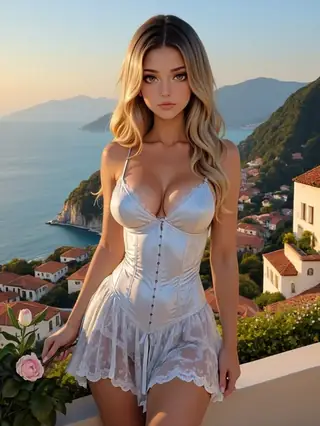
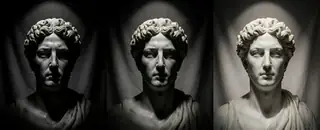
Contoh render
Prompt dan tetapan yang dikongsi oleh orang yang membuat render ini di Civitai. Pilih render untuk melihat cara ia dibuat.
Tetapan
Sampler
LCM
Langkah
10
Guidance
2
Seed
690789066
Saiz
512x768
Clip skip
2
Prompt
<lora:LCM_LoRA_Weights_SD15:1>
(((5 beautiful women))), Alexandra, Rosalind,Rosemary,Karin,Katherine
<lora:L_IR01z1:0> <lora:L_IR02x1:0> <lora:L_IR03x1:0.8>
Prompt negatif
easynegative, ng_deepnegative_v1_75t, (worst quality:2), (low quality:2), (normal quality:2), lowres, bad anatomy, bad hands, normal quality, ((monochrome)), ((grayscale)), ((watermark)), moles, freckles,
Tetapan
Sampler
LCM
Langkah
10
Guidance
2
Seed
690789066
Saiz
512x768
Clip skip
2
Prompt
<lora:LCM_LoRA_Weights_SD15:1>
(((5 beautiful women))), Alexandra, Rosalind,Rosemary,Karin,Katherine
<lora:L_IR01z1:0> <lora:L_IR02x1:0> <lora:L_IR03x1:0.4>
Prompt negatif
easynegative, ng_deepnegative_v1_75t, (worst quality:2), (low quality:2), (normal quality:2), lowres, bad anatomy, bad hands, normal quality, ((monochrome)), ((grayscale)), ((watermark)), moles, freckles,
Tetapan
Sampler
LCM
Langkah
10
Guidance
2
Seed
690789066
Saiz
512x768
Clip skip
2
Prompt
<lora:LCM_LoRA_Weights_SD15:1>
(((5 beautiful women))), Alexandra, Rosalind,Rosemary,Karin,Katherine
<lora:L_IR01z1:0> <lora:L_IR02x1:0> <lora:L_IR03x1:0>
Prompt negatif
easynegative, ng_deepnegative_v1_75t, (worst quality:2), (low quality:2), (normal quality:2), lowres, bad anatomy, bad hands, normal quality, ((monochrome)), ((grayscale)), ((watermark)), moles, freckles,
Tetapan
Sampler
LCM
Langkah
10
Guidance
2
Seed
690789066
Saiz
512x768
Clip skip
2
Prompt
<lora:LCM_LoRA_Weights_SD15:1>
(((5 beautiful women))), Alexandra, Rosalind,Rosemary,Karin,Katherine
<lora:L_IR01z1:0> <lora:L_IR02x1:0> <lora:L_IR03x1:0.6>
Prompt negatif
easynegative, ng_deepnegative_v1_75t, (worst quality:2), (low quality:2), (normal quality:2), lowres, bad anatomy, bad hands, normal quality, ((monochrome)), ((grayscale)), ((watermark)), moles, freckles,
Tetapan
Sampler
LCM
Langkah
10
Guidance
2
Seed
690789066
Saiz
512x768
Clip skip
2
Prompt
<lora:LCM_LoRA_Weights_SD15:1>
(((5 beautiful women))), Alexandra, Rosalind,Rosemary,Karin,Katherine
<lora:L_IR01z1:0> <lora:L_IR02x1:0> <lora:L_IR03x1:0.2>
Prompt negatif
easynegative, ng_deepnegative_v1_75t, (worst quality:2), (low quality:2), (normal quality:2), lowres, bad anatomy, bad hands, normal quality, ((monochrome)), ((grayscale)), ((watermark)), moles, freckles,
Tetapan
Sampler
LCM
Langkah
10
Guidance
2
Seed
690789066
Saiz
512x768
Clip skip
2
Prompt
<lora:LCM_LoRA_Weights_SD15:1>
(((5 beautiful women))), Alexandra, Rosalind,Rosemary,Karin,Katherine
<lora:L_IR01z1:0> <lora:L_IR02x1:0> <lora:L_IR03x1:1>
Prompt negatif
easynegative, ng_deepnegative_v1_75t, (worst quality:2), (low quality:2), (normal quality:2), lowres, bad anatomy, bad hands, normal quality, ((monochrome)), ((grayscale)), ((watermark)), moles, freckles,
Model serupa
Model AI untuk penjanaan imej, video dan teks
instantrealizer finisher ialah LoRA untuk keluarga Stable Diffusion 1.5 yang disenaraikan di ModelTrends.ai, katalog baca sahaja untuk model AI imej, video dan teks sumber terbuka. Bandingkannya dengan model Stable Diffusion 1.5 lain, semak skor habanya untuk melihat trendnya, dan bukanya di PirateDiffusion atau BitVector untuk mencubanya.
Lagi model Stable Diffusion 1.5Lagi LoRA Stable Diffusion 1.5realisticanimeexpressionseffectsgraphic-designartstylesstylestool
Layari mengikut keluarga model

Model Text / LLM
411
Model Anima
509

Model Chroma
14

Model Flux
1,071
Model Flux 2 / Klein
1,237
Model MiniMax H3
331
Model Hunyuan
197
Model Ideogram
20
Model Krea2
674
Model Qwen
17
Model Qwen2
36
Model Ltx2
150
Model Stable Diffusion 1.5
6,465

Model Stable Diffusion XL 1.0
15,432
Model Zimage
804
Model Wan
919

Model
Trends
.ai
© ModelTrends.ai
|
Dibuat di Jepun
|
© 2026